API Documentation
Explore the API: endpoints, request/response examples, authentication, and integration guides.
Getting started with API
API interaction is performed using POST requests in the encoding
UTF-8 to URL https://core.qostiq.com/API method;Service accepts JSON requests. When sending, the header must be "Content-Type: application/json". All requests to Qostiq are signed with a secret key from shop settings.
Each method has its own set of mandatory parameters, additional parameters can also be passed, but they do not participate in the formation of the signature.
All answers from the Qostiq service contain attributes result, message, data, error.
If result == true and error_code == 0, then field data contains data that is specific for each request. If result == false, then error != 0 - request was processed with an error, data = None, field message contains the description of the error, also by the error code (error) it is possible to find more detailed information.
To start working with Qostiq service via API, you need to register an account
https://wallet.qostiq.com/en/registration/https://wallet.qostiq.com/en/shops/createWarning! Each shop has its own balance in each currency and is not related to the balance of the personal wallet.
Creating a shop
Shop name – name will be displayed to users when the payment is being made
Shop URL – real, working website of the shop for the users
URL for notifications – address to which notification of successful payment will be sent
URL for rejected notifications – address to which notification of rejected payment will be sent
Success URL – address to which the user will be redirected after successful payment
Fail URL – address to which the user will be redirected after unsuccessful payment
URL for crypto payments notification – URL to which will be sent callback about the change of the status of the cryptocurrency invoice.
URL for crypto withdrawal notification – URL to which will be sent callback about the change of the status of the cryptocurrency withdraw.
Payment uniqueness check – if flag is set, then all payment numbers of the shop must be unique (duplication check)
Domain confirmation
In personal profile, «Shops» section it will be displayed as «Status: New Confirm the shop to connect payment methods». You need to click on «Confirm shop» link and perform the next actions
1. Download the file. File format qostiq_0123.txt where 0123 - shop ID in our system.
2. Put this file into website root (server or host). Example: http://mywebsite.com/qostiq_0123.txt
3. Click "Confirm"
If everything went well — the website has been sent for verification. You can contact our support team for more detailed information.
If the file was added incorrectly or environment settings (server/host) do not allow to read the file — the message «Unfortunately, we were unable to confirm your shop» will be displayed. In this case, it is necessary to follow the recommendations in the message or contact our support team.
Security settings
Security section of the personal profile contains the settings of your secret key and the list of whitelisted IP addresses.
Secret Key:Warning! Do not give or share your shop’s secret key with anyone. This key is used to verify all requests from your shop.
IP White List:192.168.0.1
Warning! You will not be able to send requests from other IP addresses.
Signature formation rules
Sign: The string is formed as follows: all mandatory request parameters are arranged in the alphabetical key order, values are concatenated via the colon sign («:»), at the end the secret key is added (without «:»), sha256 is generated from the received string and its HEX-representation is passed in the sign request parameter.
Each method has its own set of mandatory parameters, additional parameters can also be passed, but they do not participate in signature formation.
Example of signature formation for the invoice request.
Mandatory request parameters:
"currency": "980",
"payway": "card_uah",
"amount": "12.34",
"shop_id": 5,
"shop_order_id": 4126
Secret key of the shop (from shop settings):
secret = “SecretKey01”
Ordered keys:
'amount', 'currency', 'payway', 'shop_id', 'shop_order_id'
String for sha256 hash generation looks like:
12.34:980:card_uah:5:4126SecretKey01
HEX-representation of hash:
4c2608a8638c0650d54dd4809bd69ab50d1a1cd55f2e13366b68d43caee34104
Example of signature formation for invoice request
- {
- "currency"
- "980",
- "sign"
- "4c2608a8638c0650d54dd4809bd69ab50d1a1cd55f2e13366b68d43caee34104",
- "payway"
- "card_uah",
- "amount"
- "12.34",
- "shop_id"
- "5",
- "shop_order_id"
- 4126,
- "description"
- "Test invoice"
}
For the online recheck you can use an online service
http://www.xorbin.com/tools/sha256-hash-calculatorWorking with PAY payment page
General info about PAY
PAY - page with the interface for receiving payments via Internet. This resource allows to interact with the client regardless of the payment method. It provides a number of methods and currencies that are convenient for the client and allows to specify an additional information about the payer if necessary (for example, phone number if payment is processed through mobile commerce).
Currency selection and additional info for payment
If the currency of the invoice does not match the currency of the payway, then PAY will convert the currency automatically. Thus, the shop will receive invoice funds in the invoice currency and the client will pay in the currency that is convenient for him at the moment.
Billing for payment via PAY
For redirecting the payer on the payment page, you must form and confirm an HTML-form.
URL:
https://pay.qostiq.com/en/pay or https://pay.qostiq.com/uk/payMethod: POST, GET
Mandatory parameters: amount, currency, shop_id, shop_order_id, sign
Example of signature formation for request:
keys_sorted = ['amount', 'currency', 'shop_id', 'shop_order_id']
String for sha256 hash generation looks like:
10.00:980:1:101SecretKey01
HEX-representation of hash:
sign = 7354edb970dae3b496572252d7d7578fc8e0f1061b2e69a9eda1b39f3cdadc69
Example of HTML-form:
-
form name="Pay" method="post" action=" https://pay.qostiq.com/en/pay" accept-charset="UTF-8
input type="hidden" name="amount" value="10.00"
input type="hidden" name="currency" value="980"
input type="hidden" name="shop_id" value="1"
input type="hidden" name="sign" value="7354edb970dae3b496572252d7d7578fc8e0f1061b2e69a9eda1b39f3cdadc69"
input type="hidden" name="shop_order_id" value="101"
input type="submit"
input type="hidden" name="description" value="Test invoice"
/form
Where,
| Parameter | Description | Format | Example |
|---|---|---|---|
shop_id | shop ID in Qostiq system | Integer | 5 |
amount | bill amount | Number (no more than 2 characters after the dot) | 1, 1.0, 1.00 or "1.00" |
currency | bill currency | Integer | 840 — US Dollar, 980 — UA Hryvnia, 978 - Euro |
description | bill description | String | "test payment" |
shop_order_id | bill ID on the shop’s side. Can be checked for uniqueness depending on shop settings | String | "h8fj38dkh-hf8k-4f8d-9c8c-jd8dh38dksn92" |
sign | signature Signature formation rules (sign) | String | "a7f5bcbb774cea9d9886cbb3ce2f8731359e356a7d759437b4e9e31da1152109" |
Also, payment form can include additional parameters that do not participate in signature formation, but affect the appearance of the payment page
| Parameter | Description | Format | Example |
|---|---|---|---|
payway | payway, through which the bill must be paid | String | "card_uah" (listed in the personal profile) |
payer_account | email or ID of the payer’s wallet in Qostiq system, if passed in the request, then the bill can be paid only by this account. Only for payments via Qostiq wallet. | String | "support@qostiq.com" or "301494711279" |
failed_url | URL, to which the payer will be redirected after unsuccessful payment | String | "https://qostiq.com/failed" |
success_url | URL, to which the payer will be redirected after successful payment | String | "https://qostiq.com/success" |
Important! Success URL, Fail URL that are listed in the shop settings have a higher priority than the ones in the request, so they have to be deleted from the shop settings.
General information about the PAY page (Crypto)
PAY is a page with an interface for accepting cryptocurrency payments, which provides a blockchain client with a convenient choice of payment and displays the address to which the client can make a payment.
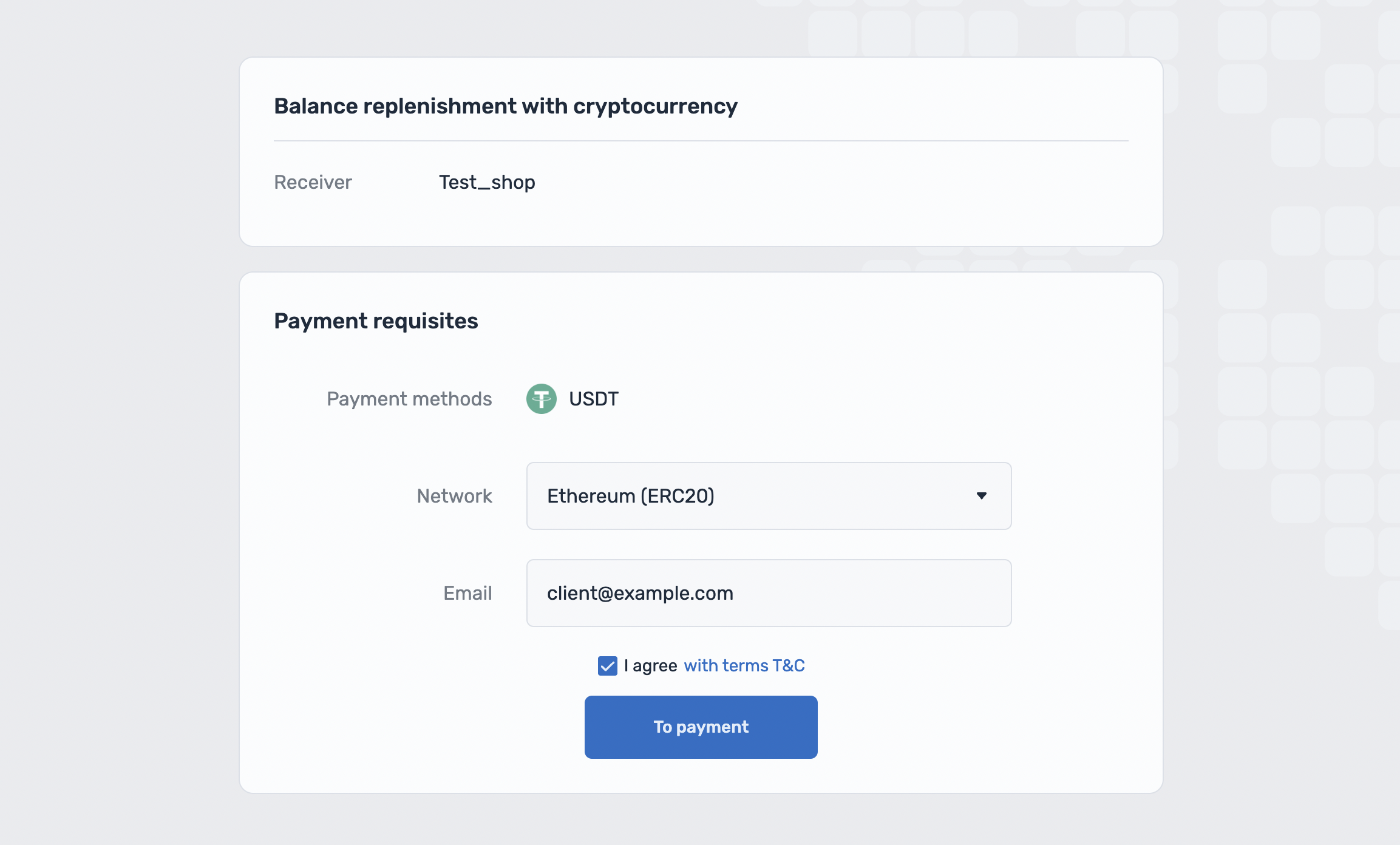
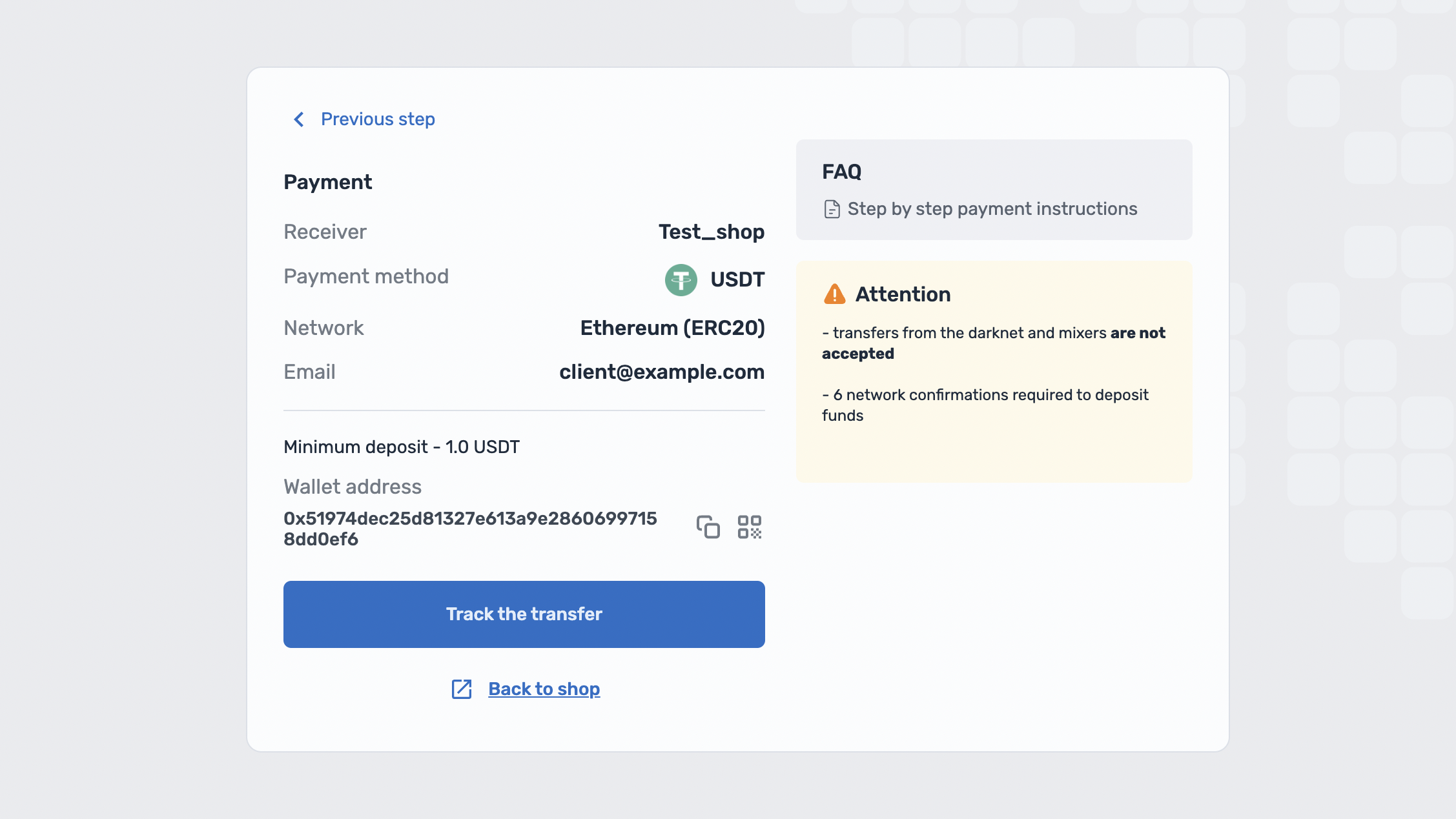
Invoice creation through PAY (Crypto)
To redirect the payer to the payment page, it is necessary to generate and submit an HTML form.
URL (en):
https://pay.qostiq.com/en/crypto/payURL (pl):
https://pay.qostiq.com/pl/crypto/payURL (uk):
https://pay.qostiq.com/uk/crypto/payURL (ru):
https://pay.qostiq.com/ru/crypto/payMethod: POST, GET
Mandatory params: client, shop_id
An example of generating a signature for a request:
-
keys_sorted = ['client', 'shop_id']
The string for generating the sha256 hash have a look:
-
testclient:6SecretKey01
-
sign = 0f5816c558d1150f76cf77694a80b50234b00fd26137dd1a3fbee168bfd9f7dc
Example URL request [GET]:
-
https://pay.qostiq.com/en/crypto/pay?client=testclient&paymethod_id=1&shop_id=6&sign=0f5816c558d1150f76cf77694a80b50234b00fd26137dd1a3fbee168bfd9f7dc&email=client@example.com&return_url=https://shop.com/crytpo_return_url
HTML-form Example [POST]:
- name="Pay" method="POST" action="https://pay.qostiq.com/ru/crypto/pay" accept-charset="UTF-8"
- type="hidden" name="client" value="testclient"
- type="hidden" name="paymethod_id" value="1"
- type="hidden" name="shop_id" value="6"
- type="hidden" name="email" value="client@example.com"
- type="hidden" name="return_url" value="https://shop.com/crypto_return_url"
- type="hidden" name="sign" value="0f5816c558d1150f76cf77694a80b50234b00fd26137dd1a3fbee168bfd9f7dc"
- type="submit"
where,
| Parameter | Description | Format | Final? | Example |
|---|---|---|---|---|
client | Client for which the address is generated | String | Yes | "testclient" |
paymethod_id | Payment method (the currency of payment and crediting to the store, when using this option, the customer chooses the payment blockchain independently) | String | *Optional | 1 |
payway | Payment direction (includes currency and payment blockchain) | String | *Optional | "usdt_bep20" |
shop_id | your shop identifier in the Qostiq system | Integer | Yes | 6 |
sign | signature | String | Yes | "0f5816c558d1150f76cf77694a80b50234b00fd26137dd1a3fbee168bfd9f7dc" |
email | Customer mail | String | No | "client@example.com" |
return_url | URL to which the customer can return from the payment page by clicking on the "Return to Shop" button | String | No | "https://shop.com/crypto_return_url" |
*One of the parameters is required for the query paymethod_id or payway.
If the paymethod_id parameter is used, the client will be able to select the payment blockchain (network);
When using payway parameter the customer will not be able to select a network, so the customer will be directed to a payment address page.
Available paymethod_id values:
Values paymethod_id | Currency |
|---|---|
1 | USDT |
2 | BNB |
3 | ETH |
4 | BTC |
5 | TRX |
6 | BUSD |
7 | LTC |
8 | MATIC |
Qostiq logo
In the archive there are logos in .png and .svg formats.
Group Operations with Qostiq wallet
Creating a bill [/bill/create]
Bill - this method allows to create bills by using Qostiq wallets.
https://core.qostiq.com/bill/create
Method: POST
Mandatory parameters: shop_amount, shop_currency, shop_id, shop_order_id, payer_currency
Uniqueness of shop_order_id is checked depending on the shop settings, we recommend to use this feature and pass the unique value to your shop to avoid duplicate billing.
The request can pass additional parameters, for example, description – bill description, or payer_account – email/ID of the payer’s wallet in Qostiq system
Example of request:
- {
- "description"
- "Test Bill"
- "payer_currency"
- 980
- "shop_amount"
- "23.15"
- "shop_currency"
- 980
- "shop_id"
- "112"
- "shop_order_id"
- 4239
- "sign"
- "ad7fbe8df102bc70e28deddba8b45bb3f4e6cafdaa69ad1ecc0e8b1d4e770575"
}
| Parameter | Description | Format | Example |
|---|---|---|---|
shop_id | shop ID in Qostiq system | Integer | 5 |
shop_amount | bill amount | Number (no more than 2 characters after the dot) | 1, 1.0, 1.00 or "1.00" |
shop_currency | bill currency (shop admission) | Integer | 980 — UA Hryvnia, 840 — US Dollar, 978 - Euro |
payer_currency | payer currency (write-off currency from the payer in Qostiq system, can be different from the shop currency) | Integer | 980 — UA Hryvnia, 840 — US Dollar, 978 - Euro |
sign | signature | String | "a7f5bcbb774cea9d9886cbb3ce2f8731359e356a7d759437b4e9e31da1152109" |
shop_order_id | bill ID on the shop’s side, format | String | "h8fj38dkh-hf8k-4f8d-9c8c-jd8dh38dksn92" |
description | bill description (optional) | String | "test bill" |
payer_account | email or ID of the payer’s wallet in Qostiq system (optional) | String or integer | "support@qostiq.com" or 301494711279 |
Also, the request can pass additional parameters, they do not participate in the signature formation.
| Parameter | Description | Format | Example |
|---|---|---|---|
failed_url | URL, to which the payer will be redirected after unsuccessful payment | String | "https://qostiq.com/failed" |
success_url | URL, to which the payer will be redirected after successful payment | String | "https://qostiq.com/success" |
callback_url | URL, to which notification of successful payment will be sent | String | "https://qostiq.com/callback_url_kvt" |
callback_rejected_url | URL, to which notification of unsuccessful payment will be sent | String | "https://qostiq.com/callback_rejected_url_kvt" |
lifetime | bill lifetime, in minutes | String | "43200" |
Important! Success URL, Fail URL, URL fornotifications, URL Reject notifications that are listed in the shop settings have a higher priority than the ones in the request, so they have to be deleted from the shop settings.
Example of the response:
- {
- `"data"`:` {`
-
- "created"
- "Wed, 06 Dec 2017 14:30:44 GMT"
- "id"
- 25
- "lifetime"
- 43200
- "payer_account"
- null
- "payer_currency"
- 980
- "payer_price"
- 23.15
- "shop_amount"
- 23.15
- "shop_currency"
- 980
- "shop_id"
- 3
- "shop_order_id"
- 4239
- "shop_refund"
- 23.15
- "url"
- "https://wallet.qostiq.com/en/bill/pay/WtvoXPzcphd"
- `}`,
- "error_code"
- 0
- "message"
- "Ok"
- "result"
- true
}
Where,
data – info about the created bill
id – unique bill ID in Qostiq system
lifetime – bill lifetime, in minutes, by default: 43200 minutes
payer_account – payer account (if passed in the request)
payer_currency – currency in which the payer must pay the bill
payer_price – amount to be paid by the payer to settle the bill
shop_currency – bill currency (shop admission)
shop_amount – bill amount (from the shop)
shop_id – shop ID
shop_order_id – bill ID on shop’s side
url – URL, to which the user can be redirected to pay the bill.
Warning! When specifying payer_account, the bill will be created and linked to the user. The user will be able to view the list of unpaid bills in the personal profile and pay them. For the convenience of payment, you can redirect the user to url from the response request. It is necessary to redirect the user to url from the response, if payer_account was not passed.
Example of error while creating a bill:
- {
- "data"
- null
- "message"
- "invalid sign"
- "error_code"
- 10
- "result"
- false
}
Where
message – error description;
error_codeCreate a Qostiq bill [POST]
-
Request (application/json)
  ```json
  {
  "description": "Test Bill",
  "payer_currency": 980,
  "shop_amount": "23.15",
  "shop_currency": 980,
  "shop_id": "112",
  "shop_order_id": 4239,
  "sign": "ad7fbe8df102bc70e28deddba8b45bb3f4e6cafdaa69ad1ecc0e8b1d4e770575"
  }
``` -
Response 200 ()
  ```json
  {
  "data":
      {
               "created": "Wed, 06 Dec 2017 14:35:43 GMT",
               "id": 26,
               "lifetime": 43200,
               "payer_account": null,
               "payer_currency": 980,
               "payer_price": 23.15,
               "shop_amount": 23.15,
               "shop_currency": 980,
               "shop_id": 3,
               "shop_order_id": 4239,
               "url": https://wallet.qostiq.com/en/bill/pay/kdrNIrMtuhb
       }
               "error_code": 0,
               "message": "Ok",
               "result": true
  }
  ```
Creating a Bill v.2 with free payment option [/bill/create/v2]
Bill v.2 - new method allows you to issue bills for payment using Qostiq wallets in 2 variants:
-
fixed amount - you decide how much should your customer pay for the services provided (if
amountis passed) -
free amount - your customer is allowed to choose an amount to be credited to the shop (if
amountis not passed)
https://core.qostiq.com/bill/create/v2
Method: POST
Mandatory parameters: currency, now, shop_id, shop_order_id
The uniqueness of shop_order_id is checked depending on the shop settings, it is recommended to enable this feature and pass a unique value for your shop to avoid duplicate billing.
Request example:
- {
- "currency"
- 840
- "shop_id"
- 6
- "now"
- 1687520474
- "shop_order_id"
- "dc5a286e-6c5e-43e8-8c68-926fa15d09ec"
- "sign"
- "771952b72a0869945d62373b46a79feabc5a674b34cf78de5dc7c4c36981cf87"
}
| Parameter | Description | Format | Example |
|---|---|---|---|
shop_id | your shop identifier in the Qostiq system | Integer | 6 |
currency | currency of the invoice (crediting to the store) | Integer | 980 - Ukrainian hryvnia 840 - US dollar, 978 - Euro |
now | response time | Integer (timestamp) | 1687520474 |
sign | signature , refer to Rules of Signature Creating(sign) | String | "a7f5bcbb774cea9d9886cbb3ce2f8731359e356a7d759437b4e9e31da1152109" |
shop_order_id | is the account number from the shop side format | String | "dc5a286e-6c5e-43e8-8c68-926fa15d09ec" |
Also, additional parameters can be passed in the request; they are not involved in the formation of signature .
| Parameter | Description | Format | Example |
|---|---|---|---|
amount | the amount of the invoice, if this parameter is present, the client will not be able to reduce the amount of payment | Number | 1, 1.0, 1.00 or "1.00" |
email | payer's wallet email in Qostiq system | String | "example@mail.com" |
failed_url | URL address where the user will be redirected after not successful payment, | String | "https://qostiq.com/failed" |
success_url | URL address where the user will be redirected after the successful payment | String | "https://qostiq.com/success" |
callback_url | URL for notification of successful payment | String | "https://qostiq.com/callback_url_kvt" |
callback_rejected_url | URL for notification about unsuccessful payment | String | "https://qostiq.com/callback_rejected_url_kvt" |
lifetime | account validity time for payment, in minutes | String | "43200" |
IMPORTANT! Success URL , Failed URL , URL callback , URL Reject callback specified in the store settings take precedence over those specified in the request, so you need to remove them from store settings.
Response example:
- {
- `"data"`:` {`
-
- "created"
- "Wed, 06 Dec 2017 14:30:44 GMT"
- "id"
- 25
- "lifetime"
- 43200
- "payer_account"
- null
- "payer_currency"
- 980
- "payer_price"
- 23.15
- "shop_amount"
- 23.15
- "shop_currency"
- 980
- "shop_id"
- 3
- "shop_order_id"
- 4239
- "shop_refund"
- 23.15
- "url"
- "https://wallet.qostiq.com/ru/bill/pay/WtvoXPzcphd"
- `}`,
- "error_code"
- 0
- "message"
- "Ok"
- "result"
- true
}
Where,
data – Bill data
id – unique bill identifier in the Qostiq system
lifetime – account validity time for payment, in minutes, by default: 43200 minutes
payer_account – account of the payer who was billed for payment (if passed in the request)
payer_currency – currency in which the payer must pay the invoice
payer_price – the amount that the payer must pay to pay off the invoice
shop_currency – account currency, crediting to the store
shop_amount – invoice amount transferred by the store
shop_id – shop identificator
shop_order_id – the order identificator on the store side
url – URL to redirect the user to pay the bill.
Attention! If you specify email , the invoice will be issued and linked to the user for payment. The user will be able to view the list of unpaid invoices in his personal account and pay it. For the convenience of payment, you can redirect the user to url from the response to the request. It is imperative to redirect the user to url from the response if you did not pass email
Example of a billi error:
- {
- "data"
- null
- "message"
- "invalid sign"
- "error_code"
- 1
- "result"
- false
}
Where,
message – error description;
error_codeQostiq Bill create [POST]
-
Request (application/json)
  ```json
  {
      "description": "Test Bill",
      "payer_currency": 980,
      "shop_amount": "23.15",
      "shop_currency": 980,
      "shop_id": "112",
      "shop_order_id": 4239,
      "sign": "ad7fbe8df102bc70e28deddba8b45bb3f4e6cafdaa69ad1ecc0e8b1d4e770575"
  }
``` -
Response 200 ()
  ```json
  {
      "data":
      {
          "created": "Wed, 06 Dec 2017 14:35:43 GMT",
          "id": 26,
          "lifetime": 43200,
          "payer_account": null,
          "payer_currency": 980,
          "payer_price": 23.15,
          "shop_amount": 23.15,
          "shop_currency": 980,
          "shop_id": 3,
          "shop_order_id": 4239,
          "url": https://wallet.qostiq.com/ru/bill/pay/kdrNIrMtuhb
      }
      "error_code": 0,
      "message": "Ok",
      "result": true
  }
  ```
Bill status request [/bill/shop_order_status]
This method allows you to find out the current status of the payment made with the Qostiq wallet.
URL:
https://core.qostiq.com/bill/shop_order_statusMethod: POST
Mandatory parameters: now, shop_id, shop_order_id
Example of request:
- {
- "now"
- "2021-05-01 16:56:25.009469"
- "shop_id"
- 1092
- "shop_order_id"
- "234234232323"
- "sign"
- "b9b838e0b1baedcf7dd60711b1afab246c3496b5cc3433df0c5a2e2d07fea976"
}
| Parameter | Description | Format | Example |
|---|---|---|---|
now | date of request | String | "2021-05-01 16:56:25.009469" |
shop_id | shop ID in Qostiq system | Integer | 1092 |
shop_order_id | bill ID on the side of your service | String | "234234232323" |
sign | signature | String | "b9b838e0b1baedcf7dd60711b1afab246c3496b5cc3433df0c5a2e2d07fea976" |
Example of response:
<li> {
<li> ` "data"`:` { ` </li>
<li> <ul> "client_price"</ul>:<ul> 1.16</ul>, </li>
<li> <ul> "created"</ul>: <ul>"2020-10-20 14:01:28"</ul>, </li>
<li> <ul> "description"</ul>:<ul> ""</ul>, </li>
<li> <ul> "is_unique"</ul>:<ul> true</ul>, </li>
<li> <ul> "payment_id"</ul>: <ul>852095</ul>, </li>
<li> <ul> "payway"</ul>: <ul>"qostiq_usd"</ul>, </li>
<li> <ul> "processed"</ul>: <ul>2020-10-20 14:01:33</ul>, </li>
<li> <ul> "ps_currency"</ul>: <ul>980</ul>, </li>
<li> ` "ps_data"`: <ul>{
"ps_payer_account": "301538122124"
}</ul>, </li>
<li> <ul> "shop_amount"</ul>:<ul> 1.1</ul>, </li>
<li> <ul> "shop_currency"</ul>: <ul>980</ul>, </li>
<li> <ul> "shop_id"</ul>:<ul> 1092</ul>, </li>
<li> <ul> "shop_order_id"</ul>:<ul> "234234232323"</ul>, </li>
<li> <ul> "shop_refund"</ul>: <ul>1.1</ul>, </li>
<li> <ul> "status"</ul>:<ul> 2</ul></li>
<li> ` },` </li>
<li> <ul> "error_code"</ul>:<ul> 0</ul>, </li>
<li> <ul> "message"</ul>:<ul> "Ok"</ul>, </li>
<li> <ul> "result"</ul>:<ul> true </ul> </li>
} </li>
Where,
client_price – payment amount
created – date of creation
description – bill description
is_unique – payment ID uniqueness
payment_id – payment ID in Qostiq system
payway – payway
processed – date of processing
ps_currency – bill currency
ps_data – additional data from the paysystem, such as payer account
shop_amount – bill amount from the shop
shop_currency – bill currency from the shop
shop_id – shop ID in Qostiq system
shop_order_id – bill ID on shop’s side
shop_refund – credited amount on the shop’s balance, in bill’s currency
status – bill status
Warning! Status request must be done no more often than once every 10 seconds
shop_order_id is not unique in the bill operations within the shop, the response will include "is_unique":false and method will return the info about the last created Bill.
Bill status request [POST]
-
Request (application/json)
  ```json
  {
   "now": "2021-05-01 16:56:25.009469",
   "shop_id": "1092",
   "shop_order_id": "234234232323",
   "sign": "ad7fbe8df102bc70e28deddba8b45bb3f4e6cafdaa69ad1ecc0e8b1d4e770575"
  }
``` -
Response 200 ()
   ```json
   {
                      "data": {
   "client_price": 1.16,
   "created": "2020-10-20 14:01:28",
   "description": "",
   "is_unique": true,
   "payment_id": 852095,
   "payway": "qostiq_usd",
   "processed": "2020-10-20 14:01:33",
   "ps_currency": 980,
   "ps_data": {
       "ps_payer_account": "201538122124"
   },
   "shop_amount": 1.1,
   "shop_currency": 980,
   "shop_id": 1092,
   "shop_order_id": "234234232323",
   "shop_refund": 1.1,
   "status": 2
                      },
                      "error_code": 0,
                      "message": "Ok",
                      "result": true
  }
   ```
Bill operation status [/bill/status]
<table><tr><th>Status</th> <th>Value</th> <th>Description</th> <th>Final?</th></tr> <tr><td>1</td> <td><code>Waiting</code></td> <td>Payment is pending user action</td> <td><strong>No</strong></td></tr> <tr><td>2</td> <td><code>Paid</code></td> <td>Payment is payed by the client</td> <td><strong>Yes</strong></td></tr> <tr><td>3</td> <td><code>Canceled</code></td> <td>Payment is cancelled by the client</td> <td><strong>Yes</strong></td></tr> <tr><td>4</td> <td><code>Expired</code></td> <td>Bill is expired</td> <td><strong>Yes</strong></td></tr></table>
Bill status request with non-unique shop_order_id [POST]
-
Request (application/json)
  ```json
  {
   "now": "2021-05-01 16:56:25.009469",
   "shop_id": "112",
  "shop_order_id": "123billtest",
  "sign": "6fb934f7e00d205cb5ebb62117d9b74029d84c2ffc7c87fe5b38ac5196fecf02"
  }
``` -
Response 200 ()
  ```json
  {
                      "data": {
   "client_price": 1.0,
   "created": "2021-06-09 13:47:05",
   "description": "",
   "is_unique": false,
   "payment_id": 19732961,
   "payway": "qostiq_usd",
   "processed": null,
   "ps_currency": 980,
   "ps_data": {
       "ps_payer_account": "201538122124"
   },
   "shop_amount": 1.0,
   "shop_currency": 980,
   "shop_id": 1092,
   "shop_order_id": "123billtest",
   "shop_refund": 0.93,
   "status": 4
                      },
                      "error_code": 0,
                      "message": "Ok",
                      "result": true
  }
  ```
Preliminary calculation of the payout to the wallet: Transfer [/transfer/try]
Transfer/try. This method is not required to create a payout to the wallet. It returns an additional info to create transfer and preliminary calculations of fees and conversion.
URL:
https://core.qostiq.com/transfer/try Method: POST
Mandatory parameters: amount, amount_type, payee_currency, shop_currency, shop_id
Example of request:
- {
-
- "amount"
- 1.11
-
- "amount_type"
- "receive_amount"
-
- "payee_currency"
- 978
-
- "shop_currency"
- 840
- "shop_id"
- 6
-
- "sign"
- "cea33ec0eeeef9866b01d51c7bbe55b4d3c3f2e18f681d7629940b816ff35a2b"
}
| Parameter | Description | Format | Example |
|---|---|---|---|
amount | receive or write-off amount (depends on amount_type) | Number (no more than 2 characters after the dot) | 1.00 or 1 |
amount_type | type of the amount, possible options: receive_amount – amount to be received, writeoff_amount — amount to be written off the shop’s balance | String | "receive_amount" or "writeoff_amount" |
payee_currency | receiving currency on the Qostiq account | Integer | 980 — UA Hryvnia, 840 — US Dollar, 978 - Euro, 398 — KZ Tenge |
shop_currency | write-off currency from the shop | Integer | 980 — UA Hryvnia, 840 — US Dollar, 978 - Euro, 398 — KZ Tenge |
shop_id | shop ID from which the payment is made | Integer | 5 |
sign | request signature | String | "cea33ec0eeeef9866b01d51c7bbe55b4-d3c3f2e18f681d7629940b816ff35a2b" |
Example of response:
- {
- `"data"`:` {`
- ` "account_info_config"`:` {`
- "payee_account": {
- "comment": {
- "en": "Enter Wallet Number or Email",
- "ru": "Введите номер кошелька или email"},
- "example": "31557414711",
- "label": {
- "en": "Wallet Number or Email",
- "ru": "Введите номер кошелька или email"},
- "regex": "^3[\\d]{10}$|^([a-zA-Z0-9_-]+\\.)*[a-zA-Z0-9_-]+@[a-zA-Z0-9_-]+(\\.[a-zA-Z0-9_-]+)*\\.[a-zA-Z]{2,6}$" } },
- ` "info"`: `{}`,
-
- "payee_amount"
- 1.11
-
- "payee_currency"
- 978
-
- "shop_currency"
- 840
-
- "write_off_amount"
- 1.19
- `}`,
-
- "error_code"
- 0
-
- "message"
- "Ok"
-
- "result"
- true
}
Where,
account_info_config.payee_account – information about the account, including a regular expression that the account must match;
payee_amount – amount to be received in payee_currency;
payee_currency – receiving currency for payee_amount;
shop_currency – write-off currency from the shop of shop_write_off amount;
write_off_amount – write-off currency from the shop of shop_currency amount;
Preliminary payout calculation [POST]
To show the request, change Production to Mock Server in the right window
-
Request (application/json)
  ```json
  {
   "amount": "1.11",
  "amount_type": "receive_amount",
  "payee_currency": "978",
  "shop_currency": "840",
  "shop_id": "6",
  "sign": "cea33ec0eeeef9866b01d51c7bbe55b4d3c3f2e18f681d7629940b816ff35a2b"
  }
``` -
Response 200 ()
   ```json
   {
   "data": {
   "account_info_config": {
           "payee_account": {
    "comment": {
            "en": "Enter Wallet Number or Email",
            "ru": "Введите номер кошелька или email"
    },
    "example": "31557414711",
    "label": {
            "en": "Wallet Number or Email",
            "ru": "Номер кошелька или email"
    },
    "regex": "^3[\\d]{10}$|^([a-zA-Z0-9_-]+\\.)*[a-zA-Z0-9_-]+@[a-zA-Z0-9_-]+(\\.[a-zA-Z0-9_-]+)*\\.[a-zA-Z]{2,6}$"
           }
   },
   "info": {},
   "payee_amount": 1.11,
   "payee_currency": "978",
   "shop_currency": "840",
   "write_off_amount": 1.19
          },
          "error_code": 0,
          "message": "Ok",
          "result": true
   }
   ```
Withdrawing funds to the wallet: Transfer [/transfer/create]
Transfer - Transfers operation is used to withdraw funds from the shop on the personal account of the user.
https://core.qostiq.com/transfer/create
Method: POST
Mandatory parameters: amount, amount_type, payee_account, payee_currency, shop_currency, shop_id, shop_payment_id
Shop_payment_id must be unique for each new transfer.
The request can pass additional parameters, such as description – payout description.
Example of request:
- {
-
- "amount"
- 10
-
- "amount_type"
- "receive_amount"
-
- "payee_account"
- "301497141132"
-
- "payee_currency"
- 980
-
- "shop_currency"
- 980
- "shop_id"
- 112
- "shop_payment_id"
- "55ac443d-958b-40e3-8956-e04e72561324"
-
- "sign"
- "cd30ba2b6e29f508edf40582e17a9a602a43be9b527238b1b0a6777e226381f4"
}
Where,
| Parameter | Description | Format | Example |
|---|---|---|---|
payee_account | payee account in Qostiq system, can be a wallet ID or user’s email | String | "201487668051" or "qostiq@qostiq.com"; |
amount | receive or write-off amount (depends on amount_type) | Number (no more than 2 characters after the dot) | 1.00 or 1 |
amount_type | type of the amount, possible options: receive_amount – amount to be received, writeoff_amount — amount to be written off the shop’s balance | String | "receive_amount" or "writeoff_amount" |
payee_currency | receiving currency on the Qostiq account | Integer | 980 — UA Hryvnia, 840 — US Dollar, 978 - Euro, 398 — KZ Tenge |
shop_currency | write-off currency from the shop | Integer | 840 — US Dollar, 978 - Euro, 980 — UA Hryvnia, 398 — KZ Tenge |
shop_id | shop ID from which the payment is made | Integer | 5 |
shop_payment_id | unique payment ID on the shop’s side | String | "h8fj38dkh-hf8k-4f8d-9c8c-jd8dh38dksn92" |
Example of response:
- {
- `"data"`:` {`
- "balance"
- 0.9
- "id"
- 3
-
- "payee_account"
- 301497141132
-
- "payee_amount"
- 10
-
- "payee_currency"
- 980
-
- "shop"
- 112
-
- "shop_currency"
- 980
-
- "write_off_amount"
- 10
- `}`,
-
- "error_code"
- 0
-
- "message"
- "Ok"
-
- "result"
- true
}
Where,
balance – shop balance after the successful transfer creation
id – unique transfer ID in Qostiq system
payee_amount – amount to be received in payee_currency
payee_currency – receiving currency for payee_amount
shop_currency – write-off currency from the shop of shop_write_off amount
shop_payment_id – unique payment ID on shop’s side
write_off_amount – write-off currency from the shop of shop_currency amount;
Warning! Transfers do not have a status since, if it was created and transfer ID is received in the response, then transfer is considered successful and no additional requests are required.
Transfer funds from the shop balance [POST]
To show the request, change Production to Mock Server in the right window
-
Request (application/json)
   ```json
   {
   "amount": 10,
   "amount_type": "receive_amount",
   "payee_account": "301497141132",
   "payee_currency": 980,
   "shop_currency": 980,
   "shop_id": 112,
   "shop_payment_id": "55ac443d-958b-40e3-8956-e04e72561324",
   "sign": "cd30ba2b6e29f508edf40582e17a9a602a43be9b527238b1b0a6777e226381f4"
   }
``` -
Response 200 ()
   ```json
   {
           "data": {
    "balance": 88.91,
    "id": 12,
    "payee_account": 301497141132,
    "payee_amount": 10,
    "payee_currency": 980,
    "shop": 112,
    "shop_currency": 980,
    "write_off_amount": 10
           },
           "error_code": 0,
           "message": "Ok",
           "result": true
   }
   ```
Transfer status request [/transfer/shop_payment_status]
Transfer status request is being performed by the shop payment ID.
In case of time-out or other errors on the request to create a transfer, you can make a transfer status request using this method. If ID and transfer data were returned in the response, that means that the transfer was successfully created and processed. Otherwise, an error will be returned, that the transfer was not found and you have to repeat a transfer creation request.
URL:
https://core.qostiq.com/transfer/shop_payment_statusMethod: POST
Mandatory parameters: now, shop_payment_id, shop_id
| Parameter | Description | Format | Example |
|---|---|---|---|
now | date of request | String | "2018-06-15 09:58:01.01" |
shop_payment_id | unique payment ID on the shop’s side | String | "h8fj38dkh-hf8k-4f8d-9c8c-jd8dh38dksn92" |
shop_id | shop ID in Qostiq system | Integer | 5 |
sign | signature | String | "a7f5bcbb774cea9d9886cbb3ce2f8731359e356a7d759437b4e9e31da1152109" |
-
Example of request:
  ```json
  {
      "shop_id": 112,
      "shop_payment_id": "55ac443d-958b-40e3-8956-e04e72561322",
      "now": "2018-01-23 16:45:14.145107",
      "sign": "e76c5ed9431d18ad6c01ea123241fe88330714c97bdd184860a80cb675c1e016"
  }
  ```
-
Example of response, if transfer was created and processed:
  ```json
  {
   "data":
           {
    "id": 3,
    "payee_currency": 980,
    "receive_amount": 1,
    "shop_currency": 980,
    "shop_payment_id": "55ac443d-958b-40e3-8956-e04e72561322",
    "write_off_amount": 1
           },
           "error_code": 0,
           "message": "Ok",
           "result": true
   }
``` -
Example of response, if transfer was not created (not found):
  ```json
  {
  "data": null,
  "error_code":7,
  "message":"Transfer (shop_payment_id=test) wasn't found",
  "result": false
  }
  ```
Transfer status request [POST]
-
Request (application/json)
  ```json
  {
      "shop_id": 112,
      "shop_payment_id": "55ac443d-958b-40e3-8956-e04e72561322",
      "now": "2018-01-23 16:45:14.145107",
      "sign": "e76c5ed9431d18ad6c01ea123241fe88330714c97bdd184860a80cb675c1e016"
  }
``` -
Response 200 ()
  ```json
  {
   "data":
           {
    "id": 3,
    "payee_currency": 980,
    "receive_amount": 1,
    "shop_currency": 980,
    "shop_payment_id": "55ac443d-958b-40e3-8956-e04e72561322",
    "write_off_amount": 1
           },
           "error_code": 0,
           "message": "Ok",
           "result": true
   }
``` -
Response 200 (error)
  ```json
  {
   "data": null,
           "error_code": 7,
           "message": "Transfer (shop_payment_id=test) wasn't found",
           "result": false
   }
  ```
Group Qostiq Wallet subscription functionality
Scheme of using Qostiq Wallet subscription functionality:
- Request /auth_token/request to create a subscription. A URL will be returned in response to this request, to which the client must be redirected to confirm their subscription.
- After the client confirms the subscription, a unique
tokenwill be sent to the URL specified in the shop settings, which will be used in further requests. - Request to perform an action allowed for the specified
token(for example, a request to withdraw fiat funds /bill/recurrent ). - If it is necessary to disable the subscription and deactivate the token, it is necessary to execute the request /auth_token/revoke.
You can create several subscriptions for one Qostiq Wallet using different external_id values. external_id values are visible to clients.
Create subscription request [/auth_token/request]
URL:
https://core.qostiq.com/auth_token/requestMethod: POST
Required parameters: external_id, now, scopes, shop_id
This request creates a subscription entity that needs to be confirmed to the client.
Attention! You must use unique external_id values. If you try to create a subscription with an already existing external_id, the previously created subscription will be updated.
Request example:
- `{`
-
- "external_id":"test_external_id",
- "now": 1691584193,
- "scopes":["bill_recurrent"],
- "shop_id": 6,
-
- "sign": "912b985f18959620bb981485132016b58fc344361a51a24eda27687613141f7f",
`}`
Where,
| Parameter | Description | Format | Example |
|---|---|---|---|
external_id | subscription number or name (visible to the client) | String | "test_external_id" |
now | request time | Integer | 1691584193 |
scopes | subscription type | Array | ["bill_recurrent"] - value for receiving a token for subscription payments |
shop_id | shop ID in Qostiq | Integer | 6 |
sign | signature | String | "912b985f18959620bb981485132016b58fc344361a51a24eda27687613141f7f" |
-
Sample response:
   ```json
   {
       data: {
           "redirect_url": "https://wallet.test-qostiq.com/subscription-request/27d5c54568e944abb2b5a64b845d13eb"
       },
       "error_code": 0,
       "message": "Ok",
       "result": true
   }
   ```
It is necessary to redirect the client to the address specified in the redirect_url parameter to confirm their subscription.
Upon confirmation, a subscription activation notificationwill be sent.
Example of create subscription request [POST]
-
Request (application/json)
   ```json
   {
   "external_id": "external_id",
   "now": 1691584193,
   "scopes": [
       "bill_recurrent"
       ],
   f"shop_id": 6,
   "sign": "912b985f18959620bb981485132016b58fc344361a51a24eda27687613141f7f"
   }
``` -
Response 201 (application/json)
-
Body
  ```json
  {
      data: {
          "redirect_url": "https://wallet.test-qostiq.com/subscription-request/27d5c54568e944abb2b5a64b845d13eb"
      },
      "error_code": 0,
      "message": "Ok",
      "result": true
  }
  ```
-
Activation and unsubscription notification [/auth_token/callback]
After the subscription is activated by the client, a notification with a token will be sent to the URL address, which will need to be used for further payment.
The URL is specified in the personal account in the shop settings - URL of notifications for auth tokens.
A notification will also be sent if the client cancels the subscription.
-
Example of subscription activation notification:
   ```json
   {
     "callback_type": "auth_token",
     "created": "2023-08-09 15:50:50",
     "external_id": "external_id",
     "scopes": [
         "bill_recurrent"
     ],
     "shop_id": 6,
     "sign": "7dh39fkd7cf1b1db2175606447c60e6d9b5c84219471f7239329a4c9a29",
     status: 1
     "token": "44c6703d-9f98-434d-936f-9e6784976c98"
   }
   ```
Where:
callback_type - notification type, auth_token value for notification of subscription activation;
created - subscription activation time;
external_id - subscription ID;
scopes - subscription type, ["bill_recurrent"] value when payment subscription is activated;
sign - callback signature;
status - token status, 1 - active token (subscription activated), 2 - inactive token (subscription cancelled);
token - subscription token, used to make subsequent requests, for example, making a payment without confirmation.
Subscription cancellation notification [POST]
If the notification is correctly received and processed, it is necessary to return the http status 200 and the message body OK in the http response. Otherwise, notifications will be sent repeatedly, with an increasing interval, in total 25 attempts, the last one after one day.
-
Request (application/json)
```json
{
"callback_type": "auth_token",
"created": "2023-08-09 14:42:46",
"external_id": "external_id",
"scopes": [
"bill_recurrent"
],
"shop_id": 6,
"sign": "11d94f04959e153cd719ab7029f767d8e6ea853af4f26a4f0f77a7b238c1e78f",
status: 2
"token": "44c6703d-9f98-434d-936f-9e6784976c98"
}
```
-
Response 200 (application/json)
-
Body
OK
Create fiat subscription payment [/bill/recurrent]
URL:
https://core.qostiq.com/bill/recurrent
Method: POST
Required parameters: amount, currency, now, shop_id, shop_order_id, token
This request creates a withdrawal from the client's wallet in favor of the shop without confirmation by the client.
-
Request example:
```json
{
"amount":"10",
"currency":840,
"now": 1691658477,
"shop_id": 6,
"shop_order_id":"test payment",
"token": "f1cebac7-e05b-4c94-bb26-a222b976cb2d",
"sign": "97a4dd349871cc80aef906cee468d8b942c0197848e3ed86a6f9f58a8725e180"
}
```
Where,
Parameter Description Format Example amountpayment amount Number (Maximum 2 characters after dot) 1, 1.0, 1.00 or "1.00" currencyinvoice currency Integer 840 - US dollar, 980 - Ukrainian hryvnia, 978 - Euro, 398 - Kazakhstani tenge shop_idshop ID in Qostiq Integer 6 nowrequest time Integer 1691584193 tokensubscription token received in response to request to create a subscription. String "f1cebac7-e05b-4c94-bb26-a222b976cb2d" scopessubscription type Array ["bill_recurrent"] - value for receiving a token for subscription payments shop_order_idorder ID on the side of your service String "123456789" signsignature String "912b985f18959620bb981485132016b58fc344361a51a24eda27687613141f7f"
-
Sample response:
```json
{
data: {
"id": 2177,
status: 2
},
"error_code": 0,
"message": "Ok",
"result": true
}
```
Where are the response parameters:
id - unique payment ID for fiat payments from Qostiq wallet;
status - payment status, where 2 - payment successful. Table of payment statuses.
In case of receiving a timeout or other error on the withdrawal request for a subscription, it is necessary to request the payment status by the operation number on the shop side - the shop_order_id parameter.
Create fiat subscription payment request [POST]
-
Request (application/json)
```json
{
"amount":"10",
"currency":840,
"now": 1691658477,
"shop_id": 6,
"shop_order_id":"test payment",
"token": "f1cebac7-e05b-4c94-bb26-a222b976cb2d",
"sign": "97a4dd349871cc80aef906cee468d8b942c0197848e3ed86a6f9f58a8725e180"
}
```
-
Response 200 (application/json)
-
Body
```json
{
data: {
"id": 2177,
status: 2
},
"error_code": 0,
"message": "Ok",
"result": true
}
```
Create crypto subscription payment [/crypto/bill/recurrent]
URL:
https://core.qostiq.com/crypto/bill/recurrent
Method: POST
Required parameters: amount, currency, now, shop_id, shop_order_id, token
This request creates a withdrawal from the client's wallet in favor of the shop without confirmation by the client.
-
Request example:
```json
{
"amount":"10",
"currency":"USDT",
"now": 1691669000,
"shop_id": 6,
"shop_order_id":"test payment",
"token": "f1cebac7-e05b-4c94-bb26-a222b976cb2d",
"sign": "ac3503d0b2e21c4716c96fbd58f32da678cf0a179a34bdf60ce5f36016efa2a2"
}
```
Where,
Parameter Description Format Example amountpayment amount String or number, number of decimals, see "Indicating the transaction amount" "1.00000001" or 1.00000001 or "10" currencyinvoice currency String "USDT" shop_idshop ID in Qostiq Integer 6 nowrequest time Integer 1691669000 tokensubscription token received in response to request to create a subscription. String "f1cebac7-e05b-4c94-bb26-a222b976cb2d" scopessubscription type Array ["bill_recurrent"] - value for receiving a token for subscription payments shop_order_idorder ID on the side of your service String "test payment" signsignature String "ac3503d0b2e21c4716c96fbd58f32da678cf0a179a34bdf60ce5f36016efa2a2"
-
Sample response:
```json
{
data: {
"id": 1579,
status: 2
},
"error_code": 0,
"message": "Ok",
"result": true
}
```
Where are the response parameters:
id - a unique payment ID for cryptocurrency payments from the Qostiq wallet;
status - payment status, where 2 - payment successful. Table of payment statuses.
In case of receiving a timeout or other error on the withdrawal request for a subscription, it is necessary to request the payment status by the operation number on the shop side - the shop_order_id parameter.
Create crypto subscription payment request [POST]
-
Request (application/json)
```json
{
"amount":"10",
"currency":"USDT",
"now": 1691669000,
"shop_id": 6,
"shop_order_id":"test payment",
"token": "f1cebac7-e05b-4c94-bb26-a222b976cb2d",
"sign": "ac3503d0b2e21c4716c96fbd58f32da678cf0a179a34bdf60ce5f36016efa2a2"
}
```
-
Response 200 (application/json)
-
Body
```json
{
data: {
"id": 1579,
status: 2
},
"error_code": 0,
"message": "Ok",
"result": true
}
```
Revoke the payment subscription [/auth_token/revoke]
URL:
https://core.qostiq.com/auth_token/revoke
Method: POST
Required parameters: now, shop_id, token
This request allows you to close the active subscription ().
-
Request example:
```json
{
"shop_id": 6,
"token": "44c6703d-9f98-434d-936f-9e6784976c98",
"now": 1691671996,
"sign": "8f15f065b07f6a2150277d57e125f3133ae4f9cab31f3529aaa8d6daa97b0c1d"
}
```
Where:
Parameter Description Format Example shop_idshop ID in Qostiq Integer 6 nowrequest time Integer 1691671996 tokensubscription token received in response to request to create a subscription. String "44c6703d-9f98-434d-936f-9e6784976c98" signsignature String "ac3503d0b2e21c4716c96fbd58f32da678cf0a179a34bdf60ce5f36016efa2a2"
-
Example of a response, if the subscription is successfully closed, the subscription token will be returned in the response:
```json
{
data: {
"token": "44c6703d-9f98-434d-936f-9e6784976c98"
},
"error_code": 0,
"message": "Ok",
"result": true
}
```
-
If the subscription has already been canceled, an error will be received:
```json
{
data: null
"error_code": 10,
"message": "Auth token (44c6703d-9f98-434d-936f-9e6784976c98) not found",
"result": false
}
```
Revoke subscription request [POST]
-
Request (application/json)
```json
{
"shop_id": 6,
"token": "44c6703d-9f98-434d-936f-9e6784976c98",
"now": 1691671996,
"sign": "8f15f065b07f6a2150277d57e125f3133ae4f9cab31f3529aaa8d6daa97b0c1d"
}
```
-
Response 200 (application/json)
```json
{
data: {
"token": "44c6703d-9f98-434d-936f-9e6784976c98"
},
"error_code": 0,
"message": "Ok",
"result": true
}
```
Fiat subscription payment status [/bill/shop_order_status]
This method allows you to find out the current status of a fiat payment from the Qostiq wallet.
URL:
https://core.qostiq.com/bill/shop_order_status
Method: POST
Required parameters: now, shop_id, shop_order_id
Example request:
- {
"now"
: "2021-05-01 16:56:25.009469"
, "shop_id"
: 1092
, "shop_order_id"
: "234234232323"
, "sign"
: "b9b838e0b1baedcf7dd60711b1afab246c3496b5cc3433df0c5a2e2d07fea976"
Parameter Description Format Example nowrequest time String "2021-05-01 16:56:25.009469" shop_idshop ID in Qostiq Integer 1092 shop_order_idorder ID on the side of your service String "234234232323" signsignature String "b9b838e0b1baedcf7dd60711b1afab246c3496b5cc3433df0c5a2e2d07fea976"
Sample response:
<li> {
<li> ` "data"`:` { ` </li>
<li> <ul> "client_price"</ul>:<ul> 1.16</ul>, </li>
<li> <ul> "created"</ul>: <ul>"2020-10-20 14:01:28"</ul>, </li>
<li> <ul> "description"</ul>:<ul> ""</ul>, </li>
<li> <ul> "is_unique"</ul>:<ul> true</ul>, </li>
<li> <ul> "payment_id"</ul>: <ul>852095</ul>, </li>
<li> <ul> "payway"</ul>: <ul>"qostiq_usd"</ul>, </li>
<li> <ul> "processed"</ul>: <ul>2020-10-20 14:01:33</ul>, </li>
<li> <ul> "ps_currency"</ul>: <ul>980</ul>, </li>
<li> ` "ps_data"`: <ul>{
"ps_payer_account": "201538122124"
}</ul>, </li>
<li> <ul> "shop_amount"</ul>:<ul> 1.1</ul>, </li>
<li> <ul> "shop_currency"</ul>: <ul>980</ul>, </li>
<li> <ul> "shop_id"</ul>:<ul> 1092</ul>, </li>
<li> <ul> "shop_order_id"</ul>:<ul> "234234232323"</ul>, </li>
<li> <ul> "shop_refund"</ul>: <ul>1.1</ul>, </li>
<li> <ul> "status"</ul>:<ul> 2</ul></li>
<li> ` },` </li>
<li> <ul> "error_code"</ul>:<ul> 0</ul>, </li>
<li> <ul> "message"</ul>:<ul> "Ok"</ul>, </li>
<li> <ul> "result"</ul>:<ul> true </ul> </li>
} </li>
Where,
client_price – payment amount;
created – creation date;
description – payment description;
is_unique – payment number uniqueness;
payment_id – payment ID on the Qostiq side;
payway – payway;
processed – payment processing date;
ps_currency – currency of the issued invoice;
ps_data – additional information from the payment system, for example, the payer's account;
shop_amount – invoice amount submitted by the shop;
shop_currency – account currency credited to the shop;
shop_id – shop ID in the Qostiq system;
shop_order_id – order ID on the shop side;
shop_refund – the amount credited to the shop balance, in the bill currency;
status – bill status.
Attention! The status request must be done no more than once every 10 seconds.
If shop_order_id is not unique across bill transactions within the shop, the response contains "is_unique":false and the method returns information on the last created fiat payment with Qostiq wallet.
Fiat subscription payment status request [POST]
-
Request (application/json)
```json
{
"now": "2021-05-01 16:56:25.009469",
"shop_id": "1092",
"shop_order_id": "234234232323",
"sign": "ad7fbe8df102bc70e28deddba8b45bb3f4e6cafdaa69ad1ecc0e8b1d4e770575"
}
```
-
Response 200 ()
```json
{
data: {
"client_price": 1.16,
"created": "2020-10-20 14:01:28",
"description": "",
"is_unique": true,
"payment_id": 852095,
"payway": "qostiq_usd",
"processed": "2020-10-20 14:01:33",
"ps_currency": 980,
"ps_data": {
"ps_payer_account": "201538122124"
},
"shop_amount": 1.1,
"shop_currency": 980,
shop_id: 1092
"shop_order_id": "234234232323",
"shop_refund": 1.1,
status: 2
},
"error_code": 0,
"message": "Ok",
"result": true
}
```
Cryptocurrency subscription payment status [/crypto/bill/shop_order_status]
URL:
https://core.qostiq.com/crypto/bill/shop_order_status
Method: POST
Required parameters: now, shop_id, shop_order_id
This request is optional. The request makes it possible to find out the current status of the created payment.
Example Request:
- {
-
"now"
:1691676646
-
"shop_id"
:6
-
"shop_order_id"
:"test payment"
-
"sign"
:97a8d477e41d7e61af1a65ac9c662d1b28064aa4248a4eebb641deb5524e37f1
}
Where,
Parameter Description Format Example nowrequest time, in unixtimestamp format Integer 1691676646 shop_idshop ID in Qostiq Integer 6 shop_order_idorder ID on the shop side String "test payment" signSignature, see Rules for Signature Formation for Cryptocurrency Transactions (sign) String "97a8d477e41d7e61af1a65ac9c662d1b28064aa4248a4eebb641deb5524e37f1"
Sample response:
- {
"data"
:- `{`
"created"
:"2023-08-10 12:03:20"
, "description"
:""
, "is_unique"
:false
, "payer_currency"
:"USDT"
, "payer_price"
:"1.0"
, "payment_id"
:1579
, "processed"
:"2023-08-10 12:03:20"
, - `"ps_data"`:`{"ps_payer_account": 31645670435}`,
"shop_amount"
:"1.0"
, "shop_currency"
:"1.0"
, "shop_id"
:"1.0"
, "shop_order_id"
:"test payment"
, "shop_refund"
:"0.97"
, "status"
:2
- `},`
"error_code":
0,
"message":
"Ok",
"result":
true
Where,
created - payment creation date;
description - description of the payment,
is_unique - uniqueness of the payment number on the shop side - shop_order_id ,
payer_currency - the currency of debiting the payment amount payer_price from the client's wallet,
payer_price - the amount to be written off the client's wallet in the currency payer_currency;
payment_id - unique transaction number on the Qostiq side, returned in the id parameter to the payment creation request /crypto/bill/create;
processed - time of the final payment status;
ps_data.ps_payer_account - payer's wallet number;
shop_amount - invoice amount in the shop_currency currency;
shop_currency - payment currency;
shop_id - shop number;
shop_order_id - order ID on the shop side;
shop_refund - payment amount to the shop in the currency shop_currency;
status - bill status, information about statuses can be found in the paragraph Payment statuses.
Attention! The status request must be done no more than once every 10 seconds.
If shop_order_id is not unique across bill operations within the shop, the response contains "is_unique":false and the method returns information on the last created bill.
The uniqueness of the shop_order_id is checked depending on the shop settings, we recommend that you enable this function and pass a unique value for your store to avoid duplicate invoicing.
Cryptocurrency subscription payment status request [POST]
-
Request
```json
{
"now": 1691676646,
"shop_id": 6,
"shop_order_id": "test payment",
"sign": "97a8d477e41d7e61af1a65ac9c662d1b28064aa4248a4eebb641deb5524e37f1"
}
```
-
Response 200()
```json
{
data: {
"created": "2023-08-10 12:03:20",
"description": "",
"is_unique": false
"payer_currency": "USDT",
"payer_price": "1.0",
"payment_id": 1579,
"processed": "2023-08-10 12:03:20",
"ps_data": {
"ps_payer_account": "31645670435"
},
"shop_amount": "1.0",
"shop_currency": "USDT",
"shop_id": 6,
"shop_order_id": "test payment",
"shop_refund": "0.97",
status: 2
},
"error_code": 0,
"message": "Ok",
"result": true
}
```
Subscription payment status [/bill/status]
Value status Name Description Final? 1Waiting Payment is pending user action No 2Paid Payment is paid by user Yes 3Canceled Payment is canceled by user Yes 4Expired Bill expired Yes
Bill status request with non-unique shop_order_id [POST]
-
Request (application/json)
```json
{
"now": "2021-05-01 16:56:25.009469",
"shop_id": "112",
"shop_order_id": "123billtest",
"sign": "6fb934f7e00d205cb5ebb62117d9b74029d84c2ffc7c87fe5b38ac5196fecf02"
}
```
-
Response 200()
```json
{
data: {
"client_price": 1.0,
"created": "2021-06-09 13:47:05",
"description": "",
"is_unique": false
"payment_id": 19732961,
"payway": "qostiq_usd",
"processed": null
"ps_currency": 980,
"ps_data": {
"ps_payer_account": "201538122124"
},
"shop_amount": 1.0,
"shop_currency": 980,
shop_id: 1092
"shop_order_id": "123billtest",
"shop_refund": 0.93,
status: 4
},
"error_code": 0,
"message": "Ok",
"result": true
}
```
Subscription functionality errors [/error]
Request `error_code` `message` Description /bill/recurrent /crypto/bill/recurrent /auth_token/revoke `10` `Auth token ({token}) not found` Token does not exist or is inactive /bill/recurrent /crypto/bill/recurrent `9` `Insufficient payer (id=6) balance` Insufficient funds to debit the client's wallet /bill/recurrent /crypto/bill/recurrent `44` `Limit exceeds` Customer subscription payment limit exceeded
Request with an error in the response [POST]
-
Request
```json
{
"now": 1691676646,
"shop_id": 6,
"shop_order_id": "test payment",
"sign": "97a8d477e41d7e61af1a65ac9c662d1b28064aa4248a4eebb641deb5524e37f1"
}
```
-
Response 200()
```json
{
data: {
"created": "2023-08-10 12:03:20",
"description": "",
"is_unique": false
"payer_currency": "USDT",
"payer_price": "1.0",
"payment_id": 1579,
"processed": "2023-08-10 12:03:20",
"ps_data": {
"ps_payer_account": "31645670435"
},
"shop_amount": "1.0",
"shop_currency": "USDT",
"shop_id": 6,
"shop_order_id": "test payment",
"shop_refund": "0.97",
status: 2
},
"error_code": 0,
"message": "Ok",
"result": true
}
```
Group Creating an invoice
General recommendations on working with invoice API
Make sure that your shop is activated and set up for working with API: shop ID is received, interaction URL is entered, secret key is generated and whitelisted IP addresses are indicated.
Payways for invoice can be found in the personal profile (shop settings, section "Payment methods").
The invoicing process goes as follows:
-
Preliminary calculation and additional data request tryis sent;
-
When receiving result==ok, presense of additional data is checked in add_ons_config, if found, it is necessary to pass additional data in the invoice request. When receiving result==error, it is necessary to analyze an error in message;
-
After checking try, the
invoice request is sent, with indication of mandatory parameters and additional data in add_ons_config (if mandatory for chosen payway);
-
The response returns information with an invoice and data to be sent by the specified method to the specified URL, to make the payment;
-
After the payment is made, the Qostiq system will send a notification to the shop interaction URL with information about the payment.
Preliminary calculation of the invoice [/invoice/try]
This method is not mandatory for invoicing. It returns additional data to create an invoice and preliminary fee calculation.
URL: https://core.qostiq.com/invoice/try
Method: POST
Mandatory parameters: amount, currency, payway, shop_id, shop_order_id, sign
Example of request:
- {
-
"currency"
: "980"
,
-
"sign"
: "912b985f18959620bb981485132016b58fc344361a51a24eda27687613141f7f",
-
"payway"
: "card_uah"
,
-
"amount"
: "12.34"
,
-
"shop_id"
: 112
,
-
"shop_order_id"
: 4128
}
Parameter Description Format Example shop_idshop ID in Qostiq system Integer 5 amountinvoice amount Number (no more than 2 characters after the dot) 1, 1.0, 1.00 or "1.00" currencyinvoice currency Integer 980 - UA Hryvnia, 840 - US Dollar, 978 - Euro paywaypayway, for which a preliminary calculation is conducted String "card_uah" (can be checked with the manager or in the personal profile) signsignature String "a7f5bcbb774cea9d9886cbb3ce2f8731359e356a7d759437b4e9e31da1152109" shop_order_idbill ID on the side of your service String "h8fj38dkh-hf8k-4f8d-9c8c-jd8dh38dksn92" descriptionbill description (optional) String "test bill"
Example of response:
- {
- ` "data"`:` {`
- ` "add_ons_config"`:` {}`,
- ` "manual"`:` {}`,
-
"payer_price"
: 10.0
,
-
"paymethod_id"
: 3
,
"paymethod_name"
: "Visa/MasterCard"
, -
"ps_currency"
: 980
- `}`,
"error_code"
: 0
, "message"
: "Ok"
, "result"
: true
or
- {
- `"data"`:` {`
- `"add_ons_config"`: `{`
- `"email"`: `{`
- `"comment"`: `{`
-
"en"
: "Enter your e-mail"
,
-
"ru"
: "Введите Ваш e-mail"
,
- ` }`,
-
"example"
: "mail@example.com"
,
- `"label"`:` {`
-
"en"
: "E-mail"
,
-
"ru"
: "E-mail:"
,
- `}`,
"regex"
: "^[a-zA-Z0-9_.+-]+@[a-zA-Z0-9-]+.[a-zA-Z0-9-.]+$"
- ` } `
- `}`,
- ` "manual"`: `{}`,
-
"payer_price"
: 10.0
,
-
"paymethod_id"
: 4
,
-
"paymethod_name"
: "Visa/MasterCard"
,
-
"ps_currency"
: 980
- ` }`,
-
"error_code"
: 0
,
-
"message"
: "Ok"
,
-
"result"
: true
Example of error:
- {
"data"
: null
, -
"error_code"
: 4
,
-
"message"
: "Payer price amount is too small, min: 1.0"
,
-
"result"
: false
}
Invoice preliminary calculation [POST]
-
Request (application/json)
```json
{
"currency": "980",
"sign": "912b985f18959620bb981485132016b58fc344361a51a24eda27687613141f7f",
"payway": "card_uah",
"amount": "12.34",
"shop_id": 112,
"shop_order_id": 4128
}
```
-
Response 200 ()
```json
{
"data": {
"add_ons_config": {},
"manual": {},
"payer_price": 12.34,
"paymethod_id": 3,
"paymethod_name": "Visa/MasterCard",
"ps_currency": 980
},
"error_code": 0,
"message": "Ok",
"result": true
}
```
Creating an invoice [/invoice/create]
Invoice. This method is used to create payments for other payment systems.
Prod URL: https://core.qostiq.com/invoice/create
Test URL: https://core.test-qostiq.com/invoice/create
Method: POST
Mandatory parameters: amount, currency, payway, shop_id, shop_order_id, sign
Uniqueness of shop_order_id is checked depending on the shop settings, we recommend to use this feature and pass the unique value to your shop to avoid duplicate billing.
The request can pass additional parameters, for example, description – bill description, or phone – phone number, in case of paying through the mobile commerce.
Example of request:
- {
"currency"
: "980"
, "payway"
: "card_uah"
, "amount"
: "12.34"
, "shop_id"
: 112
, "shop_order_id"
: 4129
, "description"
: "Test invoice"
, "sign"
:"8fb2cafda4da9de1f1c00787dd5d22e6a8094256d0e47b633783f652624b81d4"
Parameter Description Format Example shop_idshop ID in Qostiq system Integer 5 amountinvoice amount Number (no more than 2 characters after the dot) 1, 1.0, 1.00 or "1.00" currencyinvoice currency Integer 980 - UA Hryvnia, 840 - US Dollar, 978 - Euro, paywaypayway, for which a preliminary calculation is conducted String "card_uah" (can be checked with the manager or in the personal profile) signsignature String "a7f5bcbb774cea9d9886cbb3ce2f8731359e356a7d759437b4e9e31da1152109" shop_order_idinvoice ID on the side of your service String "h8fj38dkh-hf8k-4f8d-9c8c-jd8dh38dksn92"
Also, this request can pass additional parameters, that do not participate in a signature formation.
Parameter Description Format Example descriptionbill description (optional) String "test bill" failed_urlURL, to which the payer will be redirected after unsuccessful payment, String "https://qostiq.com/failed" success_urlURL, to which the payer will be redirected after successful payment String "https://qostiq.com/success" callback_urlURL, to which notification of successful payment will be sent String "https://qostiq.com/callback_url_kvt" callback_rejected_urlURL, to which notification of unsuccessful payment will be sent String "https://qostiq.com/callback_rejected_url_kvt"
Important! Success URL, Fail URL, Notification URL, Reject notification URL that are listed in shop settings have a higher priority than the ones in the request, so they have to be deleted from the shop settings.
Example of response:
- {
- `"data"`:` {`
- `"data"`:` {`
-
"session_id"
: "07bdd98b1c264fc4bd41f875419907a2"
- `}`,
"id"
: 1218989
,"method"
: "GET"
,"url"
: ""https://card.qostiq.com/en/payform/07bdd98b1c264fc4bd41f875419907a2"
- `}`,
"error_code"
: 0
,"message"
: "Ok"
,"result"
: true
Example of response:
Where,
data - info to be sent via specified method
method – data sending method, format: POST, GET
url – URL, to which the data must be delivered
id – unique invoice ID in Qostiq system
After receiving the invoice creation response, the merchant must generate an HTML page containing a form with autofill and automatic submission. This is required for proper customer redirection to the payment page.
The response body contains parameters that need to be sent via POST method to the specified URL. We recommend using an auto-submitting HTML form to ensure reliable and secure data transfer.
Important: Simply following the URL from the response will not initiate payment. Using an HTML form is mandatory as data must be transmitted via POST method.
Important: Behavior with Cryptocurrency Payments
If a merchant issues an invoice in fiat currency but the customer pays in cryptocurrency, there may be discrepancies between the original amount and the actually credited amount during final settlement.
Always verify shop_refund, shop_amount, and client_price in notifications. When is_overwritten:true, amounts will differ from initial values.
When Can Amounts Change?
Scenario Example Manifestation Exchange rate fluctuationCustomer pays in BTC, rate changed during confirmation shop_amount ≠ original amountOverpaymentCustomer sent more cryptocurrency than required client_price > calculated valueUnderpaymentCustomer sent insufficient cryptocurrency client_price < minimum limit
How to Process Responses:
Case 1: Amount unchanged (is_overwritten: false)
Example response:
"status": "completed","amount": "100.00","shop_amount": "100.00","shop_refund": "99.50","is_overwritten": false,"currency": "USD"
Merchant instructions:
Verify status
Determine amount (use original amount: amount:)
Credit funds
Case 2: Amount changed (is_overwritten: true)
Example response:
"status": "completed","amount": "100.00","overwrite_amount": "99.85","shop_amount": "99.85","shop_refund": "99.00","is_overwritten": true,"currency": "USD"
Merchant instructions:
Verify status
Adjust amount (use actual amount: overwrite_amount:)
Validate data (ensure: overwrite_amount ≈ shop_amount)
Credit the shop_refund amount
Parameter Type Required Description Example currencystring ✓ ISO 4217 currency code "980" paywaystring ✓ Payment method "card_uah" amountstring ✓ Payment amount "100.00" shop_idinteger ✓ Shop ID 112 shop_order_idinteger ✓ Order ID 4129 descriptionstring Payment description "Test invoice" signstring ✓ Request signature "8fb2cafd..." overwrite_amountstring Adjusted amount "99.85" is_overwrittenboolean Amount modification flag true shop_amountstring ✓ Final invoice amount "99.85" shop_refundstring ✓ Credited amount "99.00"
To redirect a client for an invoice payment, it is necessary to use that information to generate and verify an HTML-form, for example:
Method GET
URL
https://card.qostiq.com/en/payform/07bdd98b1c264fc4bd41f875419907a2
Example of invoice error:
- {
"data"
: null
,"message"
: "Payway (id=3) is not found"
,"error_code"
: 1
,"result"
: false
Where
message – error description;
error_code – error code
Creating an invoice [POST]
-
Request (application/json)
```json
{
"currency": "980",
"payway": "card_uah",
"amount": "12.34",
"shop_id": 112,
"shop_order_id": 4129,
"description": "Test invoice" ,
"sign":"8fb2cafda4da9de1f1c00787dd5d22e6a8094256d0e47b633783f652624b81d4"
}
```
-
Response 200 ()
```json
{
"data":
{
"data":
{
"session_id": "07bdd98b1c264fc4bd41f875419907a2"
},
"id": 2403182,
"method": "GET",
"url": "https://card.qostiq.com/en/payform/07bdd98b1c264fc4bd41f875419907a2"
},
"error_code": 0,
"message": "Ok",
"result": true
}
```
Possible errors [/invoice/errors]
Example of error display in the console: "error_code": 10
Error code Description 1 PaywayNotFound 2 PaywayNotUsed 3 PaywayNotAvailable 4 AmountTooSmall 5 AmountTooLarge 6 OperationNotUnique 7 OperationNotFound 8 OperationIsProcessing 9 InsufficientBalance 10 IncorrectRequestParam 11 ShopNotFound 12 ShopNotActive 13 AccountNotFound 14 IncorrectAccountStatus 15 RequestIpDenied 16 InvalidCurrencyExchange 17 InvalidShopContract 18 IncorrectAccountType 19 ShopAggregatorRequire 20 InvalidProject 21 ProjectNotActive 100 IncorrectOperationStatus 2000 Another error
Example of receiving an error [POST]
-
Request (application/json)
```json
{
"amount": "120000.00",
"currency": 980,
"payway": "card_uah",
"shop_id": 112,
"shop_order_id": 4129,
"description": "Test invoice" ,
"sign":"8fb2cafda4da9de1f1c00787dd5d22e6a8094256d0e47b633783f652624b81d4"
}
```
-
Response 200 ()
```json
{
"data": null,
"error_code": 5,
"message": "Payer price amount is too large, max: 100000.0",
"result": false
}
```
Offline payment methods [/invoice/offline]
When invoicing through such offline systems, the response to the invoice request will return method = offline and url = offline, information for the payer in the form of HTML-code will be passed in data (info can be sent in several languages). In this case, the client does not need to be redirected.
Offline methods include mobile commerce and top-ups via terminals.
Example of offline payment request [POST]
-
Request (application/json)
```json
{
"amount": 100,
"currency": 980,
"payway": "vodafone_uah",
"phone": "9827908437",
"shop_id": "112",
"shop_order_id": "Invoice#61586603",
"sign": "56789cc6d34ebc6e064daf416911baa9ae3aac9ca269e3566b13236cc554e1fb"
}
```
-
Response 200 ()
```json
{
"data": {
"data": {
"en": "<h4>Dear customer!</h4> <p>Your request has been successfully accepted. You have been sent an SMS with detailed instructions for completing the payment.</p> <p>Please follow the indicated steps.</p> You can close this page, after confirmation of payment the payment will be processed automatically..</p> <br/>",
"ru": "<h4>Уважаемый клиент!</h4> <p>Ваш запрос успешно принят. Вам отправлено СМС с подробной инструкцией для завершения оплаты.</p> <p>Просим Вас следовать указанным действиям.</p> Вы можете закрыть эту страницу, после подтверждения оплаты платеж будет обработан автоматически.</p> <br/>"
},
"id": 132411408,
"method": "OFFLINE",
"url": "OFFLINE"
},
"error_code": 0,
"message": "Ok",
"result": true
}
```
Invoice callback notification [/invoice/callback]
Callback - This feature is used for Bill
and Invoice
methods only.
After paying the invoice, Qostiq system sends a notification to the shop's interaction URL (specified in the shop settings).
Notifications are sent from IP-addresses:
- 34.90.243.164
- 34.147.48.238
- 34.90.176.128
- 34.90.34.134
- 35.242.192.50
It is necessary to check the values from the notification with values in invoice and recheck a signature in the notification.
Important! Always check the operation amounts (shop_refund, shop_amount, client_price ) in callback, because if you receive "is_overwritten":true, operation amounts will be changed.
You can find out whether payment amount changing option is enabled or disabled in the payway by contacting your supervising manager or our support team.
Method: POST, Content-Type=application/x-www-form-urlencoded
Example of callback notification:
- {
"client_price"
: 5.0
,"created"
: "2019-10-30 12:27:48"
,"description"
: null
,"is_overwritten"
: false
,"lang"
: "ru"
,"payment_id"
: 107120419
,"payway"
: "card_uah"
,"processed"
: "2019-10-30 12:28:47"
,"ps_currency"
: 980
,- `"ps_data"`:` "{"ps_payer_account": "537541XXXXXX7424"}"`,
"shop_amount"
: 5.0
,"shop_currency"
: 980
,"shop_id"
: 2104
,"shop_order_id"
: "test_invoice"
,"shop_refund"
: 4.8
,"sign"
: "f50c81db95829fdaf06263ef77a299eea7b3cf01efb04c053f37124cb21692db"
,"status"
: "success"
Where,
client_price – amount paid by the client in payment system currency;
created – date and time of invoice creation;
processed – date and time of invoice status change (payment or rejection);
description – invoice description;
payment_id – unique invoice ID in Qostiq system;
payway – payway in Qostiq system, through which the payment was provided by the user;
ps_currency – payway currency, through which the payment was provided by the user;
ps_data – additional info from the payment system, such as a payer account;
shop_amount – invoice amount;
shop_currency – invoice currency;
shop_id – unique shop ID;
shop_order_id – invoice ID, provided by the shop;
shop_refund – credited amount on the shop’s balance, in invoice currency;
status – invoice status, success – paid and credited, rejected – rejected by the client or payment system;
sign – signature;
test_add_on – user parameter, passed by the shop during the invoice creation;
When receiving a notification about payment rejection, a reason for rejection is added in rejected_reason.
Example of parameter in rejected callback notification:
-
- `"ps_data": "{\"ps_payer_account\": \"533669XXXXXX8888\", \"rejected_reason\": \"Na schete karty nedostatochno sredstv dlja vypolnenija operatsii\"}",`
"status": "rejected",
The signature is formed by the same algorithm as for invoicing, but signature formation involves all the parameters, value of which is not null or empty string.
When callback notification is received and processed correctly, it is necessary to return http status 200 and message body OK in the response. Otherwise notifications will be sent repeatedly, at increasing intervals, 25 attempts in total, the last one after 24 hours.
Example of string, by which a signature must be formed:
5.0:2019-10-30 12:27:48:false:ru:107120419:card_uah:2019-10-30 12:28:47:980:{"ps_payer_account": "537541XXXXXX7424"}:5.0:980:2104:test_invoice:4.8:successTestkey1
Example of callback notification for a successful payment [POST]
-
Request (application/x-www-form-urlencoded)
```json
{
"client_price": 2500,
"created": "2020-01-19 15:38:59",
"description": null,
"is_overwritten": false,
"payment_id": 132803748,
"payway": "сard_uah",
"processed": "2020-01-19 15:39:17",
"ps_currency": 980,
"ps_data": "{\"paymentPayerCode\": \"410014233707050\", \"ps_payer_account\": \"410014233707050\"}",
"shop_amount": 2500,
"shop_currency": 980,
"shop_id": 112,
"shop_order_id": "2750",
"shop_refund": 2300,
"sign": "490001f775c752c08a5a9de2337b0f26fcf6287c4a780eb70edce38386f5ffd8",
"status": "success"
}
```
-
Response 200 ()
```json
{
"response_data": "OK",
"shop": 112,
"transfer": null,
"withdraw": null
}
```
Example of callback notification for an unsuccessful payment [POST]
-
Request (application/x-www-form-urlencoded)
```json
{
"client_price": 1500,
"created": "2019-12-23 15:26:36",
"description": null,
"payment_id": 123166089,
"payway": "card_uah",
"processed": "2019-12-23 15:26:41",
"ps_currency": 980,
"ps_data": "{\"ps_payer_account\": \"533669XXXXXX8843\", \"rejected_reason\": \"Prevyshen limit po schetu karty\"}",
"shop_amount": 1500,
"shop_currency": 980,
"shop_id": 112,
"shop_order_id": "37962464",
"shop_refund": 1440,
"sign": "3f00f3b370ffce41d9de6a019e2c7a331b4f472e25ac26fef90f0bba49b7101d",
"status": "rejected",
}
```
-
Response 200 ()
```json
{
"response_data": "OK",
"shop": 112,
"transfer": null,
"withdraw": null
}
```
Invoice status check [/invoice_check]
https://core.qostiq.com/invoice/check
Method: POST
Mandatory parameters: now, shop_id, shop_order_id
Important! Always check the operation amounts (shop_refund, shop_amount, client_price ) from the received response, because if you receive "is_overwritten":true, operation amounts will be changed.
You can find out whether payment amount changing option is enabled or disabled in the payway by contacting your supervising manager or our support team.
Example of request:
- {
"now"
: "2018-06-15 09:58:01.01"
, "shop_id"
: 1
, "shop_order_id"
: "123456789"
,"sign"
: "32b2c32caa8adecf89c6dfa72ffca3a0506f33febfe3aaab090cdbfbd0e8b953"
Parameter Description Format Example nowdate and time of request String "2018-06-15 09:58:01.01" shop_idshop ID in Qostiq system Integer 1 shop_order_idinvoice ID on the side of your service String "123456789" signsignature String "32b2c32caa8adecf89c6dfa72ffca3a0506f33febfe3aaab090cdbfbd0e8b953"
Example of response:
- {
-
"data":{
-
"client_price"
: 10.2
,
-
"created"
: "2018-06-18 17:22:49"
,
-
"description"
: "Test+invoice"
,
-
"is_unique"
: false
,
-
"payment_id"
: 11639480
,
-
"payway"
: "card_uah"
,
-
"processed"
: null
,
-
"ps_currency"
: 980
,
-
"ps_data"
: null
,
-
"shop_amount"
: 10.0
,
-
"shop_currency"
: 980
,
-
"shop_id"
: 3
,
-
"shop_order_id"
: "101"
,
-
"shop_refund"
: 9.6
,
-
"status"
: 2
,
-
"updated"
: null
-
},
-
"error_code"
: 0
,
-
"message"
: "Ok"
,
-
"result"
: true
}
Where,
client_price – amount paid by the client in payment system currency;
created – date and time of invoice creation;
description – invoice description;
is_unique – uniqueness of payment ID;
payment_id – unique invoice ID in Qostiq system;
payway – payway in Qostiq system, through which the payment was provided by the user;
processed – date and time of invoice processing;
ps_currency – payway currency, through which the payment was provided by the user;
ps_data – additional info from the payment system, such as a payer account;
shop_amount – invoice amount;
shop_currency – invoice currency;
shop_id – unique shop ID;
shop_order_id – invoice ID, provided by the shop;
shop_refund – credited amount on the shop’s balance, in invoice currency;
status – invoice status:
-
Created = 1;
Waiting = 2;
PsCreatingError = 3;
Success = 4;
CallbackError = 5;
Rejected = 6;
Refunded = 7;
Hold = 8;
IntRefunded = 9;
Captured = 10.
updated – date and time of the last invoice update.
Warning! Status check can be performed no more often than once in 10 seconds.
If shop_order_id is not unique for the invoice operation within a shop, a response will contain "is_unique":false and method returns the information about the last created Invoice.
Invoice status request [POST]
-
Request (application/json)
```json
{
"now": "2018-06-15 09:58:01.01",
"shop_id": 1,
"shop_order_id": "123456789",
"sign": "32b2c32caa8adecf89c6dfa72ffca3a0506f33febfe3aaab090cdbfbd0e8b953"
}
```
-
Response 200 ()
```json
{
"data": {
"client_price": 10.2,
"created": "2018-06-18 17:22:49",
"description": "Test+invoice",
"is_unique": false,
"payment_id": 11639480,
"payway": "card_uah",
"processed": null,
"ps_currency": 980,
"ps_data": null,
"shop_amount": 10.0,
"shop_currency": 980,
"shop_id": 3,
"shop_order_id": "101",
"shop_refund": 9.6,
"status": 2,
"updated": null
},
"error_code": 0,
"message": "Ok",
"result": true
}
```
Invoice operations statuses [/invoice/allstatuses]
If the invoice was successfully created, a unique invoice ID and status will be returned in the response. Status can be final and non-final, with non-final status it is necessary to make a status request before obtaining the final status.
Status Value Description Final? 1 CreatedPayment request created No 2 WaitingPayment is pending user action No 3 PsCreatingErrorPayment creation error on payment system's side No 4 SuccessPayment executed successfully Yes 5 CallbackErrorError with callback notification on payment system's side No 6 RejectedPayment rejected on payment system's side *Yes 7 RefundedInvoice amount is refunded to payer by payment system Yes 8 HoldInvoice payment funds are on hold by payment system No 9 IntRefundedInvoice amount is refunded to payer by Qostiq system Yes 10 CapturedInvoice payment funds are captured by payment system No
*Warning! Status Rejected can be changed to Success.
Invoice status request [POST]
-
Request (application/json)
```json
{
"now": "2018-06-15 09:58:01.01",
"shop_id": 1,
"shop_order_id": "123456789",
"sign": "32b2c32caa8adecf89c6dfa72ffca3a0506f33febfe3aaab090cdbfbd0e8b953"
}
```
-
Response 200 ()
```json
{
"data": {
"client_price": 10.2,
"created": "2018-06-18 17:22:49",
"description": "Test+invoice",
"is_unique": false,
"payment_id": 11639480,
"payway": "card_uah",
"processed": null,
"ps_currency": 980,
"ps_data": null,
"shop_amount": 10.0,
"shop_currency": 980,
"shop_id": 3,
"shop_order_id": "101",
"shop_refund": 9.6,
"status": 2,
"updated": null
},
"error_code": 0,
"message": "Ok",
"result": true
}
```
Group Creating a withdraw
General recommendations on working with withdraw API
Make sure that your shop is activated and set up for working with API: shop ID is received, interaction URL is entered, secret key is generated and whitelisted IP addresses are indicated.
Payway for withdraws, as well as features can be found in the personal profile (shop settings, section "Withdraw payways").
The withdrawing process goes as follows:
1. Preliminary calculation and additional data request withdraw/try is sent;
2. If result == ok, preliminary account existence and top-up options request is sent according to the specified payway; if necessary, additional data from previous request is added (account_info_config field);
3. When receiving result == true, withdraw to checked account request is sent (with additional data from account_info_config, if necessary). When receiving result==error, it is necessary to analyze an error info in message.
4. The response returns data with the created withdraw request, with the amounts and withdraw ID. This freezes a part of funds on shop's balance from which the withdraw is made, until the final status of withdraw is received.
5. After creating a withdrawal, it is necessary to make a withdraw status check on the created withdrawal until the final status is received.
6. After receiving a final status, a withdrawal is considered completed and funds are deducted from the shop's balance (or are returned to the balance if the withdrawal could not be completed).
Preliminary calculation of the withdrawal [/withdraw/try]
Withdraw/try.This method is not mandatory for creating a withdrawal. It returns additional data to create a withdraw and preliminary fee calculation.
URL:
https://core.qostiq.com/withdraw/try
Method: POST
Mandatory parameters:amount_type, shop_currency, payway, amount, shop_id, sign
Example of request:
- {
"amount_type"
:"ps_amount"
, "shop_currency"
:980
, "sign"
:"f97c52fa8d273a9d3ad37e86e6dab314a592281654104ac9f348f386c29a2953"
, "payway"
: "card_uah"
, "amount"
:0.5
, "shop_id"
:112
Where,
Parameter Description Format Example amountreceive or write-off amount (depends on amount_type) Number (no more than 2 characters after the dot) 1, 1.0, 1.00 or "1.00" amount_typedisplays an amount type, possible options: ps_amount – amount to be received in payment system, shop_amount – amount to be deducted from the shop balance String "ps_amount" or "shop_amount" paywaywithdraw payway, can be checked in the personal profile or with the manager. Receiving currency depends on indicated payway. String "card_uah" shop_currencywrite-off currency from the shop Integer 980 - UA Hryvnia, 840 - US Dollar, 978 - Euro shop_idshop ID, from which the withdrawal is being done Integer 112 signsignature String "f97c52fa8d273a9d3ad37e86e6dab314a592281654104ac9f348f386c29a2953"
Example of response:
- {
- `"data"`:` {`
- `"account_info_config"`:` {`
- `"account"`:` {`
- ` "regex"`:` "^((4|5|6)[0-9]{15,17}|[a-z0-9]{32})$"`,
"title"
: "Номер карты без пробелов"
- `}`
- `}`,
- `"info"`: `{}`,
"payee_receive"
: 1
, "ps_currency"
: 980
, "shop_currency"
: 980
, "shop_write_off"
: 1.01
- `}`,
"error_code"
: 0
, "message"
: "Ok"
, "result"
: true
Where,
account_info_config- information about the account, including a regular expression that the account must match. Information about the additional parameters can also be returned to be sent by the payway;
title– account field title;
regex– regular expression of the account;
ps_currency– withdraw payway currency, format: international currency codes, 980;
payee_receive– amount to be received in the payment system in withdraw payway currency, format: 1.0;
shop_currency– shop balance currency, from which the withdrawal is done, format: international currency codes, 980
shop_write_off– amount to be deducted from the shop balance, in balance currency, format: 1.0;
Creating a withdrawal [POST]
To show the request, change Production to Mock Server in the right window
-
Request (application/json)
```json
{
"amount_type":"ps_amount",
"shop_currency":980,
"sign":"f97c52fa8d273a9d3ad37e86e6dab314a592281654104ac9f348f386c29a2953",
"payway": "card_uah",
"amount":1,
"shop_id":112
}
```
-
Response 200 ()
```json
{
"data":{
"account_info_config"
{
"account":
{
"regex": "^((4|5|6)[0-9]{15,17}|[a-z0-9]{32})$",
"title": "Card number without spaces"
}}
"payee_receive": 1,
"ps_currency": 980,
"shop_currency": 980,
"shop_write_off": 1.02
},
"error_code": 0,
"message": "Ok",
"result": true
}
```
Account check [/check_account]
Top-up option account check check_account. This method is not mandatory for creating a withdraw request, but recommended for processing before the withdraw/create request. It returns the info on the account, on which the withdrawal request is created.
URL:
https://core.qostiq.com/check_account
Method: POST
Mandatory parameters: shop_id, sign, payway, account, amount.
If the answer for withdraw/try has additional parameters in account_info_config, apart from account, they have to be passed in account_details (does not participate in signature formation)
Example of request:
- {
"account"
: "test_acc"
,- `"account_details"`:` {`
-
"contract"
: "C1234"
- `}`,
-
"sign"
: "faf7ee6db712752f2b107e05328bbd0d"
,
-
"payway"
: card_uah
,
-
"amount"
: 10.5
,
-
"shop_id"
: 1
}
Where,
Parameter Description Format Example amountplanned amount in payway currency, this data is needed for more precise top-up option check since sometimes receiving accounts might have top-up limitations Number (no more than 2 characters after the dot) 1, 1.0, 1.00 or "1.00" accountmain account for an account check, each payway can have its own account (info can be checked in the personal profile) String "4111111111111111" paywaywithdraw payway, can be checked in the personal profile or with the manager. Receiving currency depends on indicated payway. String "card_uah" shop_idshop ID, from which the withdrawal is being done Integer 112 signsignature String "f97c52fa8d273a9d3ad37e86e6dab314a592281654104ac9f348f386c29a2953"
account_details– additional mandatory data for the account check, for example contract – account's contract number;
Example of response:
- `{`
- `"data"`:` {`
- `"account_info"`: `{`
"verified"
: "true"
- `}`,
"provider_status"
: 1
,"result"
: true
- `}`,
"error_code"
: 0
,"message"
: "Ok"
,"result"
: true
Where,
result- account check result, format: true, false
provider_status- status of the provider's response on the account check request, format: 1 - provider available, account check successful; 2 - error on provider's side, account check unknown; 3 - error while processing a request, account check unknown;
account_info- additional info from the provider, can be shown to the payer since it usually contains his personal data, such as name and surname of the account holder;
Запросить проверку [POST]
-
Request (application/json)
```json
{
"account": "4111111111111111",
"sign":"fcf9544776bb27ddd4b0b48482a4e0c35b0c54b7db5b7ea2553c2e2ac350d536",
"payway": "card_uah"
"amount":1,
"shop_id":112
}
```
-
Response 200 ()
```json
{
"data":
{
"account_info": null,
"provider_status": 1,
"result": true
},
"error_code": 0,
"message": "Ok",
"result": true
}
```
Creating a withdraw [/withdraw/create]
Withdraw. This method is used for creating withdrawals in other currencies from shop balance on other payment systems.
URL: https://core.qostiq.com/withdraw/create
Method: POST
Mandatory parameters: account, amount_type, amount, payway, shop_currency, shop_id, shop_payment_id, sign
Shop_payment_id must be unique for each new payment.
The request can pass additional parameters, such as description – withdraw description, or account_details – additional info on the account (depends on the payway).
Example of request:
- {
-
"account"
: "test acc"
,
-
"amount"
: 1
,
-
"amount_type"
: "ps_amount"
,
-
"payway"
: card_uah
,
-
"shop_currency"
: 840
,
-
"shop_id"
: 1
,
-
"shop_payment_id"
: "2e18aadc-cf87-4cdd-9a08-9a57f9ac4066"
,
-
"sign"
: "9505e9fa97e8910a8b1d2797c348aae5d35f7846ad901cc5fc91d2afbdc978e3"
}
Parameter Description Format Example accountreceiver's account in the payment system, for example card number; String "4111111111111111" amountreceiving or write-off amount (depends on the amount_type) Number (no more than 2 characters after the dot) 1, 1.0, 1.00 or "1.00" amount_typedisplays an amount type, possible options: ps_amount – amount to be received in payment system, shop_amount – amount to be deducted from the shop balance String "ps_amount" or "shop_amount" paywaywithdraw payway, can be checked in personal profile or with the manager. Receiving currency depends on indicated payway. String "card_uah" shop_currencywrite-off currency from the shop Integer 980 - UA Hryvnia, 840 - US Dollar, 978 - Euro, shop_idshop ID, from which the withdrawal is being done Integer 1 shop_payment_idpayment ID on the shop's side String "2e18aadc-cf87-4cdd-9a08-9a57f9ac4066" callback_urlURL to receive callback (optional parameter, details about withdraw callback) String "https://shop.com/withdraw/callback"
Example of request with additional parameters:
- {
-
"account"
: "test acc"
,
- `"account_details"`:` {`
-
"fname"
: "ksu"
,
-
"lname"
: "ksu"
- `}`,
-
"amount"
: 1
,
-
"amount_type"
: "ps_amount"
,
-
"description"
: "Test desc"
,
-
"email"
: "test@email.com"
,
"payway"
: card_uah
,"shop_currency"
: 840
,"shop_id"
: 1
,"shop_payment_id"
: "63288d86-241c-418e-94b8-db4bbf5026fe"
, "sign"
: "2d9270de3c0ae94ff6571991cc2ea3a3e1c4c53265e2e76a74f1f76e4d465127"
Where,
account_details – additional parameter for account info detailization (depends on the payway). Field list can be found in the personal profile for each payway;
description – additional parameter, withdraw description, saved in withdraw history and passed in the destination, if payment system has such feature;
email – additional parameter, does not participate in signature formation.
Example of response:
- {
- `"data"`:` {`
"balance"
: 0.0
, -
"id"
: 1
,
-
"payee_receive"
: 1
,
-
"ps_currency"
: 840
,
-
"shop_currency"
: 840
,
-
"shop_payment_id"
: "63288d86-241c-418e-94b8-db4bbf5026fe"
,
-
"shop_write_off"
: 1.05
,
-
"status"
: 5
- `}`,
"error_code"
: 0
, "message"
: "Ok"
, "result"
: true
Where,
balance – shop balance after the successful withdrawal;
id – unique payment ID in Qostiq system;
payee_receive – amount to be received in ps_currency;
ps_currency – receiving currency of the payee_receive amount;
shop_currency – write-off currency of the shop_write_off amount;
shop_payment_id – unique payment ID on the shop's side;
shop_write_off – amount to be written off the shop in shop_currency;
status – withdrawal status.
Recommendations for sending requests to create and verify withdrawals
1. If withdraw creation request receives time out, it is necessary to create a status check request by payment ID (/withdraw/shop_payment_status). If response returns an error that the withdraw was not found, you can repeat a withdrawal creation request.
Note: system includes a duplicate creation protection, shop_payment_id must be unique within one shop
2. The recommended frequency of checking payment status is no more than 1 request per 60 seconds, because many payment systems also need time to process payments
3. Reason for withdrawal rejection can be found in the "rejected_reason" parameter, that is returned in withdrawal creation and status check requests.
Withdrawing funds from the shop [POST]
To show the request, change Production to Mock Server in the right window
-
Request (application/json)
```json
{
"account": "test_acc",
"amount": 1,
"amount_type": "ps_amount",
"payway": "card_uah",
"shop_currency": 980,
"shop_id": 112,
"shop_payment_id": "63288d86-241c-418e-94b8-db4bbf5026f",
"sign": "b4c3ca4b403bb065db1fe716b9cbf5138e3dabc7bc5d385750b3fa852ed97d46"
}
```
-
Response 200 ()
```json
{
"data":
{
"balance": 0.0,
"id": 11298076,
"payee_receive": 1,
"ps_currency": 980,
"shop_currency": 980,
"shop_payment_id": "63288d86-241c-418e-94b8-db4bbf5026f",
"shop_write_off": 1.02,
"status": 3
},
"error_code": 0,
"message": "Ok",
"result": true
}
```
Status check by withdraw_id [/withdraw/status]
https://core.qostiq.com/withdraw/status
Method: POST
Mandatory parameters: now, shop_id, withdraw_id
This request allows to receive a withdrawal status by withdraw_id
Example of request:
- {
-
"now"
: "2017-05-16 16:56:25.009469"
,
-
"shop_id"
: 112
,
-
"withdraw_id"
: 11298076
,
-
"sign"
: "e1dfc97b2c5430e21be08b1140f25259aa1865d56e166ee398c2368ad39712f7"
}
Where,
Parameter Description Format Example nowdate and time of the request String "2017-05-16 16:56:25.009469" shop_idshop ID in Qostiq system Integer 112 withdraw_idunique withdrawal ID in Qostiq system, for which the status is needed to be checked, format integer (returns in id parameter, when withdrawal is successfully created with withdraw/create request Integer 11298076 signsignature String "e1dfc97b2c5430e21be08b1140f25259aa1865d56e166ee398c2368ad39712f7"
Example of response:
- {
- `"data"`:` {`
"id"
: 11298076
, "payee_receive"
: 1
, "ps_currency"
: 980
,"rejected_reason": "Card number does not exist. Please check if the number is correct"
, "shop_currency"
: 980
, "shop_payment_id"
: "63288d86-241c-418e-94b8-db4bbf5026f11"
, "shop_write_off"
: 1.02
, "status"
: 6
- `}`,
"error_code"
: 0
,"message"
: "Ok"
,"result"
: true
Where,
status – withdrawal status (view «Withdrawal statuses»);
shop_payment_id – withdrawal ID on shop's side;
shop_currency – shop's currency;
ps_currency – receiving currency in payment system;
payee_receive – amount to be received on payee's balance in ps_currency;
shop_write_off – amount to be written off the shop in shop_currency;
id – unique withdrawal ID in Qostiq system.
rejected_reason – reason for the rejection of the withdrawal.
Example of response with error:
- {
-
"error_code"
: 2000
,
-
"message"
: "Withdraw (id=3) wasn't found"
,
-
"data"
: None
,
-
"result"
: False
}
Withdrawal status request [POST]
-
Request (application/json)
```json
{
"now": "2017-01-23 16:56:25.009469",
"shop_id": 112,
"withdraw_id": 11298076,
"sign": "e1dfc97b2c5430e21be08b1140f25259aa1865d56e166ee398c2368ad39712f7"
}
```
-
Response 200 ()
```json
{
"data": {
"id": 11298076,
"payee_receive": 1,
"ps_currency": 980,
"shop_currency": 980,
"shop_payment_id": "63288d86-241c-418e-94b8-db4bbf5026f",
"shop_write_off": 1.02,
"status": 5
},
"result": True,
"error_code": 0,
"message": "Ok"
}
```
Status request by shop_payment_id [/withdraw/shop_payment_status]
URL:
https://core.qostiq.com/withdraw/shop_payment_status
Method: POST
Mandatory parameters: now, shop_payment_id, shop_id
This request allows to receive a withdrawal status by shop_payment_id
Example of request:
- {
-
"shop_id"
: 112
,
"shop_payment_id"
: "63288d86-241c-418e-94b8-db4bbf5026f"
,-
"now"
: "2011-12-06 16:07:28.878200"
,
-
"sign"
: "a1ab593500a4ab146abe33121ad9f08397beaef5f4ba9279ca6e1eee1c6b0bc1"
}
Where,
Parameter Description Format Example nowdate and time of the request String "2011-12-06 16:07:28.878200" shop_idshop ID in Qostiq system Integer 112 shop_payment_idpayment ID on the shop's side String "63288d86-241c-418e-94b8-db4bbf5026f" signsignature String "e1dfc97b2c5430e21be08b1140f25259aa1865d56e166ee398c2368ad39712f7"
Parameters of response:
status – withdrawal status (view «Withdrawal statuses»);
shop_payment_id – payment ID on the shop's side;
shop_currency – shop's currency;
ps_currency – receiving currency in the payment system;
payee_receive – amount to be received on the payee's balance in ps_currency;
shop_write_off – amount to be written off the shop in shop_currency;
id – unique withdrawal ID in Qostiq system.
Example of response with error:
- {
-
"error_code"
: 2000
,
-
"message"
: "Withdraw (id=3) wasn't found"
,
-
"data"
: None
,
-
"result"
: False
}
Withdrawal status request [POST]
-
Request (application/json)
```json
{
"shop_id":112,
"shop_payment_id": "63288d86-241c-418e-94b8-db4bbf5026f",
"now": "2011-12-06 16:07:28.878200",
"sign": "a1ab593500a4ab146abe33121ad9f08397beaef5f4ba9279ca6e1eee1c6b0bc1"
}
```
-
Response 200 ()
```json
{
"data": {
"id": 11298076,
"payee_receive": 1,
"ps_currency": 980,
"shop_currency": 980,
"shop_payment_id": "63288d86-241c-418e-94b8-db4bbf5026f",
"shop_write_off": 1.02,
"status": 5
},
"result": True,
"error_code": 0,
"message": "Ok"
}
```
Withdraw callback [/withdraw/callback]
After finalizing the payment, the Qostiq system sends a notification to the shop at the interaction URL specified in the settings.
Also, the URL for receiving a callback can be passed in the optional parameter callback_url in the request operation creation /withdraw/create.
Notifications are sent from these IP addresses:
- 34.90.243.164
- 34.147.48.238
- 34.90.176.128
- 34.90.34.134
- 35.242.192.50
- 34.90.247.48
- 34.90.185.30
- 34.147.69.92
- 35.198.183.103
- 35.234.123.199
- 34.159.7.106
It is essential to verify the values from the notification against the values in the created payment and to check the signature in the notification.
Important! Always verify the operation amounts and operation IDs — shop_payment_id, "shop_write_off", payee_receive — upon receiving the notification.
Method: POST, Content-Type=application/json
Example of notification:
- {
- `"account_details"`: `{"customer_id": "12345678"}`,
"callback_type"
: "withdraw"
,"created"
: "2024-11-18 13:41:57"
,"description"
: "example"
,"payee_receive"
: 10.5
,"payment_id"
: 64045
,"payway"
: "card_usd"
,"processed"
: "2024-11-18 13:45:38"
,"ps_currency"
: 840
,"shop_currency"
: 840
,"shop_id"
: 1
,"shop_payment_id"
: "12345678"
,"shop_write_off"
: 11.5
,"sign"
: "e02baf7a7be1c591f2ad8f44dc25e7df8324bef1f109765659b3633839441584"
,"status"
: "success"
Where,
callback_type – operation type for which the notification was received, "withdraw" for a fiat payout.
created – date and time of withdraw creation;
description – withdraw description, received upon creation;
payee_receive – amount to be received in ps_currency currency;
payment_id – unique withdraw ID in Qostiq system;
payway – payway in Qostiq system that was used for creating a withdraw;
processed – date and time of withdraw status update;
ps_currency – receive currency of payee_receive amount;
shop_currency – write-off currency of shop_write_off amount;
shop_id – unique ID of the shop that created the withdraw;
shop_payment_id – unique shop payment ID of the shop that created the withdraw;
shop_write_off – write-off amount from the shop in shop_currency currency;
sign – signature;
status – withdraw status;
test_add_on – any user parameter sent by the shop while creating a withdraw.
The signature is generated using the same algorithm as when issuing an invoice, but this time, all parameters with non-null and non-empty values are involved in the signature formation.
Upon correct receipt and processing of the notification, a response with HTTP status 200 and the message body OK must be returned. Otherwise, the notifications will be sent again at increasing intervals, with a total of 25 attempts, the last one occurring after 24 hours.
Example of string, by which a signature must be formed
{"customer_id":"12345678"}:withdraw:2024-11-18 13:41:57:example:10.5:64045:card_usd:2024-11-18 13:45:38:840:840:1:12345678:11.5:successTestkey1
Example of callback notification for a successful payment [POST]
-
Request (application/json)
```json
{
"account_details": {"customer_id": "12345678"},
"callback_type": "withdraw",
"created": "2024-11-18 13:41:57",
"description": "example",
"payee_receive": 10.5,
"payment_id": 64045,
"payway": "card_usd",
"processed": "2024-11-18 13:45:38",
"ps_currency": 840,
"shop_currency": 840,
"shop_id": 1,
"shop_payment_id": "12345678",
"shop_write_off": 11.5,
"sign": "e02baf7a7be1c591f2ad8f44dc25e7df8324bef1f109765659b3633839441584",
"status": "success"
}
```
-
Response 200 ()
OK
Example of callback notification for an unsuccessful payment [POST]
-
Request (application/json)
```json
{
"account_details": {"customer_id": "12345678"},
"callback_type": "withdraw",
"created": "2024-11-18 13:41:57",
"description": "example",
"payee_receive": 10.5,
"payment_id": 64045,
"payway": "card_usd",
"processed": "2024-11-18 13:45:38",
"ps_currency": 840,
"shop_currency": 840,
"shop_id": 1,
"shop_payment_id": "12345678",
"shop_write_off": 11.5,
"sign": "e02baf7a7be1c591f2ad8f44dc25e7df8324bef1f109765659b3633839441584",
"status": "rejected",
}
```
-
Response 200 ()
OK
Withdrawal statuses [/withdraw/allstatuses]
If withdrawal is created successfully, the response will return a unique withdrawal ID and its status. Status can be final and non-final; if non-final, then it is necessary to create withdrawal status requests until the final status is received.
Status Value Description Final? 1 CreatedWithdrawal created, pending processing No, make a status request 2 WaitingManualConfirmationWithdrawal awaits manual confirmation by the operator No, make a status request 3 PsProcessingWithdrawal is sent to the payment system No, make a status request 4 PsProcessingErrorWithdrawal error on the payment system's side No, make a status request or contact support 5 SuccessWithdrawal successfully processed Yes, funds are deducted from the shop 6 RejectedWithdrawal rejected on the payment system's side Yes, funds are not deducted from the shop 7 ManualConfirmedWithdrawal is confirmed by the operator No, make a status request 9 PsNetworkErrorNetwork error on the payment system's side No, make a status request 10 CanceledManuallyWithdrawal is cancelled manually on the Qostiq's side Yes,final status 11 RefundedSuccessful withdrawal is refunded on the Qostiq's side Yes,final status
Returning unsuccessful status on request [POST]
-
Request (application/json)
```json
{
"now": "2020-01-19 15:11:18.34",
"shop_id": "112",
"sign": "e007c7641984e74620de9ee0f151aca845f0e0be1a96743ea154db9f0a2853ab",
"withdraw_id": "25161103"
}
```
-
Response 200 ()
```json
{
"data": null,
"error_code": 7,"message": "Withdraw (id=25161103) wasn't found",
"result": false
}
```
Group Other methods for shop
Account registration request [/registration]
The request for shop activation
URL:
https://core.qostiq.com/account/register
Method: POST
Mandatory parameters: now, shop_id, email
Date format - dd.mm.YYYY hh:mm:ss
Example of request:
- {
-
"shop_id"
: 1
,
-
"now"
: "30.06.2017 10:12:44"
,
-
"email"
: "example@email.com"
,
-
"sign"
: "32b2c32caa8adecf89c6dfa72ffca3a0506f33febfe3aaab090cdbfbd0e8b953"
}
Where, mandatory parameters:
Parameter Description Format Example nowdate and time of the request String "30.06.2017 10:12:44" shop_idshop ID in Qostiq system Integer 1 emailemail used in wallet registration String "example@email.com" signsignature String "32b2c32caa8adecf89c6dfa72ffca3a0506f33febfe3aaab090cdbfbd0e8b953"
Example of response:
- {
- ` "data"`:` {`
-
"account_number"
: "301499789419"
,
-
"email"
: "example@email.com"
- ` }`,
-
"error_code"
: 0
,
-
"message"
: "Ok"
,
-
"result"
: true
}
Account registration request [POST]
-
Request (application/json)
```json
{
"now":"30.06.2017 10:12:44",
"email":"nevu77@carbtc.net",
"shop_id":3,
"sign":"bd4889102893c7f764c95ae3ed30b1d4fcb4fc01ca2ccbe5344b50ffdb64fe73"
}
```
-
Response 200 ()
```json
{
"data": {
"account_number": "301499789419",
"email": "example@email.com"
},
"error_code": 0,
"message": "Ok",
"result": true
}
```
Balance request [/balance_request]
This request is used to view current shop balance
URL:
https://core.qostiq.com/shop_balance
Method: POST
Mandatory parameters: now, shop_id
Example of request:
- {
-
"now"
: "2017-05-17 10:48:45.509731"
,
"shop_id"
: 1
, "sign"
: "361f6310a04ef858df0847d1e2f6669ea61159a5c80d0ed6dcf17329751b4ef9"
Where,
Parameter Description Format Example nowdate and time of the request String "2017-05-17 10:48:45.509731" shop_idshop ID in Qostiq system Integer 1 signsignature String "361f6310a04ef858df0847d1e2f6669ea61159a5c80d0ed6dcf17329751b4ef9"
Example of response:
- {
- ` "data"`: `{`
-
"shop_id"
: 1
,
- `"balances"`:` [{`
"available"
: 28.1
, "currency"
: 980
,-
"hold"
: 0.0
,
-
"frozen"
: 20.0
-
"rolling_reserve"
: 15.0
- ` }`,
- ` {`
-
"available"
: 0.0
,
-
"currency"
: 978
,
-
"hold"
: 0.0
,
-
"frozen"
: 0.0
-
"rolling_reserve"
: 15.0
- ` }`,
- `{`
-
"available"
: 0.0
,
-
"currency"
: 840
,
-
"hold"
: 0.0
,
-
"frozen"
: 0.0
-
"rolling_reserve"
: 15.0
- `}]`
- ` }`,
"result"
: True
,-
"error_code"
: 0
,
-
"message"
: "Ok"
}
Where,
balances – shop balance by currencies;
currency – balance currency (Format: 980, 840, 978);
available – available shop balance;
frozen – frozen funds on the balance (for example, those that are frozen for the withdrawal);
hold– funds that are temporarily on hold;
rolling_reserve – temporary retention of funds on the shop balance.
Total amount of shop balance corresponds to the sum of available, frozen and hold funds in specified currency. Overall shop balance matches the sum of available, frozen and hold in chosen currency. Funds from available balance can be used for payments, except for rolling_reserve.
Balance request [POST]
-
Request (application/json)
```json
{
"now": "2017-12-06 12:31:19.500060
"shop_id": 112,
"sign": "77c6cc948751ee5c13a68e5301c1f85f222e9e3333f4fefb987eb9632732c90b"
}
```
-
Response 200 ()
```json
{
"data": {
"shop_id": 112,
"balances": [{
"available": 28.1,
"currency": 980,
"hold": 0.0,
"frozen": 20.0
}, {
"available": 0.0,
"currency": 978,
"hold": 0.0,
"frozen": 0.0
}, {
"available": 0.0,
"currency": 840,
"hold": 0.0,
"frozen": 0.0
}]
},
"result": True,
"error_code": 0,
"message": "Ok"
}
```
Available payment methods for Invoice [/available_payment_methods_invoice]
URL:
https://core.qostiq.com/shop_input_config/shop
Method: POST
Mandatory parameters: now, shop_id
Example of request:
- {
"now"
:"03.09.2018 11:19:55"
, "shop_id"
:3
,"sign"
:"588485c9d7f0d7fb3445e620450ca303ae11e35e159002bc33d2174398f9134c"
-
Where,
Parameter Description Format Example now
date and time of request String "2018-06-15 09:58:01.01" shop_id
shop ID in Qostiq system Integer 3 sign
signature String "588485c9d7f0d7fb3445e620450ca303ae11e35e159002bc33d2174398f9134c"
Example of response:
- `{"data":[{"id"`:` 3`,
"name"
: "Visa/MC"
, "payways"
: [
- `{ `
"add_ons_config"
: null
,"alias"
: "card_uah"
,"currency"
: 980
,- `"fee_config"`:` { `
"fix"
: 0.0
,"percent"
: 6.0
- `},`
- `"fee_part_config"`:` { `
"fix_part"
: 0
,"percent_part"
: 1.0
- ` }`,
"id"
: 154
,"is_active"
: true
,"max_amount"
: 100000.0
,"min_amount"
: 1.0
- ` }`,
]
,"rating"
: 2
- ` }`,
]
"error_code"
: 0
,"message"
: "Ok"
,- `"result"`: `true }`
Where,
id – payment method ID;
name – payment method name;
payways - payways, that are available for the shop;
add_ons_config - additional info, if it's needed for the payway;
alias - payway name;
currency - payway currency (Format: 980, 840, 978);
fee_config - fee amount;
fix - fixed fee;
percent - fee in percents;
fee_part_config - fee distribution settings (between shop and payer);
fix_part - fixed fee distribution (0 - on payer, 1 - on shop);
percent_part - percent fee distribution (0,0-1,0);
id - payway ID;
is_active - activation status (True, False);
max_amount - maximal payment amount by payway;
min_amount - minimal payment amount by payway.
Available invoice payment methods request [POST]
-
Request (application/json)
```json
{
"now":"03.09.2018 11:19:55", "shop_id":3, "sign":"588485c9d7f0d7fb3445e620450ca303ae11e35e159002bc33d2174398f9134c"
}
```
-
Response 200 ()
```json
{
"data": [
{
"id": 3,
"name": "Visa/MC",
"payways": [
{
"add_ons_config": null,
"alias": "card_uah",
"currency": 980,
"fee_config": {
"fix": 0.0,
"percent": 6.0
},
"fee_part_config": {
"fix_part": 0,
"percent_part": 1.0
},
"id": 154,
"is_active": true,
"max_amount": 100000.0,
"min_amount": 1.0
},
],
"rating": 2
},
]
"error_code": 0,
"message": "Ok",
"result": true
}
```
Available payment methods for Withdraw [/available_payment_methods_withdraw]
URL:
https://core.qostiq.com/shop_output_config/shop
Method: POST
Mandatory parameters: now, shop_id
Example of request:
- {
-
"now"
:"03.09.2018 11:19:55"
,
"shop_id"
:3
, -
"sign"
:"588485c9d7f0d7fb3445e620450ca303ae11e35e159002bc33d2174398f9134c"
}
Where,
Parameter Description Format Example nowdate and time of request String "2018-06-15 09:58:01.01" shop_idshop ID in Qostiq system Integer 3 signsignature String "588485c9d7f0d7fb3445e620450ca303ae11e35e159002bc33d2174398f9134c"
Example of response:
- {
"data"
: [
- ` { `
-
"id"
: 1
,
-
"name"
: "Visa/MC"
,
-
"payways"
: [
- ` {`
- ` "account_info_config"`: `{`
- ` "account"`:` { `
- ` "regex"`:` "^(4|5|6)[0-9]{15,17}$",`
-
"title"
: "Номер карты"
- ` } `
- ` }`,
-
"alias"
: "card_uah"
,
-
"currency"
: 980
,
- ` "fee_config"`: `{ `
-
"fix"
: 10.0
,
-
"percent"
: 1.5
- ` },`
-
"info_id"
: null
,
-
"max_amount"
: 14999.0
,
-
"min_amount"
: 1.0
- ` } `
-
]
,
-
"rating"
: 1
- ` }`,
- ` { `
-
"id"
: 3
,
-
"is_transfer_config"
: true,
-
"name"
: "Qostiq",
-
"payways"
: [
- ` { `
- ` "account_info_config"`: `{ `
- ` "payee_account"`:` { `
- ` "regex"`: `"^20[\\d]{10}$|^([a-zA-Z0-9_-]+\\.)*[a-zA-Z0-9_-]+@[a-zA-Z0-9_-]+(\\.[a-zA-Z0-9_-]+)*\\.[a-zA-Z]{2,6}$", `
-
"title"
: "Номер кошелька или email"
- ` }`
- `}`,
-
"alias"
: "qostiq_usd"
,
-
"currency"
: 980
,
- ` "fee_config"`: ` {`
-
"fix"
: 0.0
,
-
"percent"
: 0.0
- ` }`,
-
"info_id"
: null
,
-
"max_amount"
: 10000.0
,
-
"min_amount"
: 0.5
- ` }`,
-
]
,
-
"rating"
: 22
- ` } `
-
]
,
-
"error_code"
: 0
,
-
"message"
: "Ok"
,
-
"result"
: true
}
Where,
id – payment method ID;
name – payment method name;
payways - payways, that are available for the shop;
add_ons_config - additional info, if it's needed for the payway;
alias - payway name;
currency - payway currency (Format: 980, 840, 978);
fee_config - fee amount;
fix - fixed fee;
percent - fee in percents;
fee_part_config - fee distribution settings (between shop and payer);
fix_part - fixed fee distribution (0 - on payer, 1 - on shop);
percent_part - percent fee distribution (0,0-1,0);
id - payway ID;
is_active - activation status (True, False);
max_amount - maximal payment amount by payway;
min_amount - minimal payment amount by payway;
is_transfer_config": true is a parameter that shows, that operation is considered Transfer (transfer to Qostiq wallets), so Transfer API shall be used for transactions.
Available withdraw payment methods request [POST]
-
Request (application/json)
```json
{
"now":"03.09.2018 11:19:55", "shop_id":3, "sign":"588485c9d7f0d7fb3445e620450ca303ae11e35e159002bc33d2174398f9134c"
}
```
-
Response 200 ()
```json
{
"data": [
{
"id": 1,
"name": "Visa/MC",
"payways": [
{
"account_info_config": {
"account": {
"regex": "^(4|5|6)[0-9]{15,17}$",
"title": "Номер карты"
}},
"alias": "card_uah",
"currency": 980,
"fee_config": {
"fix": 10.0,
"percent": 1.5
},
"info_id": null,
"max_amount": 14999.0,
"min_amount": 1.0
}
],
"rating": 1
},
{
"id": 3,
"is_transfer_config": true,
"name": "Qostiq",
"payways": [
{
"account_info_config": {
"payee_account": {
"regex": "^20[\\d]{10}$|^([a-zA-Z0-9_-]+\\.)*[a-zA-Z0-9_-]+@[a-zA-Z0-9_-]+(\\.[a-zA-Z0-9_-]+)*\\.[a-zA-Z]{2,6}$",
"title": "Wallet number or email"
}},
"alias": "qostiq_usd",
"currency": 980,
"fee_config": {
"fix": 0.0,
"percent": 0.0
},
"info_id": null,
"max_amount": 10000.0,
"min_amount": 0.5
},
],
"rating": 22
}],
"error_code": 0,
"message": "Ok",
"result": true
}
```
Service check request [/service_check]
URL:
https://core.qostiq.com/check_status
Method: POST
Example of response:
- {
-
"status"
: "OK"
}
Service check request [POST]
-
Request
```json
{
null
}
```
-
Response 200 ()
```json
{
"status": "OK"
}
```
Group Host2Host interaction protocol
Interaction via Host2Host protocol allows to perform the process of collecting card data on the resource's side, if PCI DSS certificate is applicable. Interaction between the resource and Qostiq system is performed via API requests.
- To create a payment with Host2Host method, it is necessary to send an Invoice create request. The invoice creation response returns ID
session_id, that is necessary for passing the card data.
- Send a H2H Data request to receive a token. The response returns a
form_token token and payform_url URL, that are necessary for passing the card data.
- After receiving a response for H2H Data request, it is necessary to form and verify an HTML-form Pay Form on
payform_url with POST method with payer's card data
H2H Data request [/h2hdata]
Test URL:
https://test-core.tech-icard.com/h2h_data
Production URL:
https://core.tech-icard.com/h2h_data
Method: POST
Mandatory parameters: session_id
- It is necessary to pass the
session_id in H2H Data request. The response returns a form_token token and payform_url URL, that are necessary for passing the card data.
Example of request:
- {
-
"session_id"
:26d90ef012e34b44aa9d74a3556e15a6
}
Where:
Parameter Description Format session_idID, that is received in an Invoice create request string
Example of response:
- {
"data"
:- `{`
"form_token"
:"uerhdw47d748yd784dy83uhueh834h84dh84hd8dh8"
, "payform_url"
:https://card.tech-icard.com/payform/
- `},`
"error_code":
0,
"message":
"success",
"result":
true
Where:
Parameter Description Format form_tokentoken for passing the card data string payform_urlURL for redirecting the user with card data string
Group H2H Data request [POST]
-
Request (application/json)
```json
{
"session_id":"26d90ef012e34b44aa9d74a3556e15a6"
}
```
-
Response 200 ()
```json
{
"data":
"{
"form_token":"uerhdw47d748yd784dy83uhueh834h84dh84hd8dh8",
"payform_url":"https://card.qostiq.com/payform",
"},
"error_code": 0,
"message": "Ok",
"result": true
}
```
Payform HTML-form formation [/Payform]
Method: POST
Mandatory parameters: session_id,card_number,card_holder,expiry_month,expiry_year,cvv,payform_url,form_token.
Parameter session_id is taken from the response on the Invoice create request.
- After HTML-form is approved, user will be redirected to the 3DS verification page.
- After passing 3DS verification, user will be returned to the correspondent success or failed URL, that are passed in the Invoice create request.
- Simultaneously, you will receive a callback. If payment was unsuccessful, then callback will include a reason for rejection, if it was passed by the paygate.
Example of HTML-form:
action="https://card.tech-icard.com/en/payform"
method="POST"
-
type="hidden"
name="session_id" value="26d90ef012e34b44aa9d74a3556e15a6"
-
type="hidden"
name="form_token" value="uerhdw47d748yd784dy83uhueh834h84dh84hd8dh8"
-
type="hidden"
name="card_number" value="4111111111111111"
-
type="hidden"
name="card_holder" value="TEST TEST"
-
type="hidden"
name="expiry_month" value="12"
-
type="hidden"
name="expiry_year" value="22"
-
type="hidden"
name="cvv" value="123"
-
type="submit"
Parameter Description Format expiry_yearyear of expiry of the card 22card_holderTEST TEST https://qostiq.com/failed/card_numberuser's card number 4111111111111111expiry_monthmonth of expiry of the card 12cvvthree-digit card authentication number 123session_idunique payment operation ID 26d90ef012e34b44aa9d74a3556e15a6form_tokentoken for passing the card data 0e61dd5935054d7e99d3da0cef411758actionURL for redirecting the user with card data https://card.tech-icard.com/en/payform
PayForm request [POST]
-
Request
```json
{
"expiry_year": "**", "cvv": "***", "expiry_month": "**", "card_number": "****************", "card_holder": "************", "sign": "bcc0f7c61d0ef0f7063b1aef59989a0b7c0ac3daa8f5ae3fca85c28c436fb28a", "session_id": "033695c6ba634e0c94533085c5c372ca"
}
```
-
Response 200 ()
```json
{
https://tech-icard.com/
}
```
Group Recurrents
Recurring payments make it possible to perform regular withdrawals from the payer's bank card without re-entering the card details and without the payer's participation in the initiation of the next payment.
IMPORTANT: This feature is available only with your manager's approval.
Initiation of the first recurrent payment occurs by "payway": "card_uah" in several stages:
- To create a first payment in the chain of recurrents, it is necessary to pass an additional parameter
“required_pay_token”: “true” in Invoice/Create request.
The request will be followed by a callback with an additional “pay_token” parameter in “ps_data” field.
IMPORTANT: Parameter pay_token will be sent only if transaction was processed successfully.
- To initiate the subsequent payments, it is necessary to pass previously received
pay_token in an Invoice/Create request.
IMPORTANT: The response will return method: offline and url: offline - that means that payer does not need to be redirected to the payment page.
Also, Invoice/Pay request won't be initiated.
Example of request:
https://core.test-qostiq.com/invoice/create
Production URL:
https://core.qostiq.com/invoice/create
Method: POST
Mandatory parameters: amount, currency, payway, shop_id, shop_order_id, “required_pay_token”: “true”, sign.
- {
"amount":
"1",
"currency":
"980",
"description":
"Test invoice",
"payway":
"card_uah",
"pay_token":
"9af6e26f3b4b44e28c26c2bd994987c4",
"shop_id":
"158",
"shop_order_id":
"49135760",
"sign":
"f63b494eb33e5d3549385d0ba2cb68b139e4a1b4483fd707aaac2095ab01bf42"
- },
Example of successful response:
<li>{</li>
<li><ul>"data":</ul></li>
<li>{</li>
<li><ul>"data":</ul></li>
<li>{</li>
<li><ul>"en":</ul><ul>"No manual. Please, pay invoice",</ul></li>
<li>},</li>
<li><ul>"id":</ul><ul>OFFLINE,</ul></li>
<li><ul>"method":</ul><ul>"OFFLINE",</ul></li>
<li><ul>"url":</ul><ul>"OFFLINE",</ul></li>
<li>},</li>
<li><ul>"error_code":</ul><ul>0,</ul></li>
<li><ul>"message":</ul><ul>"Ok",</ul></li>
<li><ul>"result":</ul><ul>true</ul></li>
<li>},</li>
<li><ul>"shop_id":</ul><ul>158,</ul></li>
<li><ul>"transfer_id":</ul><ul>null,</ul></li>
<li><ul>"withdraw_id":</ul><ul>null</ul></li>
<li>}</li>
Example of unsuccessful response:
- {
“data”:
None,
“error_code”:
1,
“message”:
"IncorrectRequestParam",
“result”:
False
- }
Group Cryptocurrency payments with Qostiq Wallet
Crypto bill - This method allows you to bill cryptocurrency for payment using cryptocurrency balance from Qostiq wallets.
Pre-calculation of payment from the Qostiq Wallet [/crypto/bill/try]
URL:
https://core.qostiq.com/crypto/bill/try
Method: POST
Required parameters: now, payer_currency, shop_amount, shop_currency, shop_id, shop_order_id
This request is optional to create an invoice for a cryptocurrency payment from your Qostiq wallet.
The request clarifies the possibility of creating a payment with the specified parameters, returns the amounts debited from the customer's wallet and received by the store after calculating the commission or conversion.
Example request:
- {
-
"now"
:1666266703
-
"payer_currency"
:"USDT""
-
"shop_amount"
:"1"
-
"shop_currency"
:"USDT"
-
"shop_id"
:13
-
"shop_order_id"
:"test_bill_01"
-
"sign"
:af6c9c845d855013237f25sdhf80d0f91fe1569f9ee6e6125332714c322f744
}
Where,
Parameter Description Format Example nowrequest time, in the format unixtimestamp Integer 1666266703 payer_currencythe currency of debiting the client's wallet String "USDT" shop_amounttransaction amount in cryptocurrency String or number, see "Specifying the withdraw amount" for details. "1.00000001" или 1.00000001 shop_currencythe currency of receipt of funds to the balance of the shop String "USDT" shop_idshop identifier in the Qostiq system Integer 6 shop_order_idpayment identifier on the shop side String "test_bill_01" signsignature, see in more detail in the API paragraph of the signature formation String "af6c9c845d855013237f25sdhf80d0f91fe1569f9ee6e6125332714c322f744"
Example response:
- {
"data"
:- `{`
"payee_currency"
:"USDT"
, "payer_fee"
:"0.0"
, "payer_price"
:"1.0"
, "shop_amount"
:"1.0"
, "shop_currency"
:"USDT"
, "shop_refund"
:"0.97"
- `},`
"error_code":
0,
"message":
"Ok",
"result":
true
where,
data.payee_currency - currency of debiting the payment amount from the client;
data.payer_fee - the amount of commission paid by the client on the transaction in payee_currency,
data.payer_price - the amount of debit from the balance of the client's wallet for the operation in payee_currency,
data.shop_amount - invoiced amount in currency shop_currency,
data.shop_currency - currency of the payment amount crediting to the shop;
data.shop_refund - the amount of credit to the balance of the shop in currency shop_currency.
Pre-calculation of payment [POST]
-
Request
```json
{
"now": 1666266703,
"payer_currency": "USDT",
"shop_amount": "1",
"shop_currency": "USDT",
"shop_id": 13,
"shop_order_id": "test_bill_01",
"sign": "af6c9c845d855013237f25sdhf80d0f91fe1569f9ee6e6125332714c322f744"
}
```
-
Response 200 ()
```json
{
"data": {
"payer_currency": "USDT",
"payer_fee": "0.0",
"payer_price": "1.0",
"shop_amount": "1.0",
"shop_currency": "USDT",
"shop_refund": "0.97"
},
"error_code": 0,
"message": "Ok",
"result": true
}
```
Creating a payment from Qostiq Wallet [/crypto/bill/create]
URL:
https://core.qostiq.com/crypto/bill/create
Method: POST
Required parameters: now, payer_currency, shop_amount, shop_currency, shop_id, shop_order_id
This request creates a payment that the client can pay using the Qostiq Wallet.
The uniqueness of shop_order_id is checked depending on the shop settings, we recommend enabling this function and passing a unique value for your store to avoid duplicate billing for payment.
The request can pass additional parameters, such as payer_account - email/purse number of the payer's account in the Qostiq system.
Example request:
- {
-
"now"
:1666687437
-
"payer_currency"
:"USDT""
-
"shop_amount"
:"1"
-
"shop_currency"
:"USDT"
-
"shop_id"
:13
-
"shop_order_id"
:"test_bill_01"
-
"sign"
:8j2b0fn48dbsklhdhf8jd4hf80d0f91fe1569f9ee6e6125332714c322f744
}
Where,
Parameter Description Format Example nowrequest time, in the format unixtimestamp Integer 1666687437 payer_currencythe currency of debiting the client's wallet String "USDT" shop_amounttransaction amount in cryptocurrency String or number, see "Specifying the withdraw amount" for details. "1.00000001" или 1.00000001 shop_currencythe currency of receipt of funds to the balance of the shop String "USDT" shop_idshop identifier in the Qostiq system Integer 6 shop_order_idpayment identifier on the shop side String "test_bill_01" signsignature, see in more detail in the API paragraph of the signature formation String "8j2b0fn48dbsklhdhf8jd4hf80d0f91fe1569f9ee6e6125332714c322f744"
Also, you can pass additional parameters in the query, they are not involved in the formation.
. Parameter Description Format Example descriptionbilling description String "test bill description" payer_accountemail or number of the payer's wallet on the side of the Qostiq payment system to which the invoice will be billed, String или integer "client@shop.com" или 301494711279 failed_urlURL to which the payer will be redirected after rejecting the invoice, String "https://shop.com/failed" success_urlURL to which the payer will be redirected after successful payment of the bill String "https://shop.com/success" crypto_callback_urlURL address where notification of the final status will be sent String "https://shop.com/crypto_callback_url" lifetimebill validity time, in minutes (default is 90 minutes) String "90"
Attention!! Success_URL, Fail_URL, Crypto_callback_url specified in the shop settings have a higher priority than those passed in the request, so you must remove them from the store settings when they are used in the request.
Example response:
- {
"data"
:- `{`
"created"
:"Tue, 25 Oct 2022 08:43:57 GMT"
, "id"
:78
, "lifetime"
:90
, "payer_account"
:null
, "payer_currency"
:"USDT"
, "payer_price"
:"1.0"
, "shop_amount"
:"1.0"
, "shop_currency"
:"USDT"
, "shop_id"
:13
, "shop_order_id"
:"test_bill_01"
, "shop_refund"
:"0.97"
,"url"
:"https://wallet.qostiq.com/ru/crypto/bill/pay/950db2bd333840b9b4b2360baccbfc2f"
- `},`
"error_code":
0,
"message":
"Ok",
"result":
true
Where,
created - date of payment creation;
id - - a unique bill transaction number on the side of the Qostiq system;
lifetime - payment lifetime in minutes;
payer_account - the number of the wallet to which the payment is linked;
payer_currency - the currency of the bill payment from the client's wallet;
payer_price - the amount of the bill payment from the client's wallet;
shop_amount - the amount of the billed payment;
shop_currency - the currency in which the transaction amount is credited to the shop;
shop_id - shop identifier in the Qostiq system;
shop_order_id - transaction number on the shop side;
shop_refund - the amount of credit to the balance of the shop in currency shop_currency;
url - URL to redirect the client to pay the payment.
Creating a payment from Qostiq Wallet [POST]
-
Request
```json
{
"now": 1666687437,
"payer_currency": "USDT",
"shop_amount": "1",
"shop_currency": "USDT",
"shop_id": 13,
"shop_order_id": "test_bill_01",
"sign": "8j2b0fn48dbsklhdhf8jd4hf80d0f91fe1569f9ee6e6125332714c322f744"
}
```
-
Response 200 ()
```json
{
"data": {
"created": "Tue, 25 Oct 2022 08:43:57 GMT",
"id": 78,
"lifetime": 90,
"payer_account": null,
"payer_currency": "USDT",
"payer_price": "1.0",
"shop_amount": "1.0",
"shop_currency": "USDT",
"shop_id": 13,
"shop_order_id": "test_bill_01",
"shop_refund": "0.97",
"url": "https://wallet.test-qostiq.com/ru/crypto/bill/pay/950db2bd333840b9b4b2360baccbfc2f"
},
"error_code": 0,
"message": "Ok",
"result": true
}
```
Creating a Bill v.2 with free payment option [/crypto/bill/create/v2]
Bill v.2 - new method allows you to issue bills for payment using Qostiq wallets in 2 variants:
-
fixed amount - you decide how much should your customer pay for the services provided (if amount is passed)
-
free amount - your customer is allowed to choose an amount to be credited to the shop (if amount is not passed)
URL:
https://core.qostiq.com/crypto/bill/create/v2
Method: POST
Mandatory parameters: currency, now, shop_id, shop_order_id
The uniqueness of shop_order_id is checked depending on the shop settings, it is recommended to enable this feature and pass a unique value for your shop to avoid duplicate billing.
Request example:
- {
-
"currency"
:"USDT"
-
"now"
:1687520474
-
"shop_id"
:6
-
"shop_order_id"
:"dc5a286e-6c5e-43e8-8c68-926fa15d09ec"
-
"sign"
:3cbafdf3c4abe41969a994c28e3472cff1bd4711e4ab58f142b88655fef6cf27
}
Parameter Description Format Example shop_idyour shop identifier in the Qostiq system Integer 6 currencycurrency of withdrawal of funds from the client's wallet String "USDT" nowresponse time Integer (timestamp) 1687520474 signsignature , refer to Rules of Signature Creating(sign) String "3cbafdf3c4abe41969a994c28e3472cff1bd4711e4ab58f142b88655fef6cf27" shop_order_idis the account number from the shop side format String "dc5a286e-6c5e-43e8-8c68-926fa15d09ec"
Also, additional parameters can be passed in the request; they are not involved in the formation of signature .
Parameter Description Format Example amountthe amount of the invoice, if this parameter is present, the client will not be able to reduce the amount of payment Number "1.00000001" или 1.00000001 emailpayer's wallet email in Qostiq system String "example@mail.com" failed_urlURL address where the user will be redirected after not successful payment, String "https://qostiq.com/failed" success_urlURL address where the user will be redirected after the successful payment String "https://qostiq.com/success" callback_urlURL for notification of successful payment String "https://qostiq.com/callback_url_kvt" callback_rejected_urlURL for notification about unsuccessful payment String "https://qostiq.com/callback_rejected_url_kvt" lifetimeaccount validity time for payment, in minutes String "43200"
Attention! If you specify email , the invoice will be issued and linked to the user for payment. The user will be able to view the list of unpaid invoices in his personal account and pay it. For the convenience of payment, you can redirect the user to url from the response to the request. It is imperative to redirect the user to url from the response if you did not pass email
Response example:
- {
"data"
:- `{`
"created"
:"Tue, 25 Oct 2022 08:43:57 GMT"
, "id"
:1446
, "lifetime"
:90
, "payer_account"
:null
, "payer_currency"
:"USDT"
, "payer_price"
:null
, "shop_amount"
:null
, "shop_currency"
:"USDT"
, "shop_id"
:6
, "shop_order_id"
:"dc5a286e-6c5e-43e8-8c68-926fa15d09ec"
, "shop_refund"
:null
,"url"
:"https://wallet.qostiq.com/ru/crypto/bill/pay/950db2bd333840b9b4b2360baccbfc2f"
- `},`
"error_code":
0,
"message":
"Ok",
"result":
true
Where,
created – bill creation time;
id – unique bill identifier in the Qostiq system;
lifetime – account validity time for payment, in minutes, by default: 43200 minutes;
payer_account
– account of the payer who was billed for payment (if passed in the request);
payer_currency
– currency in which the payer must pay the invoice;
payer_price – the amount that the payer must pay to pay off the invoice;
shop_currency – account currency, crediting to the store;
shop_amount – invoice amount transferred by the store;
shop_id – shop identificator;
shop_order_id – the order identificator on the store side;
shop_refund - the amount credited to the shop balance in shop_currency;
url – URL to redirect the user to pay the bill.
Qostiq Bill create [POST]
-
Request
```json
{
"currency": "USDT",
"shop_id": 6,
"now": 1687520474,
"shop_order_id": "dc5a286e-6c5e-43e8-8c68-926fa15d09ec",
"sign": "3cbafdf3c4abe41969a994c28e3472cff1bd4711e4ab58f142b88655fef6cf27"
}
```
-
Response 200 ()
```json
{
"data": {
"created": "Fri, 23 Jun 2023 12:37:45 GMT",
"id": 1446,
"lifetime": 90,
"payer_account": null,
"payer_currency": "USDT",
"payer_price": null,
"shop_amount": null,
"shop_currency": "USDT",
"shop_id": 6,
"shop_order_id": "dc5a286e-6c5e-43e8-8c68-926fa15d09ec",
"shop_refund": null,
"url": "https://wallet.test-qostiq.com/en/crypto/bill/pay/5379b266fa244c85b42f704d92366165"
},
"error_code": 0,
"message": "Ok",
"result": true
}
```
Requesting payment status from Qostiq Wallet [/crypto/bill/shop_order_status]
URL:
https://core.qostiq.com/crypto/bill/shop_order_status
Method: POST
Required parameters: now, shop_id, shop_order_id
This request is not mandatory. The request allows you to find out the current status of the invoice.
Example request:
- {
-
"now"
:1666688539
-
"shop_id"
:13
-
"shop_order_id"
:"test_bill_01"
-
"sign"
:hsd8dhf88kdpc8sn9c237f25sdhf80d0f91fe1569f9ee6e6125332714c322f744
}
Where,
Parameter Description Format Example nowrequest time, in the format unixtimestamp Integer 1666688539 shop_idshop identifier in the Qostiq system Integer 6 shop_order_idpayment identifier on the shop side String "test_bill_01" signsignature, see in more detail in the API paragraph of the signature formation String "hsd8dhf88kdpc8sn9c237f25sdhf80d0f91fe1569f9ee6e6125332714c322f744"
Example response:
- {
"data"
:- `{`
"created"
:"2022-10-25 08:43:57"
, "description"
:""
, "is_unique"
:false
, "payer_currency"
:"USDT"
, "payer_price"
:"1.0"
, "payment_id"
:78
, "processed"
:null
, - `"ps_data"`:`{"ps_payer_account": null}`,
"shop_amount"
:"1.0"
, "shop_currency"
:"1.0"
, "shop_id"
:"1.0"
, "shop_order_id"
:"1.0"
, "shop_refund"
:"0.97"
, "status"
:1
- `},`
"error_code":
0,
"message":
"Ok",
"result":
true
Where,
created - payment creation date;
description - description of the payment,
is_unique - the uniqueness of the payment number on the shop side - shop_order_id ,
payer_currency - currency of debiting the payment amount payer_price from the customer's wallet,
payer_price - the amount of debit from the client's wallet in currency payer_currency;
payment_id - unique transaction number on the Qostiq side, returned in the id parameter to the request to create a payment /crypto/bill/create;
processed - the time of final payment status;
ps_data.ps_payer_account - payer's wallet number;
shop_amount - the amount of the billed payment in the currency shop_currency;
shop_currency - payment currency;
shop_id - shop identifier in the Qostiq system;
shop_order_id – shop’s transaction number;
shop_refund - the amount of payment credit to the shop in currency shop_currency;
status - payment status, information about the statuses can be viewed at Payment Statuses.
Attention! The status query should be done no more often than once every 10 seconds.
If shop_order_id is not unique for bill transactions within the shop, the response contains "is_unique":false and the method returns information on the last Bill created.
The uniqueness of code>shop_order_id is checked depending on the shop settings, we recommend enabling this function and passing a unique value for your store to avoid duplicate invoicing for payment.
Request for payment status [POST]
-
Request
  ```json
  {
      "now": 1666688539,
      "shop_id": 13,
      "shop_order_id": "test_bill_01",
      "sign": "hsd8dhf88kdpc8sn9c237f25sdhf80d0f91fe1569f9ee6e6125332714c322f744"
  }
``` -
Response 200 ()
  ```json
  {
      "data": {
          "created": "2022-10-25 08:43:57",
          "description": "",
          "is_unique": false,
          "payer_currency": "USDT",
          "payer_price": "1.0",
          "payment_id": 78,
          "processed": null,
          "ps_data": {
              "ps_payer_account": null
          },
          "shop_amount": "1.0",
          "shop_currency": "USDT",
          "shop_id": 13,
          "shop_order_id": "test_bill_01",
          "shop_refund": "0.97",
          "status": 1
      },
      "error_code": 0,
      "message": "Ok",
      "result": true
  }
  ```
Notification after payment from Qostiq Wallet [/crypto/bill/callback]
Method: POST, Content-Type=application/json
After the payment or rejection of the invoice by the client, Qostiq system
sends a notification to the shop to the specified crypto interaction URL or to the passed crypto_callback_url in the payment creation request.
Notifications are sent from IP addresses:
- 34.90.243.164
- 34.147.48.238
- 34.90.176.128
- 34.90.34.134
- 35.242.192.50
Attention! When receiving a notification, be sure to check: transaction number on the Qostiq system - payment_id; signature - sign; type of operation - callback_type; transaction status - status.
Example notification:
- {
- "callback_type"
- "crypto_bill"
- "client_price"
- "0.1"
- "created"
- "2022-10-21 13:25:30"
- "description"
- null
- "payment_id"
- 71
- "payway"
- "qostiq_usdt"
- "processed"
- "2022-10-21 13:25:53"
- "ps_currency"
- "USDT"
"ps_data":"{"ps_payer_account": "31645670659"}",- "shop_amount"
- "0.1"
- "shop_currency"
- "USDT"
- "shop_id"
- 59
- "shop_order_id"
- "16384496"
- "shop_refund"
- "0.097"
- "sign"
- "5d66740075e54cb90a1ed9e4352a957b2a7cf4955e40638e5df4a54c8f89d780"
- "status"
- "success"
},
Where,
callback_type – type of operation for which the notification came, "crypto_bill" for a payment from the Qostiq wallet;
client_price – the amount paid by the customer in the currency "ps_currency";
created – date and time when the payment was created;
processed – date and time of the final payment status (success or rejected);
description – payment description;
payment_id - unique transaction number on the Qostiq side, returned in the id parameter to the request to create a payment /crypto/bill/create;
payway – the payment direction in the Qostiq system, through which the user paid;
ps_currency – currency of the payment direction through which the user paid;
ps_data.ps_payer_account - wallet number of the customer who paid or canceled the invoice;
shop_amount – the amount of the created account, in the currency of payment;
shop_currency – payment currency;
shop_id – shop identifier in the Qostiq system
shop_order_id – payment identifier on the shop side;
shop_refund – the amount of payment credit to the shop in currency shop_currency;
status - payment status, information about the statuses can be viewed at Payment Statuses.
sign – signature.
The signature is formed using the same algorithm as all operations, but all parameters whose value is not null and an empty string are involved in forming the signature.
Example of a string to generate a signature:
crypto_bill:0.1:2022-10-21 13:25:30:71:qostiq_usdt:2022-10-21 13:25:53:USDT:{"ps_payer_account": "31645670659"}:0.1:USDT:59:16384496:0.097:successTestkey1
If the notification is received and processed correctly, it is necessary to return http status 200 and the message body OK. Otherwise notifications will be sent repeatedly, at increasing intervals, a total of 25 attempts, the last at the end of the day.
Example of notification after payment [POST]
-
Request
  ```json
  {
      "callback_type": "crypto_bill",
      "client_price": "0.1",
      "created": "2022-10-21 13:25:30",
      "description": null,
      "payment_id": 71,
      "payway": "qostiq_usdt",
      "processed": "2022-10-21 13:25:53",
      "ps_currency": "USDT",
      "ps_data": "{"ps_payer_account": "31645670659"}",
      "shop_amount": "0.1",
      "shop_currency": "USDT",
      "shop_id": 59,
      "shop_order_id": "16384496",
      "shop_refund": "0.097",
      "sign": "5d66740075e54cb90a1ed9e4352a957b2a7cf4955e40638e5df4a54c8f89d780",
      "status": "success"
  }
``` -
Response 200 ()
  ```json
  {
  OK
  }
  ```
Payment statuses from the Qostiq wallet [/crypto/bill/status]
| Status | Value | Description | Final? |
|---|---|---|---|
| 1 | waiting | Bill created, awaiting payment | No |
| 2 | success - value comes in the callback | The bill is paid | Yes, funds are credited to the balance of the shop |
| 3 | rejected - value comes in the callback | The customer canceled the bill | Yes, funds are not credited to the balance of the shop |
| 4 | expired | The timelife for possible payment of the bill has expired | Yes, funds are not credited to the balance of the shop |
Request for payment status [POST]
-
Request
  ```json
  {
      "now": 1666688539,
      "shop_id": 13,
      "shop_order_id": "test_bill_02",
      "sign": "hsd8dhf88kdpc8sn9c237f25sdhf80d0f91fe1569f9ee6e6125332714c322f744"
  }
``` -
Response 200 ()
  ```json
  {
      "data": {
          "created": "2022-10-27 07:03:10",
          "description": "",
          "is_unique": false,
          "payer_currency": "USDT",
          "payer_price": "1.0",
          "payment_id": 90,
          "processed": "2022-10-27 07:04:22",
          "ps_data": {
              "ps_payer_account": "31645670435"
          },
          "shop_amount": "1.0",
          "shop_currency": "USDT",
          "shop_id": 13,
          "shop_order_id": "test_bill_02",
          "shop_refund": "0.97",
          "status": 3
      },
      "error_code": 0,
      "message": "Ok",
      "result": true
  }
  ```
Group Cryptocurrency payouts to a personal Qostiq wallet
Crypto transfer - This method allows you to make cryptocurrency payouts from the shop’s cryptocurrency balance to a personal Qostiq wallet.
Preliminary calculation of payout to Qostiq wallet [/crypto/transfer/try]
URL:
https://core.qostiq.com/crypto/transfer/tryMethod: POST
Required parameters: amount, amount_type, now, payer_currency, shop_currency, shop_id
This request is not mandatory to create a payout to the Qostiq cryptocurrency wallet.
The request clarifies the possibility of creating a payout with the specified parameters, returns the amounts debited from the store and received to the recipient's wallet after calculating the commission or conversion.
Example Request:
- {
-
- "amount"
- 10
-
- "amount_type"
- "writeoff_amount"
-
- "now"
- 1691400155
-
- "payee_currency"
- "TRX"
-
- "shop_currency"
- "TRX"
-
- "shop_id"
- 6
-
- "sign"
- "e77dc50d3e4bc3b307924aaefeab1887d38e1aa0d73ba17a2bdad99893b984e6"
}
Where,
| Parameter | Description | Format | Example |
|---|---|---|---|
amount | payout amount | String or number, number of decimals, see "Indicating the transaction amount" | "1.00000001" or 1.00000001 |
amount_type | indicates the amount amount type, possible values: receive_amount - amount to be received to the wallet in payer_currency currency, writeoff_amount - amount to be written off the shop balance in shop_currency currency | String | "receive_amount" or "writeoff_amount" |
now | request time, in unixtimestamp format | Integer | 1691400155 |
payer_currency | currency of receiving funds to the client's wallet | String | "TRX" |
shop_currency | currency of funds written off the shop balance | String | "TRX" |
shop_id | shop ID in Qostiq | Integer | 6 |
sign | Signature, see Rules for Signature Formation for Cryptocurrency Transactions (sign) | String | "e77dc50d3e4bc3b307924aaefeab1887d38e1aa0d73ba17a2bdad99893b984e6" |
Sample response:
- {
- "data"
- `{`
- "fee"
- "0.0"
- "payee_currency"
- "TRX"
- "receive_amount"
- "10.0"
- "shop_currency"
- "TRX"
- "write_off_amount"
- "10.0"
- `},`
- "error_code":
- 0,
- "message":
- "Ok",
- "result":
- true
}
Where,
fee - payout fee;
payee_currency - payee receiving currency;
receive_amount - amount to be received to the account in the currency from the payee_currency parameter;
shop_currency - debit currency from the shop balance;
write_off_amount - amount written off from the shop in currency from the shop_currency parameter.
Preliminary calculation of payout to Qostiq wallet [POST]
-
Request
   ```json
   {

   "amount":10,

   "amount_type":"writeoff_amount",

   "now":1691400155,

   "payee_currency":"TRX",

   "shop_currency":"TRX",

   "shop_id":6,

   "sign": "e77dc50d3e4bc3b307924aaefeab1887d38e1aa0d73ba17a2bdad99893b984e6"

   }
``` -
Response 200()
   ```json
   {

       data: {

           "fee": "0.0",

           "payee_currency": "TRX",

           "receive_amount": "10.0",

           "shop_currency": "TRX",

           "write_off_amount": "10.0"

       },

       "error_code": 0,

       "message": "Ok",

       "result": true

   }
   ```
Creation of payout to Qostiq wallet [/crypto/transfer/create]
URL:
https://core.qostiq.com/crypto/transfer/createMethod: POST
Required parameters: amount, amount_type, now, payee_account, payer_currency, shop_currency, shop_id, shop_payment_id
This request creates a payout entity on the client's Qostiq wallet.
The value of the shop_payment_id parameter must be unique for each new transfer.
Additional parameters can be passed in the request, for example, description – payout description.
Attention! At the moment, making payouts from conversions is not available. When creating, the same currency must be specified in the parameters payee_currency and shop_currency , otherwise the request will receive an error message: "Currencies must be the same".
Example Request:
- {
-
- "amount"
- 10
-
- "amount_type"
- "writeoff_amount"
-
- "now"
- 1691484449
-
- "payee_account"
- "31645670435"
-
- "payee_currency"
- "TRX"
-
- "shop_currency"
- "TRX"
-
- "shop_id"
- 6
-
- "shop_payment_id"
- "bfe31d10-adea-40f4-9249-d2dafa2e09db"
-
- "sign"
- "6a3a94b38df2d2041ad75b44d3f259b75064b3deebba8f6c50c784cbe686b9bf"
}
Where,
| Parameter | Description | Format | Example |
|---|---|---|---|
amount | payout amount | String or number, number of decimals, see "Indicating the transaction amount" | "1.00000001" or 1.00000001 |
amount_type | indicates the amount amount type, possible values: receive_amount - amount to be received to the wallet in payer_currency currency, writeoff_amount - amount to be written off the shop balance in shop_currency currency | String | "receive_amount" or "writeoff_amount" |
now | request time, in unixtimestamp format | Integer | 1691484449 |
payee_account | account of the recipient of funds in the Qostiq system, both the wallet number and the user's email can be transmitted | String | "31645670435" or "example@mail.com"; |
payer_currency | currency of receiving funds to the client's wallet | String | "TRX" |
shop_currency | currency of debiting funds from the shop balance | String | "TRX" |
shop_id | shop ID in Qostiq | Integer | 6 |
shop_payment_id | unique payment identifier on the merchant side | String | "bfe31d10-adea-40f4-9249-d2dafa2e09db" |
sign | Signature, see Rules for Signature Formation for Cryptocurrency Transactions (sign) | String | "6a3a94b38df2d2041ad75b44d3f259b75064b3deebba8f6c50c784cbe686b9bf" |
Sample response:
- {
- "data"
- `{`
- "fee"
- "0.0"
- "id"
- 1266
- "payee_currency"
- "TRX"
- "receive_amount"
- "10.0"
- "shop_currency"
- "TRX"
- "write_off_amount"
- "10.0"
- `},`
- "error_code":
- 0,
- "message":
- "Ok",
- "result":
- true
}
Where,
fee - payout fee;
id - unique translation identifier on the Qostiq side;
payee_currency - payee receiving currency;
receive_amount - amount to be received to the account in the currency from the payee_currency parameter;
shop_currency - debit currency from the shop balance;
write_off_amount - amount written off from the shop in currency from the shop_currency parameter.
Attention! The transfer operation has no status because if it was created and the transfer ID returned in the response, then the transfer is considered successful, no additional requests are required.
Create payout to Qostiq wallet [POST]
-
Request
   ```json
   {

   "amount":10,

   "amount_type":"writeoff_amount",

   "now":1691484449,

   "payee_currency":"TRX",

   "payee_account":"31645670435",

   "shop_currency":"TRX",

   "shop_payment_id":"bfe31d10-adea-40f4-9249-d2dafa2e09db",

   "shop_id":6,

   "sign": "6a3a94b38df2d2041ad75b44d3f259b75064b3deebba8f6c50c784cbe686b9bf"

   }
``` -
Response 200()
   ```json
   {

       data: {

           "fee": "0.0",

           "id": 1266,

           "payee_currency": "TRX",

           "receive_amount": "10.0",

           "shop_currency": "TRX",

           "write_off_amount": "10.0"

       },

       "error_code": 0,

       "message": "Ok",

       "result": true

   }
   ```
Payout status request to Qostiq wallet [/crypto/transfer/status]
Transfer status request is performed by the merchant's payment number.
If you receive a time-out or other errors on the transfer creation request, you can request the payout status using this method. If the identifier and data on the transfer are returned in the response, then the payout was successfully created and carried out. Otherwise, an error will be returned that the payout was not found and it will be necessary to repeat the request to create a payout.
URL:
https://core.qostiq.com/crypto/transfer/statusMethod: POST
Required parameters: now, shop_id, shop_payment_id
| Parameter | Description | Format | Example |
|---|---|---|---|
now | request time | Integer | 1691491958 |
shop_payment_id | account number on the side of your service | String | "bfe31d10-adea-40f4-9249-d2dafa2e09db" |
shop_id | shop ID in Qostiq | Integer | 6 |
sign | signature | String | "a39c6eee74e6213a722e4f85ee05b0207d05e25b7c54b75f14fe646a86832948" |
Example request:
- {
- "shop_id"
- 6
-
- "shop_payment_id"
- "bfe31d10-adea-40f4-9249-d2dafa2e09db"
-
- "now"
- 1691491958
-
- "sign"
- "a39c6eee74e6213a722e4f85ee05b0207d05e25b7c54b75f14fe646a86832948"
}
An example of a response if the transfer was created and carried out:
- {
- "data"
- `{`
- "fee"
- "0.0"
- "id"
- 1266
- "payee_currency"
- "TRX"
- "receive_amount"
- "10.0"
- "shop_currency"
- "TRX"
- "write_off_amount"
- "10.0"
- `},`
- "error_code":
- 0,
- "message":
- "Ok",
- "result":
- true
}
An example of a response if the transfer was not created (not found):
- {
- "data"
- null
- "error_code"
- 7
- "message"
- "Transfer (shop_payment_id=test_order_name) wasn't found"
- "result"
- false
}
Request transfer status [POST]
-
Request (application/json)
   ```json
   {
       "shop_id": 6,
       "shop_payment_id": "bfe31d10-adea-40f4-9249-d2dafa2e09db",
       "now": 1691491958,
       "sign": "a39c6eee74e6213a722e4f85ee05b0207d05e25b7c54b75f14fe646a86832948"
   }
``` -
Response 200()
   ```json
   {
       “data”: {
           "fee": "0.0",
           "id": 1266,
           "payee_currency": "TRX",
           "receive_amount": "10.0",
           "shop_currency": "TRX",
           "write_off_amount": "10.0"
       },
       "error_code": 0,
       "message": "Ok",
       "result": true
   }
   ```
-
Response 200()
   ```json
   {
       “data”: null
       "error_code": 7,
       "message": "Transfer (shop_payment_id=test_order_name) wasn't found",
       "result": false
   }
   ```
Group Cryptocurrency invoice
To connect to the cryptocurrency account and payways to a shop, you need to contact the supervising manager or support@qostiq.com.
Make sure that your shop is activated and configured to work via the API: shop ID is received, interaction URL is specified, secret key is generated and IP addresses of your services are specified. Limits of payways and the payway name are specified in the personal account - shop settings - payment methods / withdrawal directions.
Scheme of work with cryptocurrency payments

- The shop makes a request to create and receive an up-to-date cryptocurrency address specifying the blockchain and payment currency (
paywayparameter) for transfers from the client, which receives the response in thedata.addressparameter. - The shop displays to the customer the address with the answer received in the parameter
data.address. - The client makes a cryptocurrency transfer in the blockchain and currency corresponding to the
paywayparameter to the specifieddata.address. - The Qostiq system sends the merchant notifications to the URL used for for cryptocurrency transactions with the payment status. Funds transferred by the user and received by the recipient (in the recipients currency and network), minus the Qostiq service fee, are credited to the shops's balance.
- The shop processes the notification and provides the customer with the service.
Attention! Recommended to get the current address (with the creation request) before each client payment, as a previously created address can be blocked.
Attention! Payments that do not fit the minimum or maximum amount specified in the payway will not be credited to the shop.
Invoice: address create [/crypto/shop_address/create]
URL:
https://core.qostiq.com/crypto/shop_address/createMethod: POST
Required parameters: client, now, payway, shop_id
Description request
This request returns the cryptocurrency address (data.address) to which the client transfers funds.
Attention! It is recommended to get the current address before each deposit since a previously generated address may be blocked. Payments made to a blocked address will not be credited to the shop balance.
The response parameter data.cross_chains indicates all available blockchains and currencies for the given address in which a payment can be made.
Attention! The transaction to the address must be in both the currency and the network specified in the response parameter data.cross_chains. For example, "cross_chains": {"BSC":["BNB","USDT"], "Ethereum":["USDT","ETH"]} means that you can send a USDT token or ETH currency in Ethereum network or BNB currency in Binance Smart Chain network.
Transactions sent in a different currency or in a different blockchain will not be credited to the shop.
Request example:
- {
-
- "client"
- "client@example.com"
-
- "now"
- 1655730715
-
- "payway"
- "usdt_bep20"
-
- "shop_id"
- 6
-
- "sign"
- 8bcbc318875fed556e78072a12b516dba00f6c5014ae13ed6c6163764c22f8cb
}
Where,
| Parameter | Description | Format | Example |
|---|---|---|---|
client | Client for which the address is generated (recommended to use the client's mail) | String | "client@example.com" |
now | request time, in the format unixtimestamp | Integer | 1655730715 |
payway | Payment direction, specifies blockchain and payment currency | String | "usdt_bep20" |
shop_id | shop identifier in the Qostiq system | Integer | 6 |
sign | signature, see in more detail in the API paragraph of the signature formation | String | "214984e6277a5a2f95d9eed15d7722f427c40559b02fdb3f6399e2f845683d11" |
Response:
- {
- "data"
- `{`
- "address"
- "0x685f0875ea0a55fd3c355f1f9a850a644a71d626"
- "blockchain"
- "BSC"
- ` "cross_chains": {`,
- "BSC": ["BNB", "USDT"],
- "Ethereum": ["USDT","ETH"],
- ` "Polygon": ["MATIC"]},`
- "currency"
- "BNB"
- `},`
- "error_code":
- 0,
- "message":
- "Ok",
- "result":
- true
}
Where,
data.address – the address that is generated for the specified client and to which the client will make a payment;
data.blockchain - the blockchain, in which the address was generated in accordance with "payway";
data.cross_chains - the array of blockchains and currencies for a given address, in which the payments can be made;
data.currency - the currency, in which the address was generated in accordance with "payway".
Request /crypto/shop_address/create [POST]
-
Request
  ```json
  {
  "client": "client@example.com",
  "shop_id": 6,
  "now": 1655730715,
  "payway": "usdt_bep20",
  "sign": "214984e6277a5a2f95d9eed15d7722f427c40559b02fdb3f6399e2f845683d11"
  }
``` -
Response 200 ()
  ```json
  {
  "data": {
      "address": "0x685f0875ea0a55fd3c355f1f9a850a644a71d626",
  "blockchain": "BSC",
  "cross_chains": {
        "BSC": [
          "BNB",
          "USDT"
        ],
        "Ethereum": [
          "USDT",
          "ETH"
        ],
        "Polygon": [
          "MATIC"
        ]
      },
  "currency": "BNB"
      },
  "error_code": 0,
  "message": "Ok",
  "result": true
  }
  ```
Invoice: notification after payment [/crypto_invoice/callback]
Metod: POST, Content-Type=application/json
After the customer has paid to the formed address, the Qostiq system sends a notification to the URL crypto interaction specified in the settings.
Notifications are sent from IP addresses:
- 34.90.243.164
- 34.147.48.238
- 34.90.176.128
- 34.90.34.134
- 35.242.192.50
Attention! When receiving a notification, be sure to check: transaction number on the Qostiq system - payment_id, to avoid duplicate payments uniqueness of the received one (as for one payment may be sent several notifications); signature - sign; type of operation - callback_type; transaction status - status; client who owns the payment address - client.
Example notification:
- {
"additional_info":{},- "address"
- "0x81ededbaf330af77567d7ae71a52c8eb602140b0"
- "callback_type"
- "crypto_invoice"
- "client"
- "client_price"
- "0.000200000000000000"
- "created"
- "2022-06-22 09:19:06"
- "description"
- null
- "payment_id"
- 34
- "payway"
- "bnb_bep20"
- "processed"
- "2022-06-22 09:19:16"
- "ps_currency"
- "BNB"
"ps_data":"{"ps_payer_account": "0xf8227aa7af9b5166af69581c703a4398387b2b07", "transaction_hash": "0x8cec449fd6ebbe34c78987a903a92a8a2e07d499d8851c22cc197d141e41c96c"}",- "shop_amount"
- "0.000200000000000000"
- "shop_currency"
- "BNB"
- "shop_id"
- 6
- "shop_order_id"
- null
- "shop_refund"
- "0.000194000000000000"
- "sign"
- "f8ec782aa4d1332532cc7ac5364ef979f593079505529d895e1f2c4a7cd0e024"
- "status"
- "success"
},
Where,
additional_info – additional fields required to create a payment;
address – address where the payment was made;
callback_type – type of transaction for which the notification came, "crypto_invoice" on payment;
client – Client on which the payment was made Was specified in the request create address;
client_price – the amount paid by the client in the currency of the payment system;
created – date and time when the payment was created;
processed – date and time of payment status change (success or rejection);
description – payment description;
payment_id – unique payment identifier in the Qostiq system;
payway – Qostiq payment destination, through which the user paid;
ps_currency – currency of the payment direction, through which the user paid;
ps_data.ps_payer_account - address from which the payment was made;
ps_data.transaction_hash - payment hash in the blockchain;
shop_amount – amount of the created payment, in the currency of the payment;
shop_currency – transaction currency;
shop_id – unique identifier of the store where payment is made;
shop_order_id – not used on push payments;
shop_refund – the amount of credit to the balance of the shop, in the currency of the account;
status – transaction status,
sign – signature.
To avoid duplicate payments, when you receive a callback, you must always check the uniqueness of the received payment_id, because for one payment can be sent several notifications.
Example of a string to generate a signature:
{}:0x81ededbaf330af77567d7ae71a52c8eb602140b0:crypto_invoice:client@example.com:0.000200000000000000:2022-06-22 09:19:0:34:bnb_bep20:2022-06-22 09:19:16:BNB:{}:0.000200000000000000:BNB:6:0.000194000000000000:successTestkey1
The signature is formed using the same algorithm as for all requests, but all parameters whose value is not null and an empty string are involved in forming the signature.
If the notification is received and processed correctly, it is necessary to return http status 200 and the message body OK. Otherwise notifications will be sent repeatedly, at increasing intervals, a total of 25 attempts, the last at the end of the day.
Example notification [POST]
-
Request
  ```json
  {
  "additional_info": "{}",
  "address": "0x81ededbaf330af77567d7ae71a52c8eb602140b0",
  "callback_type": "crypto_invoice",
  "client": "client@example.com",
  "client_price": "0.000200000000000000",
  "created": "2022-06-22 09:19:06",
  "description": null,
  "payment_id": 34,
  "payway": "bnb_bep20",
  "processed": null,
  "ps_currency": "BNB",
  "ps_data": "{"ps_payer_account": "0xf8227aa7af9b5166af69581c703a4398387b2b07", "transaction_hash": "0x8cec449fd6ebbe34c78987a903a92a8a2e07d499d8851c22cc197d141e41c96c"}",        "shop_amount": "0.000200000000000000",
  "shop_currency": "BNB",
  "shop_id": 6,
  "shop_order_id": null,
  "shop_refund": "0.000194000000000000",
  "sign": "859bccda6c4e7ed9ceebb78b40dae7d317741165aabede01d1d0e01930500ce0",
  "status": "waiting"
  }
``` -
Response 200 ()
  ```json
  {
  OK
  }
  ```
Invoice: status request [/crypto/invoice/status]
URL:
https://core.qostiq.com/crypto/invoice/statusMethod: POST
Required parameters: invoice_id, now, shop_id
This request allows you to find out the current invoice status using the transaction number that comes in the notification as a parameter payment_id.
Example request:
- {
-
- "invoice_id"
- 183
-
- "now"
- 1655802380
-
- "shop_id"
- 6
-
- "sign"
- bc21703c682f0b9f53d4b554cfd55d8a25fc75c0e386fe589033aa0f49f35d07
}
Where,
| Parameter | Description | Format | Example |
|---|---|---|---|
now | request time, in the format unixtimestamp | Integer | 1655802380 |
invoice_id | unique payment number in the Qostiq system, specified in the callback in the parameter payment_id | Integer | 183 |
shop_id | shop ID in the system Qostiq | Integer | 6 |
sign | signature, see in more detail in the API paragraph of the signature formation | String | "bc21703c682f0b9f53d4b554cfd55d8a25fc75c0e386fe589033aa0f49f35d07" |
Example response:
- {
- ` "data": {`
- `"additional_info"`:`{},`
-
- "address"
- "0xc8717eea12a90853c854f1df77d36180ce7f99e3",
-
- "client"
- "TestClient_denisov",
-
- "client_price"
- "2.0",
-
- "created"
- "2022-07-18 07:13:06",
-
- "description"
- null,
-
- "payment_id"
- 183,
-
- "payway"
- "usdt_bep20",
-
- "processed"
- "2022-07-18 07:13:26",
-
- "ps_currency"
- "USDT",
- `"ps_data"`:
- {
"ps_payer_account": "0xf8227aa7af9b5166af69581c703a4398387b2b07",
"refunded_address": "0xf8227AA7aF9B5166AF69581C703A4398387B2B07",
"transaction_hash": "0x764274c5548d0ace9eaeed1a0209307a147a78f399a36deacc2857538c95be15"
}
-
- "shop_amount"
- "2.0",
-
- "shop_currency"
- "USDT",
-
- "shop_id"
- 6,
-
- "shop_order_id"
- null,
-
- "shop_refund"
- "1.96",
-
- "status"
- 7
- `}`,
-
- "error_code": 0,
-
- "message": "Ok",
-
- "result": true
}
Where,
additional_info – additional fields required to create a payment;
address – address where the payment was made;
client – Client on which the payment was made Was specified in the request create address;
client_price – the amount paid by the client in the currency of the payment system;
created – date and time when the payment was created;
processed – date and time of payment status change (success or rejection);
description – payment description;
payment_id – unique payment identifier in the Qostiq system;
payway – Qostiq payment destination, through which the user paid;
ps_currency – currency of the payment direction, through which the user paid;
ps_data.ps_payer_account - address from which the payment was made;
ps_data.refunded_address - address to which the refund is done (in case the payment was refunded);
ps_data.transaction_hash - payment hash in the blockchain;
shop_amount – amount of the created payment, in the currency of the payment;
shop_currency – transaction currency;
shop_id – unique identifier of the store where payment is made;
shop_order_id – not used on push payments;
shop_refund – the amount of credit to the balance of the shop, in the currency of the account;
status – transaction status,
sign – signature.
Attention! The status request should be done no more often than once every 10 seconds.
Example response status [POST]
-
Request
      ```json
      {
      "shop_id": 6,
      "now": 1658151993,
      "invoice_id": 183,
      "sign": "bbfa4389648ee94e1e20948f73df42e25c3c657ee1b01c55fbac84fd6cb57b5d"
      }
``` -
Response 200 ()
  ```json
  {
  "data": {
  "additional_info": {},
  "address": "0xc8717eea12a90853c854f1df77d36180ce7f99e3",
  "client": "TestClient_denisov",
  "client_price": "2.0",
  "created": "2022-07-18 07:13:06",
  "description": null,
  "payment_id": 183,
    "payway": "usdt_bep20",
  "processed": "2022-07-18 07:13:26",
  "ps_currency": "USDT",
  "ps_data": {"ps_payer_account": "0xf8227aa7af9b5166af69581c703a4398387b2b07","refunded_address": "0xf8227AA7aF9B5166AF69581C703A4398387B2B07", "transaction_hash": "0x764274c5548d0ace9eaeed1a0209307a147a78f399a36deacc2857538c95be15"},
  "shop_amount": "2.0",
  "shop_currency": "USDT",
  "shop_id": 6,
  "shop_order_id": null,
  "shop_refund": "1.96",
  "status": 7
  },
  "error_code": 0,
  "message": "Ok",
  "result": true
  }
  ```
Invoice statuses [/invoice/status]
..| Status | Value | Description | Final? | Action |
|---|---|---|---|---|
waiting | 1 | waiting for the callback with final status | No, you can't provide the service | The operation was created in Qostiq, wait for the final status |
success | 2 | final successful status | Yes, it is possible to provide the service | To provide a service |
rejected | 3 | final unsuccessful status | Yes, you can't provide the service | Cancel the payment (if it was previously created) |
captured | 4 | funds are temporarily held | No, you can't provide the service | Don't provide the service, funds cannot be credited to the shop balance, please, contact support |
risky | 5 | risky transaction, payment received did not pass risk level check | No, you can't provide the service | Payment does not correspond to the security settings, you need to refund the payment with API request/crypto/invoice/refund/create; from your personal account or contact support |
refunding | 6 | invoice in the process of return | No, you can't provide the service | Refund in progress |
refunded | 7 | returned to the payer | Yes, you can't provide the service | Payment was refunded to the payer |
Example response status [POST]
-
Request
      ```json
      {
      "shop_id": 6,
      "now": 1658152321,
      "invoice_id": 201,
      "sign": "7f211766b6b0b876cc14ae40d9c29dbc70dab267c751324d3b9b9d2df379c172"
      }
``` -
Response 200 ()
  ```json
  {
   "data": {
  "additional_info": {},
  "address": "0x0f38ea28466be2a809785265a90b24bd2348b4c6",
  "client": "TestClient_denisov",
  "client_price": "2.0",
  "created": "2022-07-18 13:51:40",
  "description": null,
  "payment_id": 201,
  "payway": "usdt_bep20",
  "processed": "2022-07-18 13:51:59",
  "ps_currency": "USDT",
  "ps_data": {
      "ps_payer_account": "0xf8227aa7af9b5166af69581c703a4398387b2b07",
      "refunded_address": null,
      "transaction_hash": "0xc6d44421e029e11c8a1b7c781d050dc51b0c930df3812f56924331b6f2d4e3a2"
   },
  "shop_amount": "2.0",
  "shop_currency": "USDT",
  "shop_id": 6,
  "shop_order_id": null,
  "shop_refund": "1.96",
  "status": 2
      },
  "error_code": 0,
  "message": "Ok",
  "result": true
  }
  ```
Invoice: pre-calculation refund [/crypto/invoice/refund/try]
URL:
https://core.qostiq.com/crypto/invoice/refund/tryMethod: POST
Required parameters: address, invoice_id, now, shop_id
This query specifies the possibility of returning a risky payment and shows information about the amount and currency of the refund.
Refund are made for the amount of transfer received client_price, minus the blockchain commission for the transfer.
Attention!
To make a refund the store must clarify with the customer address to which the customer will receive a refund, as the address from which the payment was made is often not the personal address of the customer. Refund are not allowed to Qostiq system addresses.
Request example:
- {
-
- "address"
- "0xf8227AA7aF9B5166AF69581C703A4398387B2B07"
-
- "invoice_id"
- 134
-
- "now"
- "1657543247"
-
- "shop_id"
- 6
-
- "sign"
- b13a78dd63hdjdg8jn92ndndksvjhpxnwidu9293bnc729djucbe93ncb6900an
}
Where,
unique payment number in the Qostiq system, specified in thepayment_id parameter in the callback | Parameter | Description | Format | Example |
|---|---|---|---|
address | Address to which the refund will be performed (need to check with the client) | String | "0xf8227AA7aF9B5166AF69581C703A4398387B2B07" |
now | request time, in the format unixtimestamp | Integer | 1655730715 |
invoice_id | Payment_id | Integer | 134 |
shop_id | shop identifier in the Qostiq system | Integer | 6 |
sign | signature, see in more detail in the API paragraph of the signature formation | String | "b13a78dd63hdjdg8jn92ndndksvjhpxnwidu9293bnc729djucbe93ncb6900an" |
Example response:
- {
- "data"
- `{`
- "blockchain"
- "BSC"
- "shop_currency"
- "BNB"
- "shop_write_off"
- "0.00198"
- "ps_currency"
- "BNB"
- "ps_refund"
- "0.002"
- `},`
- "error_code":
- 0,
- "message":
- "Ok",
- "result":
- true
}
Where,
data.blockchain – blockchain in which the return will be performed;
data.shop_currency - the currency of the shop's debit on returns;
data.shop_write_off - the amount written off from the shop to refund;
data.ps_currency - refund currency;
data.ps_refund - amount sent for refund.
Pre-calculation refund example [POST]
-
Request
  ```json
  {
      "address": "0xf8227AA7aF9B5166AF69581C703A4398387B2B07",
      "invoice_id": 134,
      "now": 1657543247,
      "shop_id": 6,
      "sign": "b13a78dd63hdjdg8jn92ndndksvjhpxnwidu9293bnc729djucbe93ncb6900an"
  }
``` -
Response 200 ()
  ```json
  {
    "data": {
      "blockchain": "BSC",
      "ps_currency": "BNB",
      "ps_refund": "0.002",
      "shop_currency": "BNB",
      "shop_write_off": "0.00198"
    },
    "error_code": 0,
    "message": "Ok",
    "result": true
  }
  ```
Invoice: refund creation [/crypto/invoice/refund/create]
URL:
https://core.qostiq.com/crypto/invoice/refund/createMethod: POST
Required parameters:: address, invoice_id, now, shop_id
The request specifies the possibility of refunding a risky invoice and shows the information about the amount and currency of the return.
Refund are made for the amount of transfer received client_price, minus the blockchain commission for the transfer.
Attention!
To make a refund the store must clarify with the customer address to which the customer will receive a refund, as the address from which the payment was made is often not the personal address of the customer. Refund are not allowed to Qostiq system addresses.
Example request:
- {
-
- "address"
- "0xf8227AA7aF9B5166AF69581C703A4398387B2B07"
-
- "invoice_id"
- 134
-
- "now"
- "1657543247"
-
- "shop_id"
- 6
-
- "sign"
- b13a78dd63hdjdg8jn92ndndksvjhpxnwidu9293bnc729djucbe93ncb6900an
}
Where,
unique payment number in the Qostiq system, specified in thepayment_id parameter in the callback | Parameter | Description | Format | Example |
|---|---|---|---|
address | Address to which the refund will be performed (need to check with the client) | String | "0xf8227AA7aF9B5166AF69581C703A4398387B2B07" |
now | request time, in the format unixtimestamp | Integer | 1655730715 |
invoice_id | Payment_id | Integer | 134 |
shop_id | shop identifier in the Qostiq system | Integer | 6 |
sign | signature, see in more detail in the API paragraph of the signature formation | String | "b13a78dd63hdjdg8jn92ndndksvjhpxnwidu9293bnc729djucbe93ncb6900an" |
Example response:
- {
- "data"
- `{`
- "Id"
- "41"
- "blockchain"
- "BSC"
- "shop_currency"
- "BNB"
- "shop_write_off"
- 0.00198
- "ps_currency"
- "BNB"
- "ps_refund"
- "0.002"
- `},`
- "error_code":
- 0,
- "message":
- "Ok",
- "result":
- true
}
Refund is successful if a unique return number data.id was received in response to the return creation request.
Where,
data.blockchain – blockchain in which the return will be performed;
data.id – refund transaction number on the Qostiq system;
data.shop_currency - the currency of the shop's debit on returns;
data.shop_write_off - the amount written off from the shop to refund;
data.ps_currency - refund currency;
data.ps_refund - amount sent for refund.
Refund creation [POST]
-
Request
  ```json
  {
      "address": "0xf8227AA7aF9B5166AF69581C703A4398387B2B07",
      "invoice_id": 134,
      "now": 1657543247,
      "shop_id": 6,
      "sign": "b13a78dd63hdjdg8jn92ndndksvjhpxnwidu9293bnc729djucbe93ncb6900an"
  }
``` -
Response 200 ()
  ```json
  {
    "data": {
      "id": "41",
      "blockchain": "BSC",
      "ps_currency": "BNB",
      "ps_refund": "0.002",
      "shop_currency": "BNB",
      "shop_write_off": "0.00198"
    },
    "error_code": 0,
    "message": "Ok",
    "result": true
  }
  ```
Group Cryptocurrency withdraw
To connect to the cryptocurrency balance shop and cryptocurrency payway, you need to contact the supervising manager or support@qostiq.com.
Make sure that your shop is activated and configured to work via the API: shop ID is received, interaction URL is specified, secret key is generated and IP addresses of your services are specified. Limits of payway and the name are specified in the personal account - shop settings - payment methods / withdrawal directions.
Scheme of work with cryptocurrency withdraws

- The shop makes a request topreliminary withdraw calculation and the possibility of creating a withdraw on these data. If you get
result == truego to step 2. If you getresult==error, you must analyze the error message in .message. - The shop sends request to create payment. If
result == trueis received, the withdraw is created and the shop waits for a notification with the final status (step 3) or will request the payment status (step 4). Ifresult==erroris received, you must analyze the error message inmessage. - Qostiq system sends notifications to the URL for cryptocurrency interactions with payment status.
- The shop can do request the current payout status as needed.
Withdraw: pre-calculation [/crypto/withdraw/try]
URL:
https://core.qostiq.com/crypto/withdraw/tryMethod: POST
Required parameters: amount, amount_type, now, payway, shop_currency, shop_id
This request is not binding to create withdraw. The request specifies the possibility to create withdraw with the specified parameters, returns the amounts debited from the shop and received by the client after fee calculation.
Example request:
- {
-
- "amount"
- "1.00000001"
-
- "amount_type"
- "ps_amount""
-
- "now"
- 1655738319
-
- "payway"
- "usdt_bep20"
-
- "shop_currency"
- "USDT"
-
- "shop_id"
- 6
-
- "sign"
- 806b007c4cd5d855013237f250d0f91fe1569f9ee6e6125332714ee11d2eb2d8
}
Where,
.| Parameter | Description | Format | Example |
|---|---|---|---|
amount | transaction amount in cryptocurrency | String or number, see "Specifying the withdraw amount" for details. | "1.00000001" or 1.00000001 |
amount_type | indicates the type of amount, possible values: ps_amount - amount to be received in the payment system, shop_amount - amount to be write off from the shop balance | String | "shop_amount" or "ps_amount" |
now | request time, in the format unixtimestamp | Integer | 1655738319 |
payway | Payment direction (blockchain and currency) | String | "usdt_bep20" |
shop_currency | currency of the shop balance from which funds will be withdraw | String | "USDT" |
shop_id | shop identifier in the Qostiq system | Integer | 6 |
sign | signature, see in more detail in the API paragraph of the signature formation | String | "806b007c4cd5d855013237f250d0f91fe1569f9ee6e6125332714ee11d2eb2d8" |
Example response:
- {
- "data"
- `{`
- "payee_currency"
- "USDT"
- "payee_receive"
- "1.000000001"
- "shop_currency"
- "USDT"
- "shop_write_off"
- "1.03000000103"
- `},`
- "error_code":
- 0,
- "message":
- "Ok",
- "result":
- true
}
Where,
data.payee_currency - currency of receipt;
data.payee_receive - amount receivable by the client, in the currency of payway,
data.shop_currency - shop write-off currency;
data.shop_write_off - the amount written off the balance of the store in shop_currency.
Withdraw pre-calculation [POST]
-
Request
  ```json
  {"amount": "1.000000001",
  "amount_type": "ps_amount",
  "payway": "usdt_bep20",
  "shop_currency": "USDT",
  "shop_id": 6,
  "now": 1655738319,
  "sign": "806b007c4cd5d855013237f250d0f91fe1569f9ee6e6125332714ee11d2eb2d8"
  }
``` -
Response 200 ()
  ```json
  {
  "data": {
      "payee_currency": "USDT",
      "payee_receive": "1.000000001",
      "shop_currency": "USDT",
      "shop_write_off": "1.03000000103"
  },
  "error_code": 0,
  "message": "Ok",
  "result": true
  }
  ```
Withdraw: create [/crypto/withdraw/create]
URL:
https://core.qostiq.com/crypto/withdraw/createMethod: POST
Required parameters: account, amount, amount_type, now, payway, shop_currency, shop_id, shop_payment_id
The request may also include the account_details parameter – an additional parameter for detailing information about the recipient's account (depends on the chosen payment direction).
For example, comment refers to a TON Comment/Tag/Memo for withdrawals in the TON blockchain. A list of fields can be viewed in the personal account for each direction.
-
Example of sending additional parameters:
  "account_details": {
      "comment": "12345678"
  }
Example request:
- {
-
- "account"
- "EQC67_9GtyJveay9fYwjuOUg2VvokASM3xI7MQ7R84UzC2Qx",
- `"account_details"`:`{"comment": "12345678"},`
-
- "amount"
- "1",
-
- "amount_type"
- "ps_amount",
-
- "now"
- 1655802380,/code>
-
- "payway"
- "ton_ton",
-
- "shop_currency"
- "TON"
-
- "shop_id"
- 6
-
- "shop_payment_id"
- "test_withdraw_id_4"
-
- "sign"
- bc21703c682f0b9f53d4b554cfd55d8a25fc75c0e386fe589033aa0f49f35d07
}
-
Where,
.| Parameter | Description | Format | Is it a required parameter? | Example |
|---|---|---|---|---|
account | payee address | String | yes | "0xf8227AA7aF9B5166AF 69581C703A4398387B2B07" |
amount | transaction amount in cryptocurrency | String or number, see "Specifying the withdraw amount" for details. | yes | "1.00000001" or 1.00000001 |
amount_type | indicates the type of amount, possible values: ps_amount - amount to be received in the payment system, shop_amount - amount to be write off from the shop balance | String | yes | "shop_amount" or "ps_amount" |
now | request time, in the format unixtimestamp | Integer | yes | 1655802380 |
payway | Payment direction (blockchain and currency) | String | yes | "bnb_bep20" |
shop_currency | currency of the shop balance from which funds will be withdraw | String | yes | "BNB" |
shop_id | shop identifier in the Qostiq system | Integer | yes | 6 |
shop_payment_id | unique transaction number in the shop | String | yes | "test_withdraw_id_4" |
sign | signature | String | yes | "bc21703c682f0b9f53d4 b554cfd55d8a25fc75c0e386f e589033aa0f49f35d07" |
account_details.comment | detailed info about the recipient's account, for ex. TON Comment/Tag/Memo | String up to 255 characters | no | "12345678" |
description | operation description | String up to 255 characters | no | "test description" |
crypto_callback_url | URL for accepting a payout callback | String | no | "https://shop.com/callback/crypto" |
Example response:
- {
- "data"
- `{`
- "balance"
- "2.96"
- "id"
- 15
- "payee_address"
- "EQC67_9GtyJveay9fYwjuOUg2VvokASM3xI7MQ7R84UzC2Qx"
- "payee_currency"
- "TON"
- "payee_receive"
- "1"
- "shop_currency"
- "TON"
- "shop_payment_id"
- "test_withdraw_id_4"
- "shop_write_off"
- "1.005"
- "status"
- 2
- `},`
- "error_code":
- 0,
- "message":
- "Ok",
- "result":
- true
- }
Where,
data.balance - the available balance of the shop in the currency shop_currency after creating the withdraw;;
data.id - transaction number in the Qostiq system;
data.payee_address - address to which the withdraw was created;
data.payee_currency - currency of receipt;
data.payee_receive - amount receivable by the client, in the currency of payway;
data.shop_currency - shop write-off currency;
data.shop_payment_id - withdraw number on the side of the shop;
data.shop_write_off - amount written off the balance of the store in shop_currency;
data.status - current operation status.
When you receive a network error on the request to create a withdraw, you must make a request for the withdraw status by shop_payment_id.
Withdraw create [POST]
-
Request
  ```json
  {
  "account": "0xf8227AA7aF9B5166AF69581C703A4398387B2B07",
  "amount": "0.0001",
  "amount_type": "ps_amount",
  "payway": "bnb_bep20",
  "shop_currency": "BNB",
  "shop_id": 6,
  "now": 1655802380,
  "shop_payment_id": "test_withdraw_id_4",
  "sign": "bc21703c682f0b9f53d4b554cfd55d8a25fc75c0e386fe589033aa0f49f35d07"
  }
``` -
Response 200 ()
  ```json
  {
  "data": {
  {
  "balance": "0.96",
  "id": 15,
  "payee_address": "0xf8227AA7aF9B5166AF69581C703A4398387B2B07",
  "payee_currency": "USDT",
  "payee_receive": "0.0001",
  "shop_currency": "USDT",
  "shop_payment_id": "test_withdraw_id_4",
  "shop_write_off": "0.000103",
  "status": 2
      },
  "error_code": 0,
  "message": "Ok",
  "result": true
  }
Payment: callback whith the final withdraw status [/crypto_withdraw/callback]
After receiving the final status of the crypto withdraw, the Qostiq system sends a callback to the shop at the crypto interaction URL specified in the settings.
Callback are sent from IP addresses:
- 34.90.243.164
- 34.147.48.238
- 34.90.176.128
- 34.90.34.134
- 35.242.192.50
When you receive a notification, be sure to check the signature - sign , type of operation - callback_type, the status of the operation - status in the notification
Method: POST, Content-Type=application/json
Example request:
<div>
<ul>
<li>{
<li><ul>"address"</ul>:<ul>"0xf8227AA7aF9B5166AF69581C703A4398387B2B07"</ul>,</li>
<li><ul>"callback_type"</ul>:<ul>"crypto_withdraw"</ul>,</li>
<li><ul>"created"</ul>:<ul>"2022-06-29 10:29:47"</ul>,</li>
<li><ul>"description"</ul>:<ul> null</ul>,</li>
<li><ul>"payee_receive"</ul>:<ul>"0.000100000000000000"</ul>,</li>
<li><ul>"payment_id"</ul>:<ul>58</ul>,</li>
<li><ul>"payway"</ul>: <ul>"bnb_bep20"</ul>,</li>
<li><ul>"processed"</ul>:<ul> "2022-06-29 10:30:33"</ul>,</li>
<li><ul>"ps_currency"</ul>: <ul>"BNB"</ul>,</li>
<li><ul>"ps_data"</ul>:<ul> "{"transaction_hash": "0x8d3d3f6851a16c4f5d957124fa8444f4be9add351aa9c4e301e2eeff13a910df"}"</ul>,</li>
<li><ul>"shop_currency"</ul>:<ul>"BNB"</ul>,</li>
<li><ul>"shop_id"</ul>:<ul> 6</ul>,</li>
<li><ul>"shop_order_id"</ul>:<ul>"test_withdraw_id_5"</ul>,</li>
<li><ul>"shop_write_off"</ul>:<ul>"0.000103000000000000"</ul>,</li>
<li><ul>"sign"</ul>:<ul> "f8ec782aa4d1332532cc7ac5364ef979f593079505529d895e1f2c4a7cd0e024"</ul>,</li>
<li><ul>"status"</ul>: <ul>"success"</ul></li>
},</li>
</ul>
</div>
Where,
address – address on which the withdraw was created;
callback_type – type of transaction on which the notification came, "crypto_withdraw" on the withdraw;
created – date and time of withdraw creation;
description – withdraw description;
payee_receive - the amount sent to the customer to the address;
payment_id – unique identifier of the issued withdraw in the Qostiq system;
payway – payment destination in the Qostiq system, through which the withdraw was created;
processed – date and time when the invoice status changed (success or reject);
ps_currency – currency of the payment direction, through which the user paid;
ps_data.transaction_hash - withdraw hash in the blockchain;
shop_amount – the amount written off from the shop;
shop_currency – shop write off currency;
shop_id – shop ID that created the withdraw;
shop_order_id – shop’s transaction number;
shop_write_off – write off amount from shop in shop_currency;
status – withdraw status;
sign – signature;
test_add_on – any user parameter passed by the shop when creating the withdraw.
The signature is formed using the same algorithm as all operations, but all parameters whose value is not null and an empty string are involved in forming the signature.
If the notification is received and processed correctly, it is necessary to return http status 200 and the message body OK. Otherwise notifications will be sent repeatedly, at increasing intervals, a total of 25 attempts, the last at the end of the day.
Example of a string to generate a signature:
0xf8227AA7aF9B5166AF69581C703A4398387B2B07:crypto_withdraw:2022-06-29 10:29:47:0.000100000000000000:58:bnb_bep20:2022-06-29 10:30:33:BNB:{"transaction_hash": "0x8d3d3f6851a16c4f5d957124fa8444f4be9add351aa9c4e301e2eeff13a910df"}:BNB:6:test_withdraw_id_5:0.000103000000000000:successTestkey1
Callback with final withdraw status [POST]
- Request
```json
{
        "account": "0xf8227AA7aF9B5166AF69581C703A4398387B2B07",
        "callback_type": "crypto_withdraw",
        "created": "2022-06-29 10:29:47",
        "description": null,
        "payee_receive": "0.000100000000000000",
        "payment_id": 58,
        "payway": "bnb_bep20",
        "processed": "2022-06-29 10:30:33",
        "ps_currency": "BNB",
        "ps_data": "{\"transaction_hash\": \"0x8d3d3f6851a16c4f5d957124fa8444f4be9add351aa9c4e301e2eeff13a910df\"}",
        "shop_currency": "BNB",
        "shop_id": 6,
        "shop_payment_id": "test_withdraw_id_5",
        "shop_write_off": "0.000103000000000000",
        "sign": "834d007ca3d1552b3630cb47318a828508311461eb406826943471a44301dd7b",
        "status": "success"
}
+ Response 200 ()

```json
```json
{
            OK
}
### Withdraw: response status by withdraw_id [/crypto/withdraw/status]
<div id="/crypto/withdraw/status"> </div>
<strong>URL:</strong> <code>https://core.qostiq.com/crypto/withdraw/status</code>
<strong>Method:</strong> <code>POST</code>
<strong>Required parameters:</strong> <code>now, shop_id, withdraw_id</code>
<strong>Example response:</strong>
<div>
<ul>
<li> {
<li> <ul>"now"</ul>:<ul>1655802380</ul> </li>
<li> <ul>"shop_id"</ul>:<ul>6</ul> </li>
<li> <ul>"withdraw_id"</ul>:<ul>15</ul> </li>
<li> <ul>"sign"</ul>:<ul>bc21703c682f0b9f53d4b554cfd55d8a25fc75c0e386fe589033aa0f49f35d07</ul> </li>
} </li>
</ul>
</div>
Where,
<table><tr><th>Parameter</th> <th>Description</th> <th>Format</th> <th>Example</th></tr> <tr><td><code>now</code></td> <td>request time, in the format unixtimestamp</td> <td>Integer</td> <td>1655815845</td></tr> <tr><td><code>shop_id</code></td> <td>shop identifier in the Qostiq system</td> <td>Integer</td> <td>6</td></tr> <tr><td><code>withdraw_id</code></td> <td>Transaction number on the Qostiq system (returned in <a href="#crypto_wd_response"> response <code>/crypto/withdraw/create</code></a> in parameter <code>data.id</code>)</td> <td>Integer</td> <td>15</td></tr> <tr><td><code>sign</code></td> <td>signature, <a href="#sign">see in more detail in the API paragraph of the signature formation</a></td> <td>String</td> <td>"175365f50e85fa717be6cb5dc3e456b09c5d3e2e6ee7046286ef31019f87ff59"</td></tr></table>
<strong>Example response:</strong>
<div>
<ul>
<li> {
<li><ul>"data"</ul>:</li>
<li><ul>{</ul></li>
<li><ul>"id"</ul>:<ul>15</ul>, </li>
<li><ul>"payee_address"</ul>:<ul>"0xf8227AA7aF9B5166AF69581C703A4398387B2B07"</ul>, </li>
<li><ul>"payee_currency"</ul>:<ul>"USDT"</ul>, </li>
<li><ul>"payee_receive"</ul>:<ul>"0.0001"</ul>, </li>
<li><ul>"shop_currency"</ul>:<ul>"USDT"</ul>, </li>
<li><ul>"shop_payment_id"</ul>:<ul>"test_withdraw_id_4"</ul>, </li>
<li><ul>"shop_write_off"</ul>:<ul>"0.000103"</ul>, </li>
<li><ul>"status"</ul>:<ul>2</ul> </li>
<li><ul>},</ul></li>
<li><ul>"error_code":</ul><ul>0,</ul></li>
<li><ul>"message":</ul><ul>"Ok",</ul></li>
<li><ul>"result":</ul><ul>true</ul></li>
} </li>
</ul>
</div>
Where,
<strong><code>data.id</code></strong> - transaction number in the Qostiq system,
<strong><code>data.payee_address</code></strong> - Client's address to which the withdraw was created;
<strong><code>data.payee_currency</code></strong> - currency of receipt;
<strong><code>data.payee_receive</code></strong> - сamount receivable by the client, in the currency of - <code>payway</code>;
<strong><code>data.shop_currency</code></strong> - shop write-off currency;
<strong><code>data.shop_payment_id</code></strong> - transaction number on the shop;
<strong><code>data.shop_write_off</code></strong> - amount written off the balance of the shop in <code>shop_currency</code>;
<strong><code>data.status</code></strong> - current operation status.
<b>Attention!</b> The request for withdraw status should be made no more than once a minute.
If the payment is created, a unique payment identifier and its status will be returned in the response.
Status can be final and non-final, with non-final status it is necessary to make status request before receiving final status,
or expect to receive callback after receiving final withdraw status.
### Requesting withdraw status [POST]
+ Request
```json
```json
{
"shop_id": 6,
"now": 1655815845,
"withdraw_id": 15,
"sign": "175365f50e85fa717be6cb5dc3e456b09c5d3e2e6ee7046286ef31019f87ff59"
}
+ Response 200 ()

```json
```json
{
        "data": {
        "currency": "BNB",
        "id": 15,
        "payee_address": "0xf8227AA7aF9B5166AF69581C703A4398387B2B07",
        "payee_receive": "0.0001",
        "shop_payment_id": "test_withdraw_id_4",
        "status": 2
}
```,
        "error_code": 0,
        "message": "Ok",
        "result": true
        }
Withdraw: response status by shop_payment_id [/crypto/withdraw/shop_payment_status]
URL:
https://core.qostiq.com/crypto/withdraw/shop_payment_statusMethod: POST
Required parameters: now, shop_id, shop_payment_id
Request returns the current withdraw status by the transaction ID on the store side - shop_payment_id.
For example, if you receive a network error on the request to create a withdraw, you can get information about whether the withdraw was created in the Qostiq system and its current status.
Example request:
- {
-
- "now"
- 1655802380
-
- "shop_id"
- 6
-
- "shop_payment_id"
- "test_withdraw_id_4"
-
- "sign"
- bc21703c682f0b9f53d4b554cfd55d8a25fc75c0e386fe589033aa0f49f35d07
}
Where,
| Parameter | Description | Format | Example |
|---|---|---|---|
now | request time, in the format unixtimestamp | Integer | 1655815845 |
shop_id | shop identifier in the Qostiq system | Integer | 6 |
shop_payment_id | Transaction number on the Qostiq system (returned in the response to the request /crypto/withdraw/create in parameter data.id) | String | "test_withdraw_id_4" |
sign | signature, see in more detail in the API paragraph of the signature formation | String | "175365f50e85fa717be6cb5dc3e456b09c5d3e2e6ee7046286ef31019f87ff59" |
Example response:
- {
- "data"
- {
- "id"
- 15
- "payee_address"
- "0xf8227AA7aF9B5166AF69581C703A4398387B2B07"
- "payee_currency"
- "USDT"
- "payee_receive"
- "0.0001"
- "shop_currency"
- "USDT"
- "shop_payment_id"
- "test_withdraw_id_4"
- "shop_write_off"
- "0.000103"
- "status"
- 2
- },
- "error_code":
- 0,
- "message":
- "Ok",
- "result":
- true
}
Description of the response parameters when a withdraw is created:
- data.id
- data.payee_address
- data.payee_currency
- data.payee_receive
- payway
- data.shop_currency
- data.shop_payment_id
- data.shop_write_off
- shop_currency
- data.status
Example of a response to a request for withdraw status if the withdraw was not created on the Qostiq system:
- {
- "data"
- null
- "error_code":
- 7,
- "message":
- "Withdraw (shop_payment_id='test_withdraw_id_5') is not found",
- "result":
- false
- }
Attention! The request for withdraw status should be made no more than once a minute.
Requesting withdraw status by shop_payment_id [POST]
- Request
{
        "shop_id": 6,
        "now": 1655815845,
        "shop_payment_id": "test_withdraw_id_5",
        "sign": "175365f50e85fa717be6cb5dc3e456b09c5d3e2e6ee7046286ef31019f87ff59"
}
- Response 200 ()
{
        "data": {
         "id": 15,
        "payee_address": "0xf8227AA7aF9B5166AF69581C703A4398387B2B07",
        "payee_currency": "USDT",
        "payee_receive": "0.0001",
        "shop_currency": "USDT",
        "shop_payment_id": "test_withdraw_id_4",
        "shop_write_off": "0.000103",
        "status": 2
}
```,
        "error_code": 0,
        "message": "Ok",
        "result": true
        }

### Withdraw: operation statuses [/status/crypto_withdraw]

<div id="wdstatus_crypto"> </div>

<table><tr><th>Status</th> <th>Value</th> <th>Description</th> <th>Final?</th></tr> <tr><td>1</td> <td><code>New</code></td> <td>Payment created, waiting for processing</td> <td><strong>No,</strong> to request the status</td></tr> <tr><td>2</td> <td><code>Waiting</code></td> <td>Payment created, waiting for processing</td> <td><strong>No,</strong> to request the status</td></tr> <tr><td>3</td> <td><code>Success</code></td> <td>Withdraw success</td> <td><strong>Yes,</strong> funds written off from the store</td></tr> <tr><td>4</td> <td><code>Rejected</code></td> <td>Withdraw rejected</td> <td><strong>Yes,</strong> funds are not debited from the store</td></tr> <tr><td>5</td> <td><code>ProcessingError</code></td> <td>Payment created, waiting for processing</td> <td><strong>No,</strong> to request the status</td></tr></table>

### Withdraw response status [POST]

+ Request

```json
{
        "shop_id": 6,
        "now": 1655815845,
        "withdraw_id": 15,
        "sign": "175365f50e85fa717be6cb5dc3e456b09c5d3e2e6ee7046286ef31019f87ff59"
}
- Response 200 ()
{
"data": {
"currency": "BNB",
"id": 15,
"payee_address": "0xf8227AA7aF9B5166AF69581C703A4398387B2B07",
"payee_receive": "0.0001",
"shop_payment_id": "test_withdraw_id_4",
"status": 2
}
```,
"error_code": 0,
"message": "Ok",
"result": true
}
# Group Cryptocurrency shop balance
### Requesting the cryptocurrency balance of the shop [/crypto/shop_balance]
<strong>URL:</strong> <code>https://core.qostiq.com/crypto/shop_balance</code>
<strong>Method:</strong> <code>POST</code>
<strong>Required parameters:</strong> <code>now, shop_id</code>
<strong>Example request:</strong>
<div>
<ul>
<li> {
<li> <ul>"now"</ul>:<ul>1655821138</ul> </li>
<li> <ul>"shop_id"</ul>:<ul>6</ul> </li>
<li> <ul>"sign"</ul>:<ul>f2c67bc4f3cf7afdf9b08573de36d42b1fc1984d48187ef560d6163beeb907e7</ul> </li>
} </li>
</ul>
</div>
where,
<table><tr><th>Parameter</th> <th>Description</th> <th>Format</th> <th>Example</th></tr> <tr><td><code>now</code></td> <td>request time, in the format unixtimestamp</td> <td>Integer</td> <td>1655821138</td></tr> <tr><td><code>shop_id</code></td> <td>shop identifier in the Qostiq system</td> <td>Integer</td> <td>6</td></tr> <tr><td><code>sign</code></td> <td>signature, <a href="#sign">see in more detail in the API paragraph of the signature formation</a></td> <td>String</td> <td>"f2c67bc4f3cf7afdf9b08573de36d42b1fc1984d48187ef560d6163beeb907e7"</td></tr></table>
<strong>Example response:</strong>
<div>
<ul>
<li> {
<li>`"data"`:`{`</li>
<li>`"balances"`:`[{` </li>
<li><ul>"available"</ul>:<ul>"9.8",</ul></li>
<li><ul>"currency"</ul>:<ul>"USDT",</ul> </li>
<li><ul>"frozen"</ul>:<ul>"0.0",</ul> </li>
<li><ul>"hold"</ul>:<ul>"0.0"</ul> </li>
<li>`}, {`</li>
<li><ul>"available"</ul>:<ul>"0.0000134",</ul></li>
<li><ul>"currency"</ul>:<ul>"BNB",</ul> </li>
<li><ul>"frozen"</ul>:<ul>"0.000103",</ul> </li>
<li><ul>"hold"</ul>:<ul>"0.0010475903"</ul> </li>
<li>`}],`</li>
<li><ul>"shop_id"</ul>:<ul>6</ul> </li>
<li><ul>},</ul></li>
<li><ul>"error_code":</ul><ul>0,</ul></li>
<li><ul>"message":</ul><ul>"Ok",</ul></li>
<li><ul>"result":</ul><ul>true</ul></li>
} </li>
</ul>
</div>
Where,
<strong><code>data.balances</code></strong> - an array of data on currencies on the shop in which:
<strong><code>data.balances.available</code></strong> - balance available for withdraw;
<strong><code>data.balances.currency</code></strong> - balance cryptocurrency;
<strong><code>data.balances.frozen</code></strong> - frozen funds on the balance (for example, under the created withdraw, which is being processed);
<strong><code>data.balances.hold</code></strong> - temporarily withheld funds (for example: risky invoice).
### Requesting the cryptocurrency balance of the shop [POST]
+ Request
```json
{
"shop_id": 6,
"now": 1655821138,
"sign": "f2c67bc4f3cf7afdf9b08573de36d42b1fc1984d48187ef560d6163beeb907e7"
}
- Response 200 ()
{
        "data": {
        "balances": [
        {
        "available": "9.8",
        "currency": "USDT",
        "frozen": "0.0",
        "hold": "0.0"
}
```,
        ```json
        {
        "available": "0.0000134",
        "currency": "BNB",
        "frozen": "0.000103",
        "hold": "0.0010475903"
        }],
        "shop_id": 6
        },
        "error_code": 0,
        "message": "Ok",
        "result": true
        }


# Group Specifying the transaction amount

### Table of accuracy of specifying the amount of the transaction [/amount]

<div id="amount"> </div>

The table shows the recommended number of characters after the point of the <code>amount</code> parameter.

<table><tbody> <tr><th>Blockchain</th> <th>Currency</th> <th><code>Payway</code></th> <th>Number of characters after the dot</th> <tr> <td rowspan="1">Bitcoin</td> <td>BTC</td> <td><code>btc_btc</code></td> <td>8</td></tr> <tr><td rowspan="1">Litecoin</td> <td>LTC</td> <td><code>ltc_ltc</code></td> <td>8</td></tr> <tr><td rowspan="3">Polygon</td> <td>MATIC</td> <td><code>matic_polygon</code></td> <td>18</td></tr> <tr><td>USDT</td> <td><code>usdt_polygon</code></td> <td>6</td></tr> <tr><td>BUSD</td> <td><code>busd_polygon</code></td> <td>18</td></tr> <tr><td rowspan="2">TRON</td> <td>TRX</td> <td><code>trx_trc20</code></td> <td>6</td></tr> <tr><td>USDT</td> <td><code>usdt_trc20</code></td> <td>6</td></tr> <tr><td rowspan="2">Ethereum</td> <td>ETH</td> <td><code>eth_erc20</code></td> <td>18</td></tr> <tr><td>USDT</td> <td><code>usdt_erc20</code></td> <td>6</td></tr> <tr><td rowspan="2">Binance Smart Chain</td> <td>BNB</td> <td><code>bnb_bep20</code></td> <td>18</td></tr> <tr><td>USDT</td> <td><code>usdt_bep20</code></td> <td>18</td></tr> </tbody></tr></table>

<b>Attention!</b>Not all decimal numbers can be accurately represented using binary notation. It is recommended to use decimal data types (for example: decimal.Decimal type in Python) to work with sums.

If you specify the <code>amount</code> parameter with many digits after the point - the Qostiq system will return in response rounded amount of receive/write off.


### Request with rounded amount [POST]

+ Request

```json
{
        "amount": 0.100000889,
        "amount_type": "ps_amount",
        "payway": "usdt_erc20",
        "shop_currency": "USDT",
        "shop_id": 6,
        "now": 1659081383,
        "sign": "e60d8f25564f7191cc170557a34102228307b0b267eeba7ee0cc5732bbb2f235"
}
- Response 200 ()
{
            "data": {
                "payee_currency": "USDT",
                "payee_receive": "0.100001",
                "shop_currency": "USDT",
                "shop_write_off": "0.10300103"
    }
```,
            "error_code": 0,
            "message": "Ok",
            "result": true
        }


## Group Contacts

If you have any questions, you can always contact our support service at support@qostiq.com

        ```
        ```